Cookie consent in the UK: what small business websites need in 2026
What UK cookie law requires from a small business website in 2026, which cookies need consent, how the new analytics exception works, and what the ICO expects from a cookie banner.
By GP 13 minute read
TL;DR: Under PECR, a UK website must give clear information and get cookie consent before setting any cookie or tracker that does not fall under an exception. Since the Data (Use and Access) Act 2025, simple analytics used only to improve your site can run without consent if you explain it and offer an easy way to object. Advertising, social media pixels and tracking still need consent, and the ICO expects Reject all to be as easy as Accept all.
Key takeaways
- UK cookie consent rules come from PECR and apply to cookies and similar technologies such as tracking pixels, web storage and device fingerprinting.
- You need consent before setting any cookie or tracker that does not fall under one of five exceptions, such as strictly necessary cookies.
- Since the Data (Use and Access) Act 2025, analytics used only to improve your website can run without consent, if you explain it and offer a simple way to object.
- Advertising, social media pixels and tracking individual visitors still need consent; the ICO says no advertising purpose is strictly necessary.
- The ICO expects a cookie banner to make refusing as easy as accepting, with no pre-ticked options and nothing set before the visitor chooses.
What are the cookie consent rules in the UK?
Under the Privacy and Electronic Communications Regulations (PECR), a UK website must give visitors clear information about cookies and similar technologies, and get their cookie consent before setting any that do not fall under an exception. Strictly necessary cookies need no consent, and since 2025 simple analytics can run without consent if visitors can object.
The rules are explained in the Information Commissioner’s Office’s guidance on the use of storage and access technologies, which the ICO finalised in April 2026 after two consultations, including one on the changes made by the Data (Use and Access) Act 2025. Everything in this guide comes from that guidance, checked on 14 October 2026.
The rules are not only about cookies. The ICO says PECR covers storage and access technologies in general, including tracking pixels, link decoration, device fingerprinting, web storage and scripts or tags. If something on your site stores or reads information on a visitor’s device, the same rules apply.
For a small business website, the practical questions are simple: what does your site set, which of those need cookie consent, and does your cookie banner ask properly? This guide answers each in turn.

Which cookies need consent?
Any cookie or similar technology needs consent unless it falls under one of five exceptions in PECR. The ones that matter for most small business websites are strictly necessary cookies, analytics used only to improve your site, and cookies that remember a visitor’s display preferences. Advertising and tracking always need consent.
The ICO’s chapter on what the exceptions are lists all five. Storage or access is allowed without consent when it is:
- For transmitting a communication, such as load balancing between servers.
- Strictly necessary to provide the service the visitor asks for.
- For statistical purposes, collecting information about how your site is used to improve it.
- For appearance, adapting how the site looks or works to the visitor’s preference.
- For emergency assistance, locating someone who needs emergency help.
For the statistical purposes and appearance exceptions, the ICO says you must also give clear and comprehensive information and an easy, free way to object. If you do not, you cannot rely on the exception and you need consent instead.
| Cookie or tag | Needs consent? | Why |
|---|---|---|
| Shopping basket or checkout | No | Strictly necessary for the service the visitor asked for |
| Login and security | No | Strictly necessary, such as authentication and fraud prevention |
| Remembering the cookie choice itself | No | Records a selection the visitor made |
| Simple, aggregate website analytics | No, if visitors can object | Statistical purposes exception |
| Remembering language or display settings | No, if visitors can object | Appearance exception |
| Advertising and remarketing pixels | Yes | No advertising purpose is strictly necessary |
| Social media tracking pixels | Yes | Tracking, not needed to provide the service |
| Session recordings of individual visitors | Yes | Monitoring individuals is outside the analytics exception |

What counts as strictly necessary?
A cookie is strictly necessary when the service the visitor asked for could not work without it. The ICO says to judge this from the visitor’s point of view, not yours. Remembering items in a shopping basket, keeping someone logged in and security cookies usually qualify. Advertising never does, even if it pays for the site.
The ICO’s examples of activities that meet the exception include security, preventing fraud, detecting technical faults, authenticating users and recording selections a visitor makes, such as items in a basket. It gives the example of a business that sees advertising cookies as necessary because they bring in revenue, and says clearly that they are not strictly necessary from the user’s perspective. Its guidance states that no advertising purpose meets the strictly necessary exception.
This is where many small business sites go wrong. A booking widget, a chat bubble or an embedded map may set cookies that are not needed for the page to work. Check what each third-party feature sets before you treat it as necessary.
Do analytics cookies need consent in the UK?
Not always, since the Data (Use and Access) Act 2025. The ICO says analytics can run without consent under the statistical purposes exception if it is used only to produce aggregate statistics to improve your website, you explain it clearly, and you give visitors a simple, free way to object. Tracking or profiling individuals still needs consent.
The ICO gives examples of analytics that are likely to meet the exception: total visits page by page, scroll depth and clicks on sections of a page, device and browser types, how people reached your site, A/B testing, city or region level location, and page speed, bounce rates and exit pages. You can use a third-party analytics provider, as long as it only uses the information to improve your website.
It also lists what does not qualify and still needs consent: logs or recordings of individual visitors, measuring whether people saw or clicked an advert, sharing conversions with advertising partners, tracking or profiling individuals or groups, and monitoring people across different sites and apps. If your analytics tool does any of these, or the provider uses the data for its own purposes, you need cookie consent.
The ICO suggests one practical way to offer the objection: an analytics toggle in your cookie settings that is on by default, which the visitor can switch off at any time. If someone objects, you must stop. You cannot rely on browser settings alone as a sign that someone has not objected.

What should a cookie banner look like?
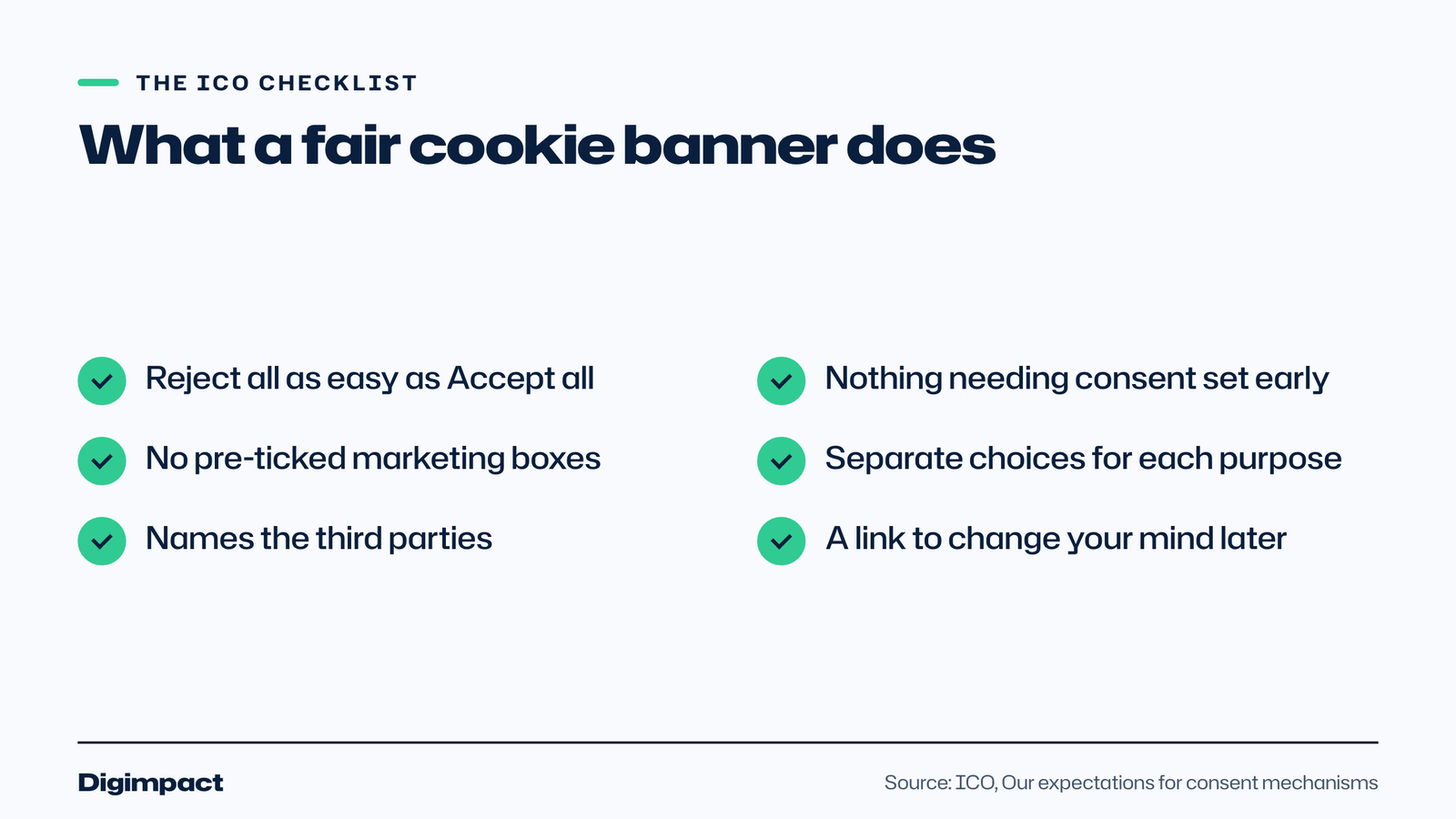
A good cookie banner explains what you use in plain words, makes Reject all as easy and as visible as Accept all, sets nothing that needs consent until the visitor chooses, offers separate choices for each purpose, names the third parties involved and tells people how to change their mind later. The ICO publishes a checklist covering each point.
The ICO’s checklist of expectations for consent mechanisms says your banner should:
- Make refusing as easy as accepting, with equally prominent Accept all and Reject all buttons.
- Require a positive action before any non-exempt cookie or tag is set.
- Work as intended, so nothing is set until valid consent is given or an exception applies.
- Offer granular choices for each purpose, such as analytics, social media and advertising.
- Name the third parties that information will be shared with, and let users control them.
- Explain how to revisit choices, such as a cookie settings link in the footer.
The ICO also shows examples of bad practice: a banner with only Accept all and More options but no Reject all, and banners that say by continuing to use our website you consent, or that tell visitors to change their browser settings to opt out. Both pre-enable cookies without consent.
Can you use pre-ticked boxes or a cookie wall?
No pre-ticked boxes for anything that needs consent. The ICO’s checklist says consent needs a positive action before non-exempt cookies are set, and its example settings screen shows advertising and social media switched off by default. Analytics can be on by default only when it genuinely meets the statistical purposes exception.
Cookie walls, which block the site unless visitors accept, and consent or pay models are covered in a separate section of the ICO’s guidance. For a local business website, there is no reason to use either. Let people browse whatever they choose, and make your case for marketing cookies with a clear explanation instead.
What do most small business websites actually use?
Most small business websites set a handful of cookies: something to remember the cookie choice, analytics, and often a Meta or Google advertising pixel, embedded videos or maps, a booking or chat widget, and a newsletter form. The pixels and many embeds need consent; the rest may not, depending on how they work.
Run a simple audit, which the ICO’s guidance describes as part of complying with PECR:
- List every tool on your site: analytics, pixels, embeds, widgets, forms and fonts.
- Check what each sets, using your browser’s developer tools or a cookie scanner.
- Sort them into strictly necessary, analytics or appearance, and consent needed.
- Set up your banner so consent-needed tags only load after the visitor accepts.
- Update your privacy or cookie page with what you use, why and for how long.
- Repeat the audit whenever you add a new tool or plugin.
Our guide to the essential website pages every small business needs covers the privacy policy that should sit alongside your cookie information.
What should your cookie information say?
Your cookie information should list the technologies you use, what each is for, which third parties set or receive information through them, and how long each lasts. The ICO says it must be concise, transparent, intelligible, easily accessible and in clear and plain language, without vague references to partners.
The ICO’s section on telling people about the technologies you use sets out four things to cover:
- What you use, such as analytics cookies, a Meta pixel or an embedded map.
- Why you use each one, in words a customer understands.
- Which third parties store or read information, or receive it, and for what.
- How long it lasts, such as the duration of each cookie.
Write it for your customers, not for lawyers. A short table on your privacy or cookie page, with one row per tool, usually does the job. The ICO also notes that where you put the link matters: on a short page a footer link may be easy to find, but on a long page a link near the top is more visible.
How long should cookies last?
PECR does not set a maximum. The ICO says the duration must be proportionate and limited to what is needed for the purpose, gives the example of a preference cookie lasting 90 days where that suits the service, and says a cookie set to expire in the year 9999 could never be proportionate.
Many tools set long default expiry dates, and the ICO says you cannot simply rely on a visitor’s browser to shorten them. Check the defaults on your analytics, chat and marketing tools, shorten them where you can, and list the real durations in your cookie information. A cookie choice itself can last a sensible period before you ask again.
What happens if you get cookie consent wrong?
The ICO can take formal action, and its enforcement powers for PECR are changing. The ICO says that because the Data (Use and Access) Act 2025 became law on 19 June 2025, the PECR enforcement regime is being aligned with the UK GDPR regime, and until the new regime is in force its existing Regulatory Action Policy still applies.
The ICO says it aims to make organisations comply, that any formal action must be proportionate, and that under its current policy monetary penalties are reserved for the most serious breaches. For a small business, the bigger day-to-day risk is losing visitors’ trust with a banner that feels like a trick. A clear, fair banner is easy to build and protects you either way.
Do the cookie rules apply to my small business?
Yes. The ICO says the service provider has the primary responsibility for complying with PECR, including deciding which third-party features and technologies to use on the site. There is no exemption for small businesses, and the rules apply to apps and other online services as well as websites.
If someone else built or manages your website, you are still responsible for what it sets. Ask your web designer for a list of the cookies and tags on your site, and check that your cookie banner is set up to block anything that needs consent until the visitor accepts. If they cannot tell you, that is worth fixing.
Frequently asked questions
Do I need a cookie banner if I only use Google Analytics?
It depends on how it is set up. The ICO says analytics can run without consent if it only produces aggregate statistics to improve your site, the provider only uses it for that, and visitors can object. If the data is used for advertising or to track individuals, you need consent.
Is a cookie banner a legal requirement in the UK?
PECR requires clear information and consent for non-exempt cookies, not a banner as such. A banner is the usual way to ask. If your site only uses strictly necessary cookies, you still need to explain them, but you do not need to ask for consent.
Can I set analytics cookies before the visitor chooses?
Only if they meet the statistical purposes exception, you explain them, and you give an easy way to object, such as an analytics toggle that is on by default. Advertising and tracking cookies must wait for consent.
Does a Meta or TikTok pixel need consent?
Yes. Pixels used to measure adverts, build audiences or share conversions with advertising partners are outside the analytics exception, and the ICO says no advertising purpose is strictly necessary. Load them only after the visitor accepts.
How often should I ask for cookie consent again?
The ICO’s guidance covers how often to request consent and what to do if your use of cookies changes. In practice, ask again when you add new purposes or third parties, and give visitors a footer link to change their choice at any time.
Want a website that gets this right?
Getting cookie consent right is part of building a website properly, not an afterthought. Our website design service sets up a fair cookie banner, privacy policy and analytics from the start, and our free website check is a quick way to see what your current site sets.
Keep reading
- How to make Reels for business on a phone, step by step A practical guide to filming Instagram Reels for a local business on a phone: what to film, how long Reels should be, how to edit and caption them, when to post and how to reuse them on other platforms.
- Apple Business Connect is now Apple Business: how to get your business on Apple Maps (2026 UK guide) Apple Business Connect became part of Apple Business in April 2026. This UK guide shows how to add your business to Apple Maps in seven steps, what is free and available in the UK, and how to use showcases, action buttons and insights.
- How to choose your Google Business Profile categories How to choose the right Google Business Profile categories, why the primary category matters most, when additional categories help, the mistakes Google warns against, and how to change them safely.
Free website check
How does your own website do?
Enter your website and see a quick check on screen in about 20 seconds: speed, Google, phones and the details that win the click. A full written report follows within two working days, free and with no sales call unless you ask.
Want help with this?
Tell us about your business. We reply within one working day with a time for a 30-minute call, and a fixed quote afterwards.
Rather talk now? Call 07551 079787.
Thanks, that is with us.
We will reply within one working day with a time for a call.