Website maintenance: what a small business site needs each month
A practical website maintenance guide for small business owners: the weekly, monthly and yearly jobs that keep a site fast, secure and bringing in enquiries, what WordPress and Google advise, and what to do yourself versus hand over.
By GP 13 minute read
TL;DR: Website maintenance means keeping your site updated, backed up, secure, accurate and visible on Google. Each month, update the software after taking a backup, test the contact form, check Search Console for errors and refresh anything out of date. Each year, renew the domain and hosting, review every page and check speed on a phone. WordPress says you should always update to the latest version, and that most sites apply minor and security updates automatically.
Key takeaways
- Website maintenance keeps a site secure, fast, accurate and visible, and protects the enquiries it brings in.
- WordPress says you should always update to the latest version and back up before you update.
- Since WordPress 3.7, most sites apply minor and security updates automatically; major releases still need a click.
- In our October 2026 check of 935 local business websites, a quarter did not load at all.
- A short monthly routine of updates, a backup check, a form test and a Search Console check covers most of the risk.
What is website maintenance?
Website maintenance is the regular work that keeps a website secure, working and up to date: software updates, backups, security checks, testing forms, fixing errors Google reports, renewing the domain and hosting, and keeping prices, opening hours and photos current. Done little and often, it takes minutes a month and prevents most website disasters.
A website is not finished when it launches. Software gets security fixes, browsers change, staff and prices change, and Google reports new issues. A site nobody looks after slowly breaks: a form stops sending, a page shows last year’s prices, or a renewal is missed and the whole site goes dark.
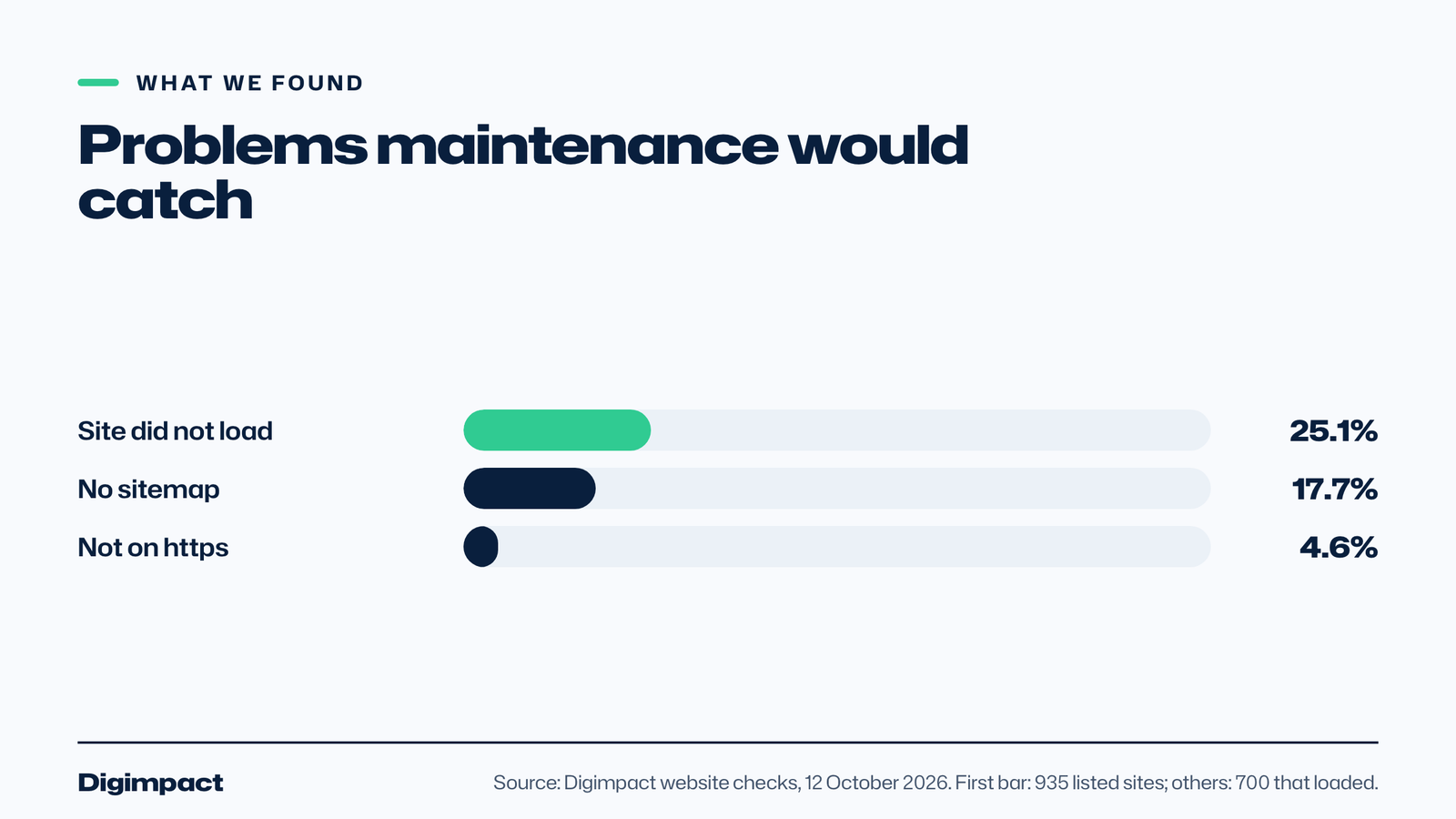
In our check of 935 local business websites around Portsmouth on 12 October 2026, 25.1% did not load at all, some because their domains had expired. Of the 700 that loaded, 4.6% were not served over a secure https address and 17.7% had no sitemap for search engines. Most of those problems are exactly what regular website maintenance catches.

Why does website maintenance matter?
Website maintenance matters because an unmaintained site loses customers quietly. It gets slower, less secure and less accurate, and the business rarely notices until enquiries drop or a customer mentions a problem. Regular checks catch issues while they are small, cheap and invisible to customers.
There are four risks. Security: out-of-date software is a common way in for attackers. Reliability: forms, booking systems and payments can stop working after changes elsewhere. Accuracy: old prices, hours and staff details cost trust. And visibility: errors Google finds, such as broken pages or slow loading, make it harder for customers to find you.
What should you do every week?
Every week, spend five minutes checking that the website loads on your phone, the contact form or booking system still works, and any messages that came through the site have been answered. If you run an online shop, check that orders are coming in as normal and that stock levels look right.
The quickest check is to use the site as a customer would. Open the homepage, tap the phone button, send a short test message through the form, and make sure it arrives where it should. If your enquiries suddenly go quiet, this is the first thing to check.
What should you do every month?
Every month, take or confirm a backup, update the website software, plugins and themes, check Google Search Console for errors, test every form, and update anything out of date such as prices, menus, opening hours or team members. These five jobs cover most of the risk for a small business website.
- Confirm the backup. Make sure a recent backup exists and you know how to restore it.
- Run the updates. Update the software, then plugins and themes, and check the site afterwards.
- Check Search Console. Look for pages Google cannot reach, and any security or usability messages.
- Test forms and bookings. Send a test enquiry and, if you take bookings or orders, make a test one.
- Refresh the content. Change anything that is out of date, and add a new photo, post or offer if you have one.

How should you update a WordPress website?
Back up first, then update. WordPress’s guide on updating WordPress says it is a good idea to back up your website before you get started, so you can restore it if anything goes wrong, and that you should always update WordPress to the latest version.
WordPress also says that since version 3.7, most sites apply minor and security updates automatically in the background, while major feature releases still need you to click Update Now. Plugins and themes need updating too, because out-of-date add-ons are a common way into a site.
After each update, open the homepage, a service page and the contact form to check everything still works. If something breaks, restore the backup and investigate before trying again. If your caching plugin or host keeps copies of pages, clear the cache so visitors see the updated site.
How do you keep backups that actually work?
A backup only counts if you can restore it. Keep automatic backups of both the website files and the database, store at least one copy away from the web hosting, and test a restore occasionally. Daily backups suit sites that change often or take bookings and orders; weekly is enough for a brochure site that rarely changes.
Check what your hosting includes. Many hosts take backups, but some keep only a few days or charge to restore them. Before you rely on your host’s backups, find out how far back they go, how you restore one, and whether it costs anything.
What should you check in Google Search Console?
Google Search Console shows how Google sees your website: which pages are indexed, which have problems, how people find you in search and whether there are security or usability issues. Check it once a month, and act on any error or warning that affects important pages.
Look at the pages report for pages Google could not index, the experience reports for problems on phones, and any security messages. Google’s page experience guidance asks whether your pages are served securely over https, so make sure every page loads on a secure address. Our guide to why a website is not showing on Google explains the common causes.
What should you do every year?
Every year, renew your domain and hosting, review every page of the site, check speed on a phone, update your privacy policy if anything has changed, and make sure every login still belongs to someone in the business. A yearly review is also the right time to decide whether the site needs a refresh or a redesign.
- Renewals. Domain, hosting, security certificate if separate, and any paid plugins.
- Content review. Read every page as a customer would, and update or remove anything stale.
- Speed check. Test the homepage and a key service page with Google PageSpeed Insights on the phone setting.
- Legal pages. Privacy policy, cookies and terms, especially if you added forms, analytics or a shop.
- Access review. Remove former staff or agencies, and keep the owner as the main admin.
Google’s Core Web Vitals give clear speed targets: main content within 2.5 seconds, a response to a tap within 200 milliseconds and layout shift of 0.1 or less, measured across real visits, according to web.dev. If your site misses them, images and heavy plugins are the usual causes.

What happens if you skip website maintenance?
If you skip website maintenance, the problems build up out of sight. Software falls behind and becomes easier to attack, forms or bookings stop working without anyone noticing, Google reports errors nobody fixes, and content goes stale. Eventually a renewal is missed or the site breaks, and fixing it costs far more than regular care would have.
The most expensive problems are the ones nobody sees for weeks: a contact form sending to an old email address, a booking system that stopped taking payments, or a domain that lapsed while the renewal emails went to a former employee. A monthly check catches all three.
What extra care does an online shop need?
An online shop needs everything above plus checks on the parts that take money. Each month, place a test order, check that card payments, delivery rates and order emails work, and make sure stock levels match what you actually have. Check that discount codes have not expired early or stayed live too long.
Keep an eye on payment provider emails, because providers sometimes change their requirements and ask you to update settings. Review your returns and delivery pages whenever your policy or prices change, so customers always see the terms they will get. If you sell seasonal products, add the next season’s range before demand starts, not after.
What extra care does a booking system need?
A booking system needs its availability kept right: opening hours, staff holidays, bank holidays and any special dates. Each month, make a test booking, check the confirmation and reminder messages arrive, and if you take deposits, check the payment goes through and appears where it should.
Look at the bookings report for patterns too. A sudden drop in online bookings can mean something has broken, not that demand has fallen. If customers say they could not find a slot, check that the right days and times are open.
What signs mean your website needs attention now?
Some signs mean your website needs attention straight away rather than at the next monthly check: a browser warning that the site is not secure, a contact form that does not arrive, pages that will not load, an email from Google Search Console about a security issue, or a sudden fall in enquiries with no obvious reason.

If you see any of these, check the basics first: is the domain still active, is the hosting account paid, and has anything been changed or updated recently? If you cannot find the cause quickly, restore the most recent backup from before the problem started and investigate from there.
Keep a simple maintenance log
A maintenance log is a short note of what was done and when: the date, the updates applied, the backup confirmed, the forms tested and anything fixed. It takes a minute each month and makes problems far easier to trace, because you can see what changed just before something broke.
Keep the log somewhere the business owns, such as a shared document, and include renewal dates and who has access to each account. If you ever change provider or designer, the log and the list of logins are what the next person needs first.
Can you do website maintenance yourself?
Yes, many owners handle the basics: content updates, form tests, backups and checking Search Console. Software updates are also manageable on a simple site, as long as you back up first and check the site afterwards. Handing it over makes sense when the site takes bookings or payments, uses many plugins, or when you would rather spend the time on the business.
If someone else maintains your site, ask for a short monthly note of what they did: updates applied, backups confirmed, errors fixed. Keep the owner login with the business, and make sure the agency’s access can be removed if you change provider.
How much does website maintenance cost?
Doing it yourself costs your time, plus any paid plugins and backup tools. Paying someone else usually means a monthly or yearly fee that covers updates, backups, security checks and small changes. Prices vary widely, so compare what each plan includes: how often updates and backups run, how fast problems are fixed, and how many content changes are included.
At Digimpact, websites start from £300 a year per site, including hosting, your domain and five pages, with one fixed price in writing before any work starts. Ask us what the ongoing care for your site would involve, and we will put it in writing.
Want it done for you? See website design in Portsmouth, or web design across Hampshire if you are further out.
Frequently asked questions
How often should a website be updated?
Check for software updates at least monthly, and apply security updates as soon as they are available. WordPress says most sites apply minor and security updates automatically. Update content such as prices and hours whenever they change.
What does website maintenance include?
Software and plugin updates, backups, security checks, testing forms and bookings, fixing errors Google reports, renewing the domain and hosting, and keeping content accurate.
Do I need to back up my website?
Yes. A backup lets you restore the site after a failed update, a hack or a mistake. WordPress advises backing up before you update. Keep a copy away from your hosting and check you can restore it.
What happens if my website is not updated?
Out-of-date software is easier to attack, features can stop working, and the site can slow down. Content that is out of date also costs trust with customers.
How do I know if my website has a problem?
Test it yourself each week on a phone, check Google Search Console monthly, and watch for a sudden drop in enquiries. Our free website check gives a quick view of speed, phones and what Google can read.
How long does website maintenance take each month?
For a small brochure site, the monthly website maintenance routine usually takes under an hour: a few minutes to confirm the backup, a few more for updates and checks, and the rest for content. Sites with a shop or bookings take longer because there is more to test.
Who should have access to my website?
The business owner should hold the main administrator login, and anyone else should have their own account with only the access they need. Remove accounts for former staff and agencies straight away, and change shared passwords when someone leaves.
Should I keep old pages on my website?
Keep pages that still bring visits or explain something customers need. Update pages that are out of date, and if you remove a page that has visitors, redirect its address to the closest current page so nobody lands on an error.
Is website maintenance included with website builders?
Hosted builders such as Shopify, Wix and Squarespace handle the platform’s updates and hosting for you. You still need to keep content accurate, test forms and keep apps up to date.
Want your website kept in good shape?
A website that is updated, backed up and accurate keeps bringing in enquiries. Start with our free website check, which tests speed on phones, what Google can read and the details that win the click. If your site needs more than maintenance, our website design service starts from £300 a year per site, including hosting, your domain and five pages.
See it in practice: the Bella Route Travel holiday website.
Keep reading
- How to make Reels for business on a phone, step by step A practical guide to filming Instagram Reels for a local business on a phone: what to film, how long Reels should be, how to edit and caption them, when to post and how to reuse them on other platforms.
- Apple Business Connect is now Apple Business: how to get your business on Apple Maps (2026 UK guide) Apple Business Connect became part of Apple Business in April 2026. This UK guide shows how to add your business to Apple Maps in seven steps, what is free and available in the UK, and how to use showcases, action buttons and insights.
- How to choose your Google Business Profile categories How to choose the right Google Business Profile categories, why the primary category matters most, when additional categories help, the mistakes Google warns against, and how to change them safely.
Free website check
How does your own website do?
Enter your website and see a quick check on screen in about 20 seconds: speed, Google, phones and the details that win the click. A full written report follows within two working days, free and with no sales call unless you ask.
Want help with this?
Tell us about your business. We reply within one working day with a time for a 30-minute call, and a fixed quote afterwards.
Rather talk now? Call 07551 079787.
Thanks, that is with us.
We will reply within one working day with a time for a call.