Google AI Overviews: what they are, how they choose sources, and 9 ways a UK small business can get cited
What Google AI Overviews and AI Mode are, how Google picks the websites it links to, what the research says about clicks, and nine practical ways for a UK small business to get its website cited.
By GP 13 minute read
TL;DR: Google AI Overviews are AI-written summaries at the top of some search results, with links to the websites they draw on. Google says there are no special requirements to appear: a page must be indexed and allowed to show a snippet, and normal SEO best practice applies. Research by Pew found people clicked a result link on 8% of searches with an AI summary, against 15% without one, so the aim is to be one of the sources the summary cites.
Key takeaways
- Google AI Overviews are AI-written summaries shown at the top of some Google results, with links to the websites they draw on.
- Google says there are no extra requirements to appear: a page must be indexed and eligible to show a snippet, and normal SEO best practice applies.
- You do not need special schema, an llms.txt file or any new markup for Google’s AI features, according to Google.
- In Pew Research Center’s study, people clicked a result link on 8% of searches with an AI summary, against 15% without one, and clicked a link inside the summary on just 1%.
- Longer, question-style searches trigger AI summaries far more often: 53% of searches of ten words or more, against 8% of one or two word searches.
- AI Mode is a separate tab for longer, multi-part questions. It launched in the UK on 28 July 2025.
Search for a question on Google today and there is a good chance the first thing you see is not a list of websites but a written answer. These are Google AI Overviews, and they change how people find local businesses. The answer appears first, the links come second, and fewer people scroll past it.
This guide explains what Google AI Overviews are, how Google picks the websites it links to, what the research says about clicks, and nine practical ways for a UK small business to become one of the sources. Everything about how the features work comes from Google’s own documentation, linked as we go.
What are Google AI Overviews?
Google AI Overviews are short summaries written by AI that appear at the top of some Google search results, with links to the web pages they draw on. Google says they help people get the gist of a question quickly and give a starting point for exploring links. They only appear when Google decides they add something to the normal results.
Google’s guide to AI features and your website says AI Overviews often do not trigger, because they are only shown when Google’s systems decide they add to classic search. In the UK, Ofcom’s report on how the UK goes online found that about 30% of searches now show AI overviews, and that 53% of adults say they see these summaries often.
What is the difference between AI Overviews and AI Mode?
AI Overviews appear inside the normal search results when Google thinks they help. AI Mode is a separate tab for longer, more complex questions, where you can ask follow-up questions and get a fuller answer with links. Google launched AI Mode in the UK on 28 July 2025.
Google said at the UK launch that AI Mode appears as a tab on the search results page and in the Google app for Android and iOS, and that early users were asking questions two or three times the length of normal searches. It is aimed at comparing products, planning trips and complicated how-tos.
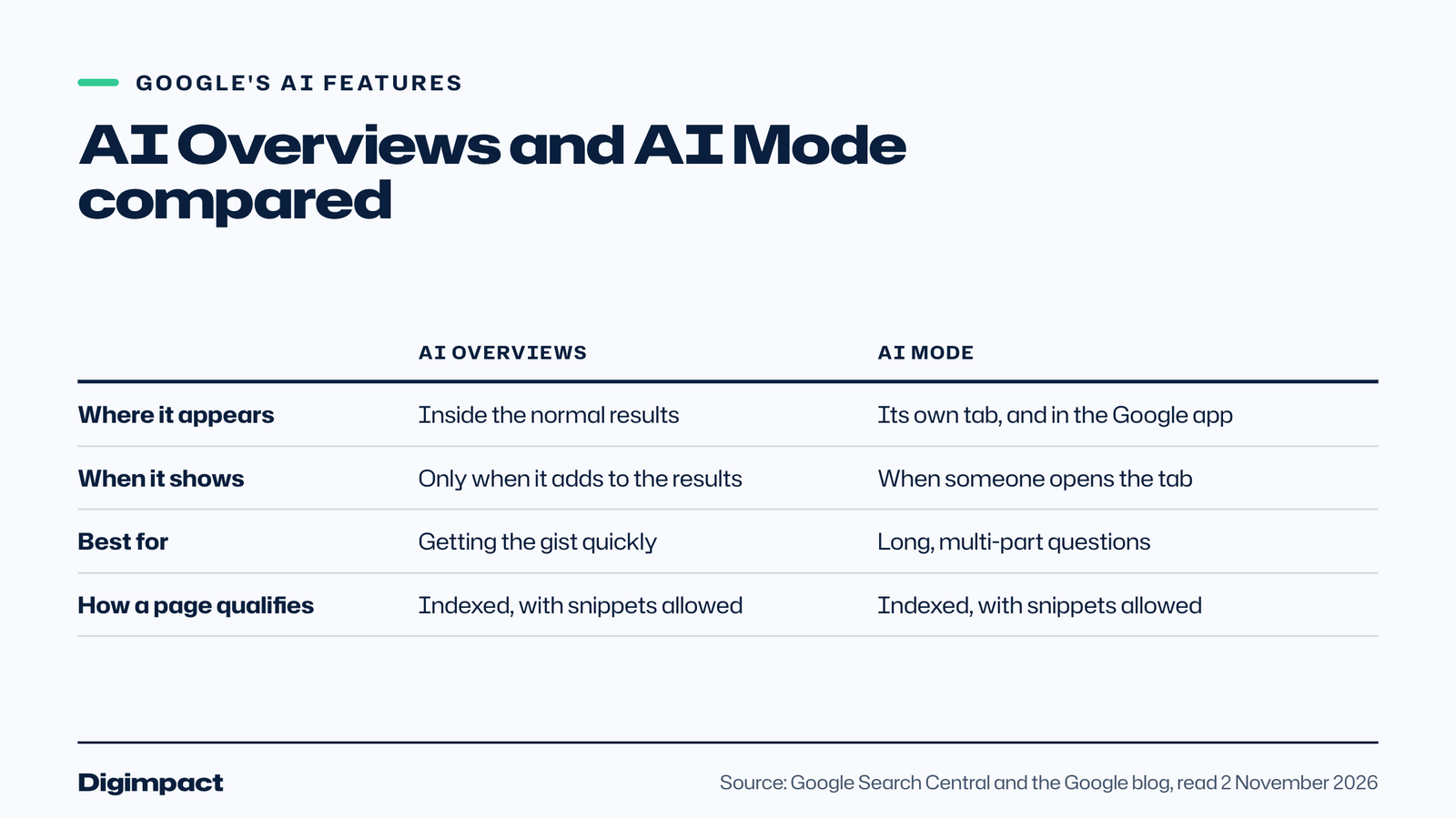
For a website owner the two work the same way. Google says both may use a technique called query fan-out, running several related searches across subtopics to build the answer, and both link to supporting web pages. They may use different models, so the links they show can differ.
How do Google AI Overviews choose which websites to show?
Google says a page must be indexed and eligible to be shown in Google Search with a snippet to appear as a supporting link. There are no extra technical requirements. Because of query fan-out, Google can show a wider range of supporting pages than a normal search, so a page that answers one part of a question clearly can be cited.
Google is equally clear that meeting the requirements does not guarantee anything. Crawling, indexing and showing a page are never guaranteed, in AI features or in normal results.
Pew Research Center’s study of Google AI summaries found that 88% of the summaries it saw cited three or more sources, and only 1% cited a single source. The most cited sites in AI summaries and normal results alike were Wikipedia, YouTube and Reddit.
Do AI Overviews reduce clicks to your website?
For most searches, yes. In Pew Research Center’s study of 900 US adults, people clicked a normal result link on 8% of visits to a search page with an AI summary, against 15% without one. They clicked a link inside the summary on just 1% of visits, and ended their browsing session more often after an AI summary: 26% against 16%.
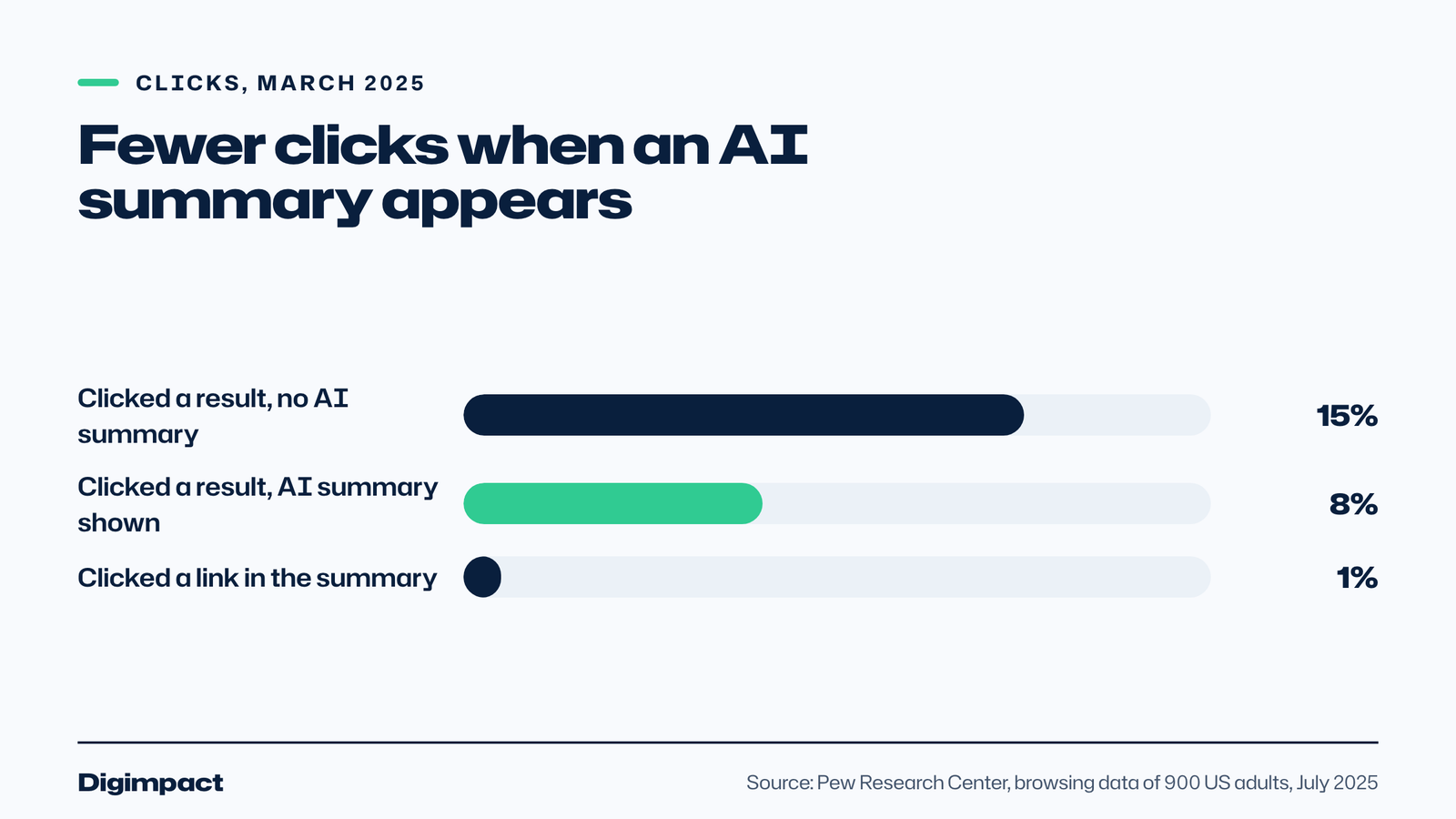
Google sees it differently. It says that when people click from a results page with an AI Overview, the clicks are higher quality, meaning people are more likely to spend more time on the site. Both can be true: fewer clicks, from people who already know more about what they want.
For a small business, the lesson is to aim for two things at once: be one of the cited sources, and make sure your name, reviews and details look right wherever an AI summary might send people next.
Which searches show an AI Overview?
Longer searches and questions are much more likely to show an AI summary. Pew found that around 18% of all Google searches in March 2025 produced one. Just 8% of searches of one or two words did, but that rose to 53% for searches of ten words or more. Searches that asked questions or used full sentences also triggered them more often.
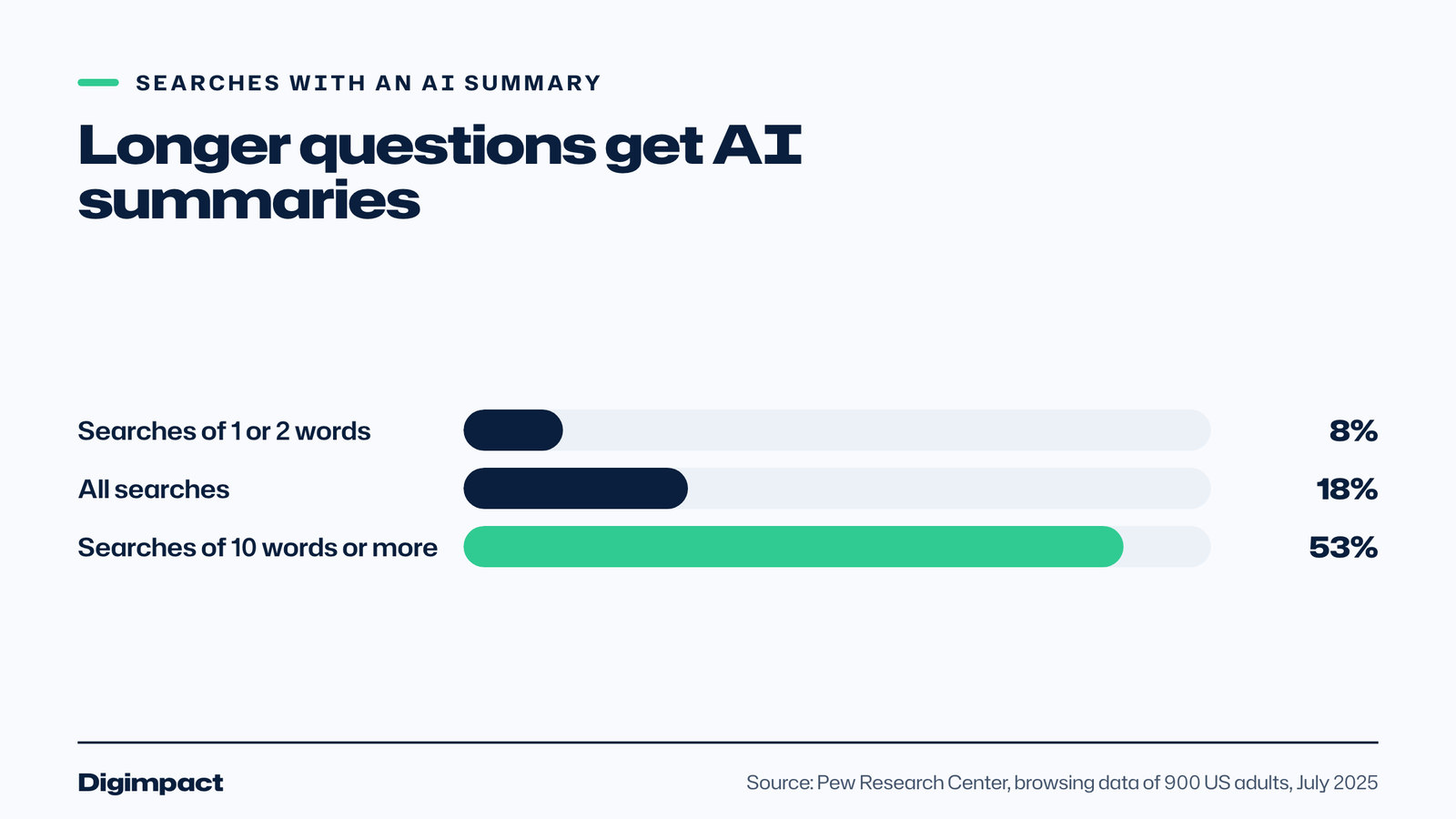
That matters for how you write. Short searches, such as a business type and a town, are still mostly answered with maps and normal links. Longer questions, such as how much a boiler service costs or what to check before booking a wedding venue, are where AI Overviews appear, and where a clear, specific answer on your website can be cited.
What do AI Overviews mean for local businesses?
For short local searches, such as a trade and a town, AI summaries are much less common: in Pew’s data just 8% of one or two word searches produced one. Where AI Overviews matter for a local business is in the questions people ask before they choose: how much a job costs, how long it takes, what to look for and whether it is worth doing.
Those questions are a chance to be the business that explains it best. A plumber who answers how much a boiler service costs in Portsmouth, a salon that explains how long balayage lasts, or a venue that sets out what a wedding package includes gives Google something specific to cite, and gives the reader a reason to call.
Your Google Business Profile matters too. Google lists an up-to-date Business Profile among its SEO basics for AI features, and our local SEO checklist covers the rest: categories, reviews, service pages and consistent listings.
How to get your business into Google AI Overviews: 9 ways
Google’s advice is that the normal SEO basics are what count. These nine steps turn that advice into a plan for a small business website:
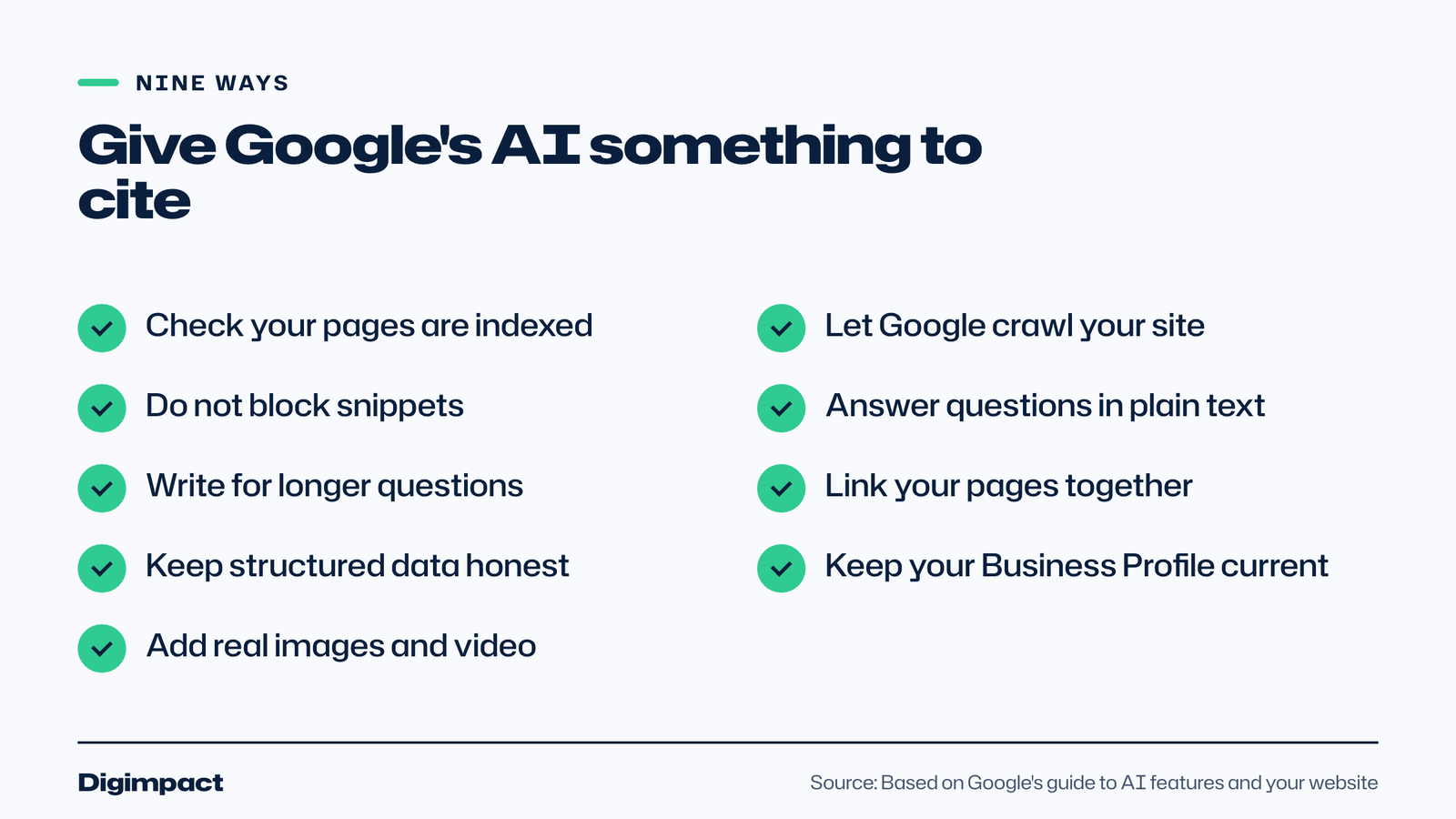
- Check your pages are indexed. Use the URL Inspection tool in Google Search Console. A page that is not in Google’s index cannot be cited. If pages are missing, our guide to a website not showing on Google covers the usual causes.
- Let Google crawl your site. Google lists making sure crawling is allowed in robots.txt, and by your CDN or hosting, as a basic. Some security settings block crawlers without the owner knowing.
- Do not block snippets. A page must be eligible to show a snippet. Settings such as nosnippet or a very short max-snippet keep pages out of AI Overviews.
- Answer questions in plain text. Google says important content should be available as text. Start each section with a short, direct answer, then add the detail.
- Write for longer questions. Use the questions customers actually ask as headings, since longer, question-style searches trigger AI summaries most often.
- Link your pages together. Google lists making content easy to find through internal links. Link each service page to the related guides and back.
- Keep structured data honest. Google says your structured data should match the visible text on the page. Do not mark up prices, reviews or hours that the page does not show.
- Keep your Business Profile up to date. Google names an up-to-date Business Profile and Merchant Center information in its list. Our guide to writing a Google Business Profile description is a good place to start.
- Add real images and video. Google suggests supporting text with high-quality images and videos where they help. Pew found YouTube among the most cited sites, so a short how-to video can help too.
How do you write pages that AI Overviews cite?
Write each page so that any section still makes sense when it is lifted out on its own, because that is how an AI summary uses it: it takes the passage that answers part of a question and links to it. These habits make a page easier to quote:
- Put the answer first. Open each section with two or three sentences that answer its heading, then add the detail.
- One question per heading. Use the words customers use, such as How much does a boiler service cost?, rather than a heading like Our pricing.
- Be specific. Prices, times, the areas you cover and what is included are easier to cite than general claims.
- Show where facts come from. Link to the source of any figure, and date the page so readers can see it is current.
- Use tables and lists for comparisons and steps, and keep paragraphs short.
- Keep your details consistent. Your business name, address, phone number and hours should match on your website, your Google profile and directories.
Do you need llms.txt or special schema for AI Overviews?
No. Google says you do not need to create new machine-readable files, AI text files or markup to appear in its AI features, and that there is no special schema.org structured data to add. Normal, accurate structured data that matches the page is still worthwhile, but nothing extra is needed for AI Overviews.
Other AI tools work differently. ChatGPT search has its own crawler, called OAI-SearchBot, and Bing matters for it too, which is why our guides to getting your business on ChatGPT and Bing Places for Business cover different steps.
How do you see AI Overview traffic in Search Console?
Google says visits from AI Overviews and AI Mode are counted in your overall search traffic in Search Console, in the Performance report under the Web search type. So your normal clicks and impressions already include them. Google also suggests tracking conversions and time on site in a tool such as Google Analytics.
In practice, watch for pages whose impressions rise while clicks stay flat. That pattern can mean people are seeing your page in search but getting their answer before they click, which is a reason to make the page’s offer, such as a booking button or a price, clear in the first few lines.
How do you check whether AI Overviews cite you?
Search Console counts AI Overview traffic inside your normal search data, so the simplest way to see where you are cited is to check by hand once a month:
- List ten questions customers ask you, written the way they would type them.
- Search each one in a private browser window and note whether an AI Overview appears and which sites it cites.
- Ask the same questions in the AI Mode tab and note the links there too.
- In Search Console, filter the Performance report to queries containing words such as how, what or cost, and see which of your pages they lead to.
- Keep the results in a simple spreadsheet, so you can see what changes after you improve a page.
Can you stop Google using your content in AI Overviews?
Yes, but it costs you visibility. Google says the controls are the same as for search snippets: nosnippet, data-nosnippet, max-snippet and noindex. Robots.txt rules for Googlebot control crawling for Search as a whole. Google-Extended only limits training and grounding in some of Google’s other AI systems, not Search.
For most small businesses, blocking is the wrong move. A local business wants to be the source an AI summary names, not the one it leaves out.
What to do this week
- Open Google Search Console and check your main service pages are indexed.
- Search five longer questions your customers ask and note which sites the AI Overview cites.
- Rewrite the opening of one service page so it answers the main question in two or three sentences.
- Check your structured data matches what the page shows, and fix anything that does not.
- Update your Google Business Profile hours, services and description.
Frequently asked questions
What are Google AI Overviews?
Google AI Overviews are AI-written summaries that appear at the top of some Google search results, with links to the web pages they draw on. Google only shows them when its systems decide they add something to the normal results, so many searches do not have one.
How do I get my website into Google AI Overviews?
Make sure your pages are indexed and allowed to show a snippet, then follow normal SEO best practice: clear, helpful content in text, internal links, accurate structured data and an up-to-date Business Profile. Google says there are no extra requirements or special optimisations.
Do AI Overviews reduce traffic to websites?
Pew Research Center found people clicked a result link on 8% of searches with an AI summary, against 15% without one. Google says clicks from pages with AI Overviews are higher quality, with people spending more time on the site they visit.
Can I stop my website appearing in AI Overviews?
Yes. Google says the same controls as for snippets apply: nosnippet, data-nosnippet, max-snippet and noindex. Blocking reduces how much of your content appears in search, so most small businesses are better off aiming to be cited.
Is Google AI Mode available in the UK?
Yes. Google launched AI Mode in the UK on 28 July 2025. It appears as a tab on the search results page and in the Google app for Android and iOS, and it is designed for longer, more complex questions with follow-ups.
Want help getting found in AI search?
Our local SEO service covers the basics that Google’s AI features rely on: pages that answer real questions, a complete Business Profile, accurate structured data and a site Google can crawl, for a fixed monthly fee agreed in writing after a 30-minute call. Want to know where your website stands first? Start with a free website check.
Keep reading
- Email marketing rules UK businesses must follow: consent and the soft opt-in What PECR says about marketing emails and texts in the UK, when you need consent, how the soft opt-in for existing customers works, the different rules for companies and sole traders, and a checklist to stay compliant.
- How long does SEO take? A realistic timeline for UK small businesses, with Google’s own answer How long SEO takes for a UK small business: what Google says today and used to say, what a study of millions of pages found, a realistic four stage timeline, how local SEO differs, and the red flags in any promise of fast rankings.
- How to make Reels for business on a phone, step by step A practical guide to filming Instagram Reels for a local business on a phone: what to film, how long Reels should be, how to edit and caption them, when to post and how to reuse them on other platforms.
Free website check
How does your own website do?
Enter your website and see a quick check on screen in about 20 seconds: speed, Google, phones and the details that win the click. A full written report follows within two working days, free and with no sales call unless you ask.
Want help with this?
Tell us about your business. We reply within one working day with a time for a 30-minute call, and a fixed quote afterwards.
Rather talk now? Call 07551 079787.
Thanks, that is with us.
We will reply within one working day with a time for a call.