Google Business Profile suspended? Why it happens and how to appeal
Why Google suspends Business Profiles, the difference between suspended, disabled and restricted, how to fix the cause, and how to appeal with the right evidence.
By GP 14 minute read
TL;DR: If your Google Business Profile is suspended, Google has decided it breaks one of its guidelines, most often with extra words in the business name, a PO box or virtual office address, a duplicate profile or an ineligible business. Fix the cause first, do not create a new profile, then appeal through Google’s appeals tool with evidence such as business registration and utility bills in the same name and address.
Key takeaways
- If you find your Google Business Profile suspended, Google has decided it breaks a guideline, and you can appeal if you believe it should be reinstated.
- The most common causes are extra words in the business name, a PO box or virtual office address, duplicate profiles and businesses that are not eligible.
- Do not create a new business profile for the same business while an appeal is under review; Google tells you not to.
- Evidence that helps an appeal includes business registration, a business licence, tax certificates and utility bills, with the same name and address as the profile.
- If you open the evidence form, Google says you must submit it within 60 minutes or it will not be attached to the appeal.
What does it mean when a Google Business Profile is suspended?
A suspended Google Business Profile is one Google has restricted because it believes the profile breaks its guidelines. Google says it may suspend or disable profiles that do not follow its guidelines, and that you can submit an appeal if you believe yours should be reinstated. While it is suspended, Google may reject new content and changes until the profile is reinstated.
Finding your Google Business Profile suspended is stressful, because for many local businesses the profile brings in more calls than the website. The good news is that most suspensions have a clear cause, and the cause is usually something you can fix. This guide is based on Google’s own help pages, checked on 14 October 2026: Fix suspended or disabled profiles, the Guidelines for representing your business on Google, the business eligibility and ownership guidelines and the overview of Business Profile policies.
If you have not set up a profile yet, start with our guide on how to set up a Google Business Profile, which builds in the rules below from day one.
Suspended, disabled or restricted: what is the difference?
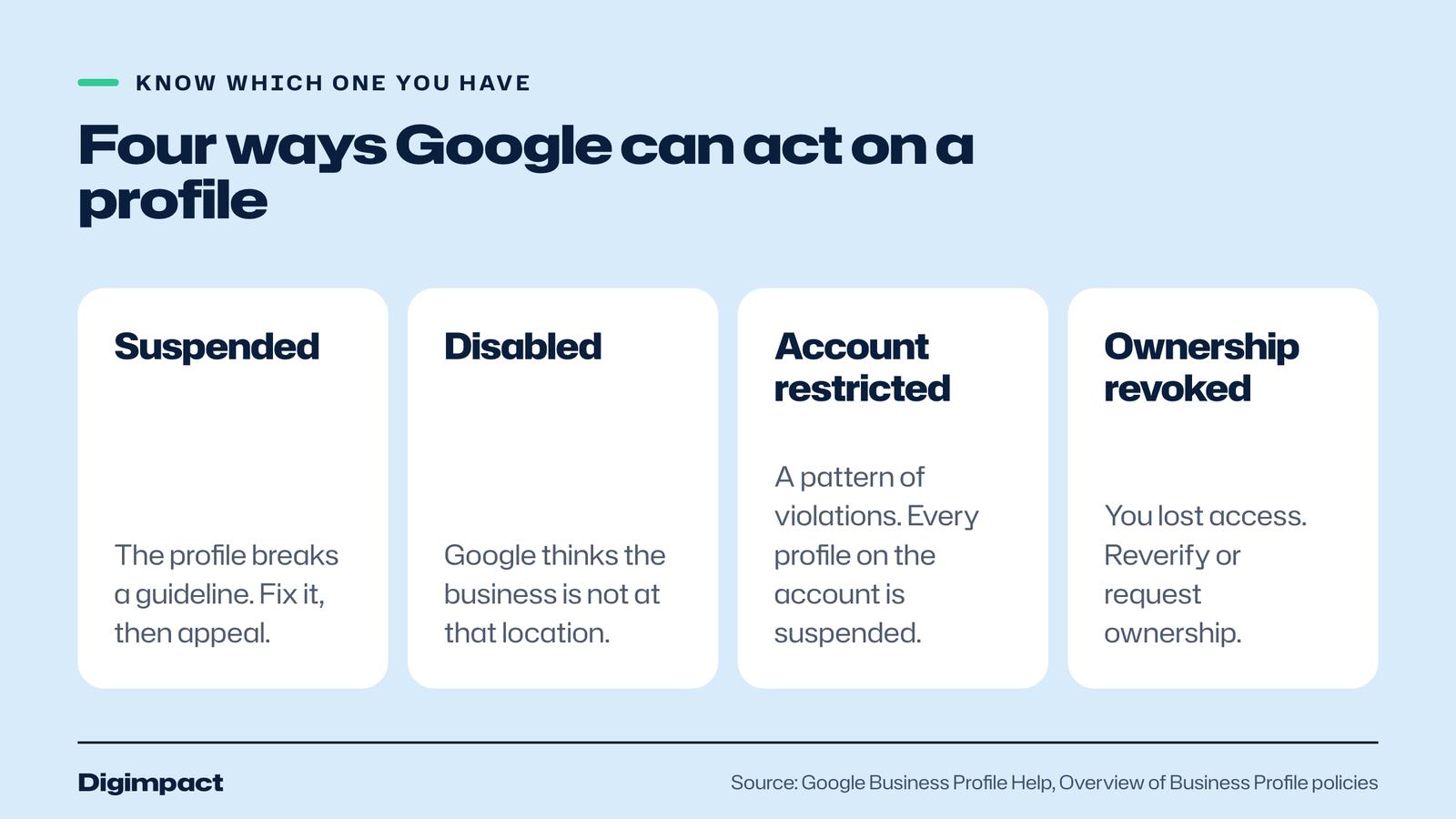
Google uses several words for a Google Business Profile it has acted on, and they need different fixes. A suspended profile breaks a guideline. A disabled profile is one Google believes does not exist at the location you claim. A restricted account means a pattern of violations, and every profile on that account is suspended. Revoked ownership is not a suspension at all.
| What you see | What Google means | What to do |
|---|---|---|
| Profile suspended | The profile breaks a guideline | Fix the cause, then appeal the profile |
| Profile disabled | Google believes the business does not exist at that location | Gather proof of the real location, then appeal |
| Account restricted | The account shows a pattern of violations, so all its profiles are suspended | Appeal the account first, then each profile |
| Ownership revoked | You lost access, for example after a long time without signing in | Reverify or request ownership |
Google’s policy overview explains that if an account is restricted, every Google Business Profile associated with it is suspended, and the account must be reinstated before anything else can be fixed. It also says a profile can be suspended when the Google account behind it is restricted in another Google product.
Why is my Google Business Profile suspended?
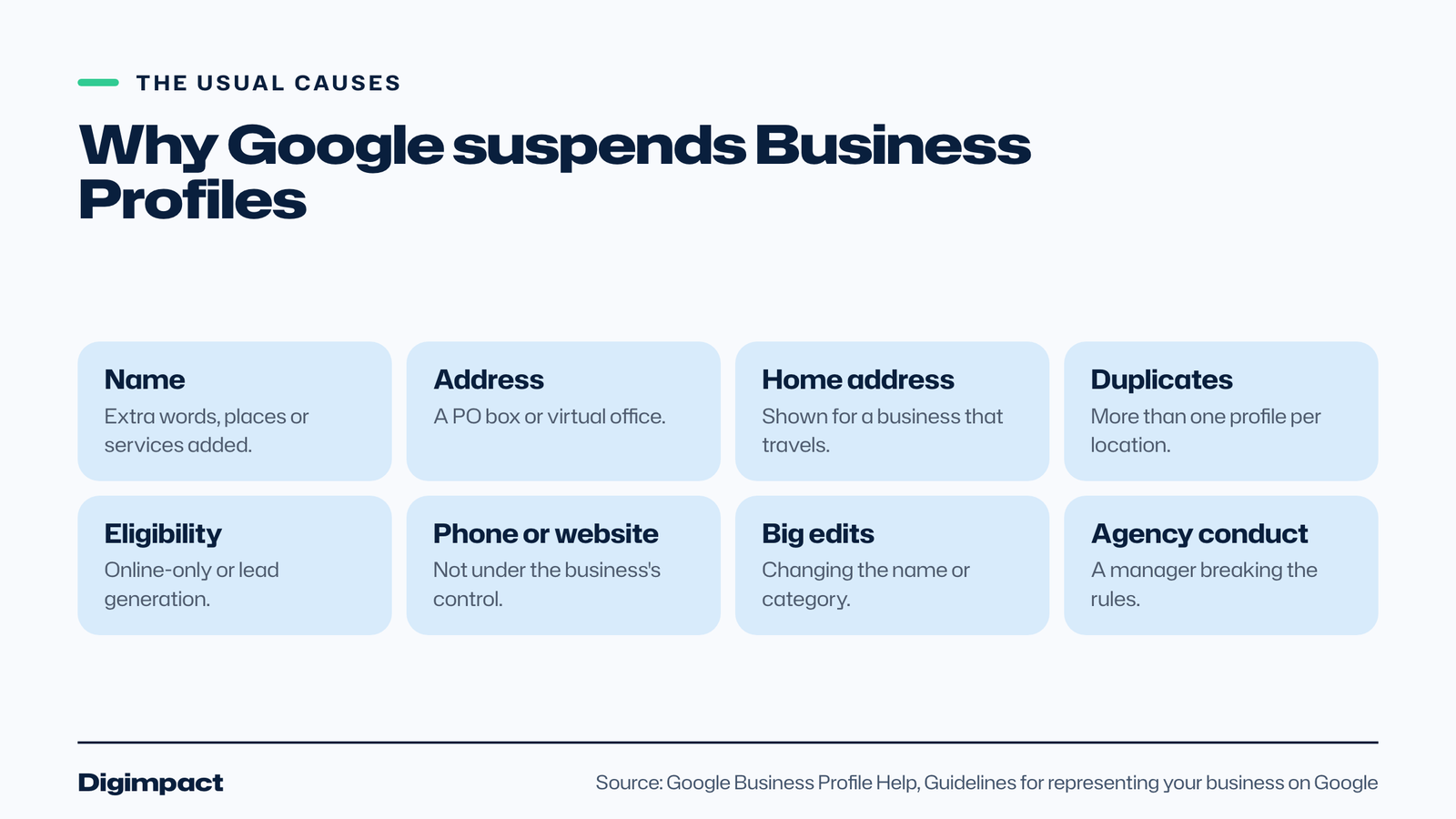
Most suspensions come from a small set of guideline breaks: extra words in the business name, an address Google does not accept, more than one profile for the same place, a business that is not eligible, a phone number or website that is not the business’s own, or a big change of name or category. Google shows the reason in its appeals tool.
Google’s appeals tool shows the restricted profile, the reason for the action and a link to the policy it says was broken. Start there, because the reason tells you exactly what to fix. These are the most common reasons for a Google Business Profile suspended by Google, each taken from Google’s published rules.
Extra words in the business name
Your business profile name must match your real-world name, as used on your shopfront, website and stationery. Google’s guidelines say that including unnecessary information in your business name is not permitted and could result in suspension. That rules out taglines, locations, services, phone numbers, opening hours and words in capitals that are not part of your name.
A hairdresser called Bloom Hair Salon should be Bloom Hair Salon, not Bloom Hair Salon Best Hairdresser Portsmouth. Legal terms such as Ltd are also on Google’s list of things to leave out, unless you can show real-world proof, such as signage or invoices, that use them as part of the name.
An address Google does not accept
Google requires a precise, real-world address. Its policy overview says businesses that set their address as a PO box will have their profile suspended. A virtual office, meaning a postal address you rent but do not operate from, is not eligible either. An office in a co-working space only qualifies if it has clear signage, receives customers and is staffed during opening hours.
Google also says businesses that show their address should have permanent fixed signage with the business name at that address. If customers cannot find you there, the address is a risk.
A home address shown for a service-area business
If you travel to customers, such as a plumber, cleaner or mobile hairdresser, Google says you should hide your business address and set a service area instead. Its guidelines give the example of a plumber who runs the business from home clearing the address from the profile. The service area should not extend further than about two hours of driving from where you are based.
More than one profile for the same place
Google allows one business profile per location. Its guidelines say not to create more than one page for each location, in one account or several. Duplicates break the guidelines and confuse customers. If you find an old profile for your business, claim that one rather than starting a new one.
A business that is not eligible
To qualify, a business must make in-person contact with customers during its stated hours. Google lists online-only businesses, lead generation companies, and rental or for-sale properties as examples of businesses that are not eligible. A business with no customer contact at a real place or in a real service area will not keep a Google Business Profile for long.
A phone number or website that is not yours
Google says the phone number must be under the direct control of the business, and that you should not use numbers or links that redirect people to other businesses or landing pages. Premium phone numbers are not accepted. Use your own local number and your own website, not a tracking page run by someone else.
Big changes to the name, category or location
Google’s policy overview says edits that attempt to significantly change the nature of a business are often fraudulent, and it may reject big changes to the name or category. If a different business is now at the address, the old profile should be marked permanently closed, not renamed. Restaurants, hotels and venues that move must close the old profile and create a new one at the new address.
Breaking the rules through an agency
Anyone who manages your Google Business Profile for you, from an SEO agency to a booking provider, is what Google calls an authorised representative. Google says representatives must never claim a profile without the owner’s consent or make false or misleading claims, and that breaking these rules may result in suspension of the profile, the account or both.
What should you do first if your profile is suspended?
First, find the reason in Google’s appeals tool and fix it on the profile, so the profile follows every guideline before anyone at Google looks at it. Do not create a new profile for the same business; Google explicitly says not to while an appeal is under review. Then gather your evidence and submit the appeal.
A new business profile for the same business looks like a duplicate, which is itself a guideline break, and it can make the problem worse. If you have a Google Business Profile suspended, resist the urge to change lots of details at once too. Fix what the reason says, check the rest of the profile against the guidelines, and leave everything else as it was.
Use this short checklist before you appeal:
- Read the reason and the linked policy in the appeals tool.
- Change the business name to your exact real-world name.
- Check the address is a real, signed location, or hide it and set a service area.
- Make sure the phone number and website are your own.
- Search Google Maps for duplicate profiles of your business.
- Check that your categories describe what the business is, not keywords.
How do you appeal a suspended Google Business Profile?
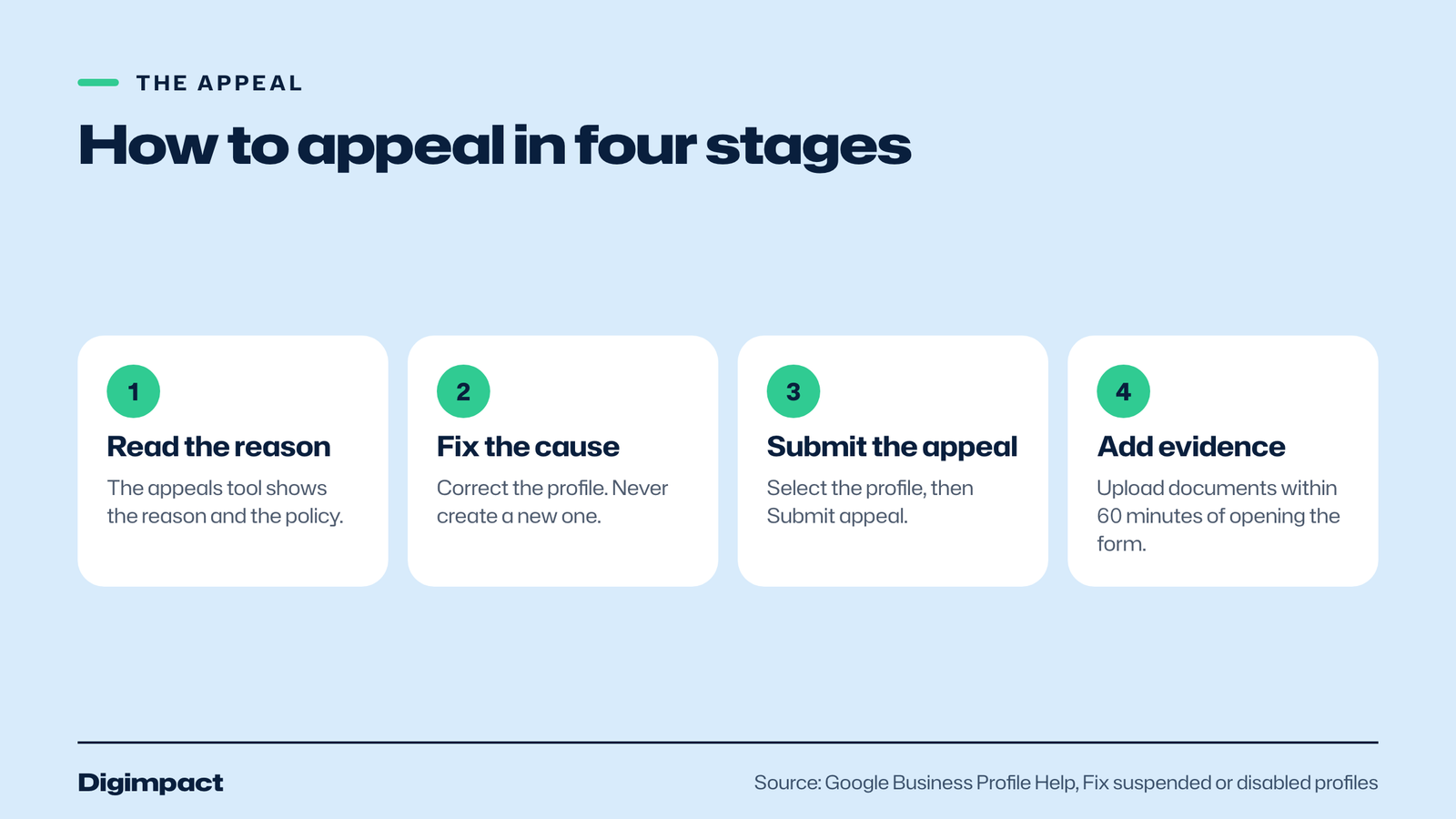
You appeal through the Google Business Profile appeals tool. Sign in to the Google account that owns the profile, select the suspended profile, read the reason and the policy, then select Submit appeal. Google recommends adding evidence when prompted, and says it will review the appeal and email you its decision.
Google’s help page sets out the steps for a suspended business profile:
- Open the Google Business Profile appeals tool.
- Sign in to the Google account linked to the profile, then select Confirm, or Switch account if needed.
- Select the profile you want to appeal and continue.
- Read the restricted profile, the reason and the link to the policy.
- Select Submit appeal.
- When prompted, select Add evidence, upload your documents and add any context.
- Select Submit, then wait for Google’s email with the decision.
Timing matters at step 6. Google says that once you open the evidence form, you must submit it within 60 minutes or it will not be attached to your appeal. Have your documents scanned and ready before you start.
What evidence helps a Google Business Profile appeal?
Google lists official business registration, a business licence, tax certificates and utility bills for the business, such as electricity, phone, water or internet, as evidence that can strengthen an appeal. It advises checking that the business name and address on every document match the profile you are appealing.
For a UK business, that usually means documents such as these:
- Business registration. For a limited company, the certificate of incorporation from Companies House.
- Licences. A premises licence, food business registration or trade licence, where your business has one.
- Tax documents. A business rates bill or other tax paperwork in the business name.
- Utility bills. Electricity, phone, water or broadband bills for the business address.
The match between the documents and the Google Business Profile is what counts. If your bills say Bloom Hair Ltd at 14 High Street and your profile says Bloom Hair Salon at a different address, the appeal will be harder. Where your signage shows a special character or a legal term such as Ltd in the name, Google’s guidelines say you need real-world proof, such as signage, business cards or invoices, that shows it.

What happens after you submit an appeal?
Google reviews the appeal and emails you its decision. The appeals tool shows the status as Submitted, Approved, Not approved, Can’t be appealed or Eligible for appeal. If the appeal is not approved, Google says it may be able to do one additional review, where you can add evidence you did not include the first time.
Google’s help page does not give a time frame for decisions, so be wary of anyone who promises one. If your whole account is restricted rather than a single profile, Google says you must appeal the account first from your My accounts page, and only once that restriction is lifted can you appeal each suspended profile.
When Google reinstates a removed profile, its help page says it reinstates both the profile and its owner and managers. Once you are back, check every detail is still correct, because a Google Business Profile suspended a second time for the same reason is harder to argue for.
How can you stop your profile being suspended?
Keep your Google Business Profile an honest copy of the real business: your exact name, a real address with signage or a hidden address with a service area, your own phone number and website, as few categories as describe the business, and one profile per location. Check it whenever anything about the business changes.
- Name: exactly as it appears on your sign and website, nothing added.
- Address: a real place with permanent signage, or hidden with a service area if you travel to customers.
- Phone and website: your own, under your direct control.
- Categories: the fewest that describe the core business, chosen as this business is a, not this business has a.
- One profile: one per location, with no duplicates in other accounts.
- Owner access: the business owner owns the profile and adds any agency as a manager.
- Regular checks: sign in regularly, because Google says inactive owners may lose access.
Our local SEO checklist covers the rest of the business profile, and our Show up on Google Maps page explains how we keep profiles accurate for clients.
Should an agency own your Google Business Profile?
No. Google’s guidelines say authorised representatives should, whenever possible, encourage the business owner to create an account, own the profile and add the representative as a manager. If an agency owns your profile and you part ways, Google says representatives must transfer ownership to the owner immediately on request.
Owning your own Google Business Profile protects you if an agency’s account is ever restricted, because a restriction suspends every profile on that account. It also means you can always sign in and fix a problem yourself. When we manage a business profile for a client, the client is the owner and we are added as a manager.
Frequently asked questions
Why was my Google Business Profile suspended without warning?
Google can act on a profile when it decides it breaks a guideline, and the appeals tool shows the reason and the policy. Common causes are extra words in the business name, a PO box or virtual office, a duplicate profile or an ineligible business.
How long does a Google Business Profile appeal take?
Google’s help page does not give a time frame. It says Google will review your appeal and send an email with the decision. You can check the status at any time in the appeals tool.
Can I create a new profile while mine is suspended?
No. Google says not to create a new Business Profile for the same business while your appeal is under review. A second profile for the same business is a duplicate, which breaks the guidelines in its own right.
What documents do I need to appeal?
Google lists official business registration, a business licence, tax certificates and utility bills as helpful evidence. The business name and address on each document should match the profile you are appealing.
What if my appeal is not approved?
Google says that if your request is denied, it may be able to do an additional review, and you can add evidence you did not include with your original appeal.
Need help getting your profile back?
A Google Business Profile suspended for even a week costs calls every day it stays down. We can check what triggered the suspension, put the profile right and prepare the appeal with you, as part of our local SEO service. If your website might be part of the problem, our free website check is a quick place to start.
Keep reading
- How to make Reels for business on a phone, step by step A practical guide to filming Instagram Reels for a local business on a phone: what to film, how long Reels should be, how to edit and caption them, when to post and how to reuse them on other platforms.
- Apple Business Connect is now Apple Business: how to get your business on Apple Maps (2026 UK guide) Apple Business Connect became part of Apple Business in April 2026. This UK guide shows how to add your business to Apple Maps in seven steps, what is free and available in the UK, and how to use showcases, action buttons and insights.
- How to choose your Google Business Profile categories How to choose the right Google Business Profile categories, why the primary category matters most, when additional categories help, the mistakes Google warns against, and how to change them safely.
Free website check
How does your own website do?
Enter your website and see a quick check on screen in about 20 seconds: speed, Google, phones and the details that win the click. A full written report follows within two working days, free and with no sales call unless you ask.
Want help with this?
Tell us about your business. We reply within one working day with a time for a 30-minute call, and a fixed quote afterwards.
Rather talk now? Call 07551 079787.
Thanks, that is with us.
We will reply within one working day with a time for a call.