Online booking system UK: how to choose one, what it costs and the seven checks that matter
How to choose an online booking system for a UK service business: the seven checks that matter, the prices Square Appointments, Fresha, SimplyBook.me, Acuity Scheduling and Bookwhen publish, the fees that sit outside the subscription, and when to have a system built.
By GP 14 minute read
TL;DR: An online booking system lets customers see your availability, book and pay without calling you. Published subscriptions start free on Square Appointments, SimplyBook.me and Bookwhen and from £14.95 a month on Fresha, but payment fees, text messages and marketplace commissions sit outside the subscription, so compare the total cost for a normal month.
Key takeaways
- An online booking system UK service businesses use lets customers see your real availability, book and pay on their own, which takes phone calls, direct messages and double bookings out of your day.
- The seven checks that matter are live availability, payments and deposits, reminders, calendar sync, staff and resources, your own website and branding, and being able to export your data.
- Published subscription prices start at £0 on Square Appointments, SimplyBook.me and Bookwhen, and at £14.95 a month on Fresha, with higher plans from £25 to £69 a month.
- The subscription is rarely the whole bill. Payment processing fees, text messages and marketplace commissions are charged separately, and Fresha lists a 20 per cent commission, with a £4 minimum, on new clients it finds for you.
- Direct booking links from your own website or social profiles are free on some systems, so a good booking page on your own site keeps the customer and the money.
- Try two systems on a free trial with your real week before you commit, and think about a custom build only if no ready-made system fits.
A salon owner takes bookings by phone, Instagram messages and a paper diary. On Saturday she is halfway through a colour when a call goes unanswered, and on Monday two clients turn up for the same slot. Neither is anyone’s fault, and both are avoidable.
An online booking system fixes this by letting customers book from a link, with your availability always up to date. This guide explains how to choose an online booking system UK businesses can rely on, what the main systems say they cost, the charges that sit outside the monthly price, and what to ask before you move your diary online.
What is an online booking system?
It is software that shows when you are free, lets a customer pick a service and a time, takes a deposit or full payment if you want one, and then adds the appointment to your calendar and sends reminders. Some people call it appointment booking software or a scheduling tool, and the names are interchangeable.
The booking page can sit on its own web address, inside your website as a button or widget, or behind a link in your social media profiles. Customers should be able to use your online booking system in under a minute on a phone, because most of them will be using one.
It is different from a simple calendar that you share with a link. A shared calendar shows your free time but, unlike real booking software, cannot take a payment, stop two people booking the same slot or send a reminder, and each of those is a job you then do by hand.
How to choose an online booking system UK businesses can rely on
Work through these seven checks with your real week in front of you. Enter your own services, prices and working hours during a free trial, because a demo with three tidy appointments will not show you where a system struggles.
- Live availability. The booking page must show only times you can really work, with buffers between appointments, lunch breaks, holidays and a limit on how far ahead people can book.
- Payments and deposits. Can you take a deposit, a full payment or a card on file, and what is the fee for each? A deposit is the most effective tool most businesses have against no shows.
- Reminders. Email reminders cut missed appointments, and text reminders cut them further. Check whether texts are included or charged one by one.
- Calendar sync. The system should read your Google or Apple calendar so personal commitments block your availability, and write new bookings back to it.
- Staff and resources. If you have more than one person, or a room or chair that can only be used once at a time, check that the system handles it and what it costs per team member.
- Your website and branding. You want the booking page to look like your business and to sit on your own website, so customers do not feel they have been sent to a stranger’s marketplace.
- Your data. Ask how to export your customer list and booking history, in a format you can open. It is the best protection against being stuck with a system you have outgrown.

What do the main online booking systems cost?
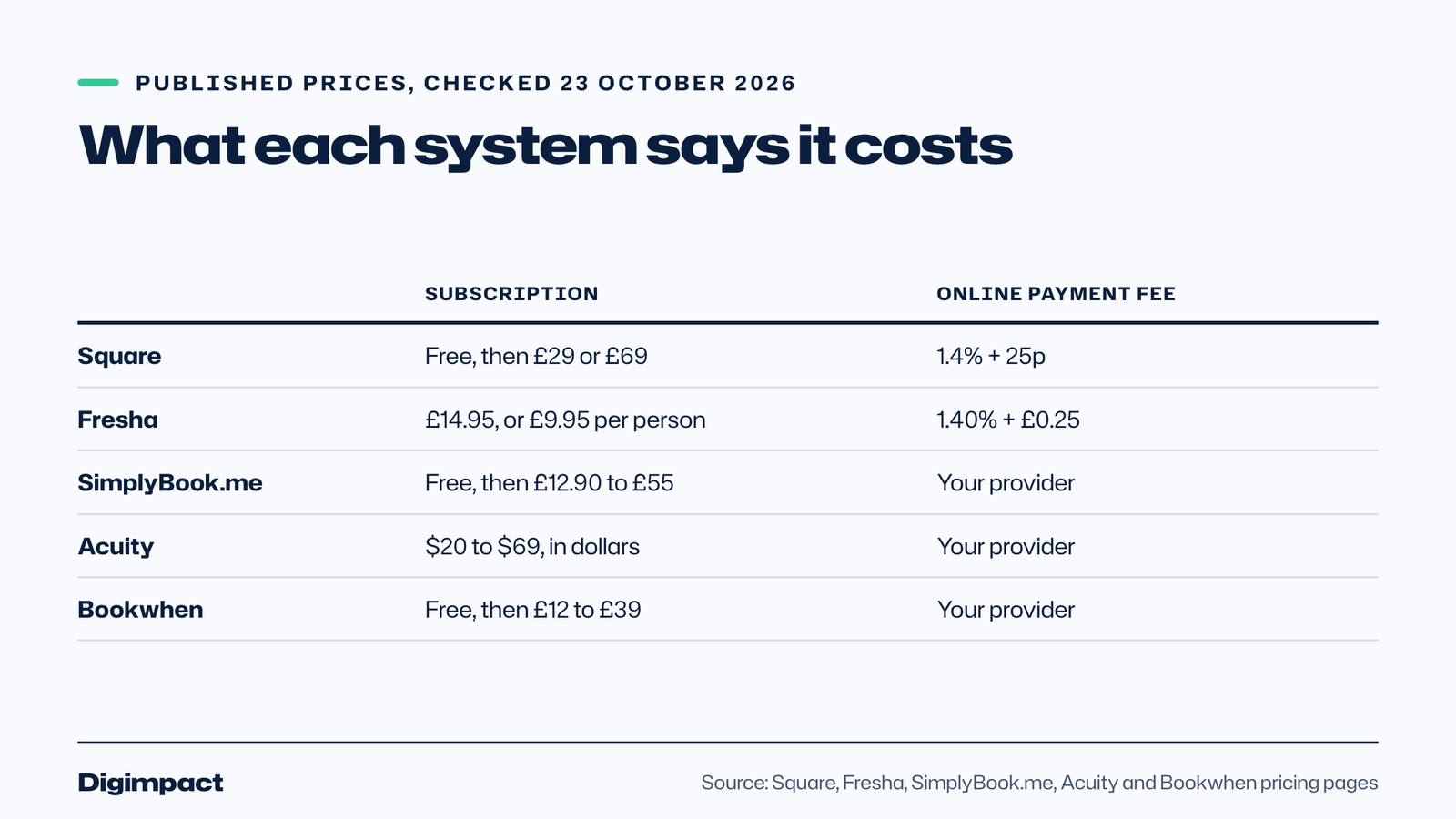
The table lists what each online booking system publishes on its own pricing page, checked on 23 October 2026. Prices change, some are in US dollars, and the monthly price is only part of the cost, so use it as a starting point.
| System | Published subscription | Payment fees stated | Trial and contract |
|---|---|---|---|
| Square Appointments | Free for one location, Plus £29 and Premium £69 a month per location | 1.4% + 25p online on UK cards | Not stated on the page |
| Fresha | £14.95 a month for one bookable team member, £9.95 per team member for a team | 1.40% + £0.25 online with Fresha Payments | 7 day trial, no minimum commitment |
| SimplyBook.me | Free for 50 bookings a month, then £12.90, £25 or £55 a month on monthly billing | Set by your payment provider | 14 day trial, no long term contract |
| Acuity Scheduling | $20, $34 or $69 a month on monthly billing, priced in US dollars | Set by Stripe, Square, PayPal or Venmo | 7 day trial, no card needed |
| Bookwhen | Free for 50 bookings a month, then £12, £19 or £39 plus VAT | Separate fee from your payment provider | 2 week trial, cancel any time |
Some of these are built for appointments, such as a haircut or a treatment, and some for classes and courses. Bookwhen and the paid Square Appointments plans, for instance, handle classes and waiting lists. If you run classes, our guide to choosing a gym class booking app goes into those features, while this one is aimed at appointments.
What costs sit outside the subscription?
This is where the cheapest online booking system on the page can turn out to be the dearest. There are three kinds of extra cost, and each one can be larger than the subscription for a busy business.
The first is payment processing. Square lists 1.4% plus 25p for online payments on UK cards, and Fresha lists 1.40% plus £0.25 online. On a £40 booking, that is about 81p each time, which is roughly 2 per cent of the price. Across 200 paid bookings a month, it adds up to about £160.
The second is messaging. Fresha gives 20 free texts a month and then lists £0.06 per text, and SimplyBook.me sells text credits at $8 for 100. If you send a reminder for every booking, a busy diary uses a lot of texts, so check whether reminders are included in your plan.
The third is marketplace commission. Fresha lists a one off 20 per cent commission, with a £4 minimum, on new clients found through its marketplace, and says bookings from your own booking link, Facebook or Instagram are free. That is a fair trade if the marketplace really brings you customers, but you should know the rule before you switch it on.

How do deposits and cancellations work?
Deposits change behaviour. A customer who has paid something is far more likely to turn up, and if they do cancel, you have both a rule and some money to cover the empty slot. Decide the amount of your deposits, say it clearly on the booking page, and make sure the system collects it before the booking is confirmed.
Look at how each system handles cancellation. Square lists cancellation policies and fees as a feature of its Plus plan, and not of the free one, so a cheaper plan may leave you chasing people for fees by hand.
Customers also have legal rights when they book services online. Our guide to the right to cancel an online booking explains when a customer has up to 14 days to cancel and when that right does not apply, which matters for how you word a deposit.
Should customers book on your website or a marketplace?
A marketplace can bring new customers, but the customer belongs to the marketplace first. Your own booking page, linked from your website, Instagram and Google profile, keeps the relationship with you and avoids commission.
For a local business the Google profile matters just as much. Reserve with Google lets a booking button appear directly on your profile, and our guide to adding a booking button to your Google profile explains how it works. If your profile is not set up yet, start with our Google Business Profile guide.
Whatever you choose, put the booking link in the same four places: your website menu, your Google profile, your social media bio and your email signature. A booking system customers cannot find does not save you any phone calls.
Which businesses benefit most from appointment booking?
Any business that sells time benefits from appointment booking, but the features that matter change with the trade. A solo practitioner needs a simple diary, deposits and reminders. A team needs staff calendars, and a clinic or garage needs rooms or bays that cannot be double booked.
Salons and barbers lose the most to no shows, because an empty chair is lost income that cannot be recovered. Deposits and text reminders are the two features to prioritise, and our page on booking systems for salons and barbers shows what we would set up.
Clinics and dental practices need reminders, forms before the first visit and careful handling of customer data, which makes the export and privacy checks above more important. See our page on booking systems for dentists and clinics for what we would build.
Vets and other practices that combine appointments with staff rotas have a second problem, which is matching bookings to the people available. Our page on vet booking systems explains how booking and rota fit together.
Tradespeople and mobile services often need a booking system that asks where the job is and what it involves before a time is offered. Choose software that lets you add questions to the booking form, and one that blocks out travel time, so a customer cannot book you in Fareham ten minutes after a job in Gosport.
Whatever your trade, the sensible order is the same. Pick online booking software that handles your busiest week, add deposits where no shows cost you money, make the booking link easy to find, and review the numbers after a month. If the cost of payment fees and texts is higher than you expected, change the plan or the settings before you change the system.
Do you need to build your own system?
For most small businesses, no. A ready-made system is quick to set up, maintained by someone else and cheap because the cost is shared. Start a free trial, enter your real week and see whether it copes.
A custom build starts to make sense when your bookings do not fit a standard calendar, for example if a job needs several people and several rooms, if you sell packages across sites, or if you want booking built into your own website and customer area. It costs more at the start and you rely on whoever builds it, so ask who owns the code and what happens if you part ways.
At Digimpact we build booking systems to order for businesses that run appointments and classes, with a fixed price in writing after a short call, and you own the result. Our booking systems service explains how that works, and if a ready-made system fits, we will say so. Restaurants have their own requirements, which we cover in our guide to restaurant booking software.
What mistakes do businesses make when they move online?
The booking software is rarely the problem. The common mistakes are in the set up, and they are easy to avoid once you know them.
The first is leaving no buffer between appointments. If the system lets customers book back to back, you will run late all day. Add the clean up, notes or travel time as a buffer on every service.
The second is offering every time slot. Show only the times you want to work, and limit how many bookings a day you accept, or you will be booked solid at times you hate.
The third is skipping the test. Book yourself in on a phone, pay a deposit, cancel it and rebook it, and ask a friend to do the same. Every confusing step you notice is one a customer will notice too.
The fourth is forgetting the old routes. If customers can still message you to book, many will. Put the booking link in your replies and your voicemail, and tell regulars the date the diary moves.
The fifth is not reading what happens to your data. Check where customer details are stored, who can see them and how you export them, and mention the booking system in your privacy notice.
What to do this week
- List your services, how long each takes, the buffer you need and the price.
- Decide whether you want deposits, and how much.
- Shortlist two systems and start a free trial on each.
- Enter your real week, including holidays and breaks.
- Test a booking, a deposit, a cancellation and a reschedule on your phone.
- Add up the real monthly cost for a normal month, including payment fees and texts.
- Put the booking link on your website, Google profile and social media, then tell your regulars.
If your website is where customers start, run our free website check too. It looks at speed on phones, what Google can read and your business details, and shows the results on screen in about twenty seconds.
Frequently asked questions
What is the best online booking system for a small business in the UK?
There is no single best. Square Appointments, SimplyBook.me and Bookwhen have free plans, Fresha starts at £14.95 a month, and Acuity prices in US dollars. Try two on a free trial with your real week before you decide.
How much does an online booking system cost?
Subscriptions run from free to about £69 a month for a single business on the plans above. Payment processing, text messages and marketplace commissions are usually extra, so work out the total for a normal month.
Is there a free online booking system?
Yes. Square Appointments, SimplyBook.me and Bookwhen all publish free plans with limits, such as a single location or 50 bookings a month. Check which features the free plan leaves out, such as text reminders or cancellation fees.
Do I need a deposit on bookings?
You do not have to, but deposits are the most effective tool against no shows. Choose an amount that matters to the customer without putting them off, and state it before they book.
Can I put the booking page on my own website?
Most systems offer a link, a button or an embeddable widget for your own website. Check that it works well on a phone and looks like your business.
Want a booking system built around your business?
We build booking systems to order, tied to a website that Google can read and customers can use on a phone. Booking systems are a fixed quote after a 30 minute call, and websites start from £300 a year per site, including hosting, your domain and five pages. See our booking systems service or tell us how your bookings work and we will say what would suit.
Keep reading
- How to make Reels for business on a phone, step by step A practical guide to filming Instagram Reels for a local business on a phone: what to film, how long Reels should be, how to edit and caption them, when to post and how to reuse them on other platforms.
- Apple Business Connect is now Apple Business: how to get your business on Apple Maps (2026 UK guide) Apple Business Connect became part of Apple Business in April 2026. This UK guide shows how to add your business to Apple Maps in seven steps, what is free and available in the UK, and how to use showcases, action buttons and insights.
- How to choose your Google Business Profile categories How to choose the right Google Business Profile categories, why the primary category matters most, when additional categories help, the mistakes Google warns against, and how to change them safely.
Free website check
How does your own website do?
Enter your website and see a quick check on screen in about 20 seconds: speed, Google, phones and the details that win the click. A full written report follows within two working days, free and with no sales call unless you ask.
Want help with this?
Tell us about your business. We reply within one working day with a time for a 30-minute call, and a fixed quote afterwards.
Rather talk now? Call 07551 079787.
Thanks, that is with us.
We will reply within one working day with a time for a call.