UK restaurant booking software compared: real prices, cover fees and contracts
OpenTable, Tablein, Eat App, booking through Google and running your own system, compared for UK restaurants on real prices, cover fees, contracts and the features that cut no-shows.
By GP 13 minute read
TL;DR: UK restaurant booking software comes in two pricing models. Network apps such as OpenTable charge cover fees for diners they send you, on a one-year contract. Subscription tools such as Tablein (from £60 a month) and Eat App (from about £74) charge a fixed monthly fee with no commission. Choose on total yearly cost, deposits and no-show tools, and who owns your guest list.
Key takeaways
- Restaurant booking software in the UK is priced in two ways: cover fees for diners a network sends you, or a fixed monthly subscription.
- OpenTable charges cover fees only for diners who find you through OpenTable, and its standard contract is one year, renewing automatically.
- Tablein lists UK prices of £60, £105 and £157 a month, with no commission on bookings.
- Eat App lists plans from about £74 a month on yearly billing, plus a free plan for up to 100 guests a month.
- Bookings through Google run via a booking provider, and Google says the provider might charge you for them.
What is restaurant booking software?
Restaurant booking software takes table reservations online, from your website, Google, social media and booking apps, and puts them in one diary with your phone and walk-in bookings. Good booking software also sends confirmations and reminders, take deposits or card details, manage tables and keep a guest list you can use for marketing.
For a small restaurant the choice usually comes down to three things: what it costs per year once every fee is counted, how well it cuts no-shows, and who owns the guest data. A booking system that brings in new diners can be worth a per-cover fee. A booking system that only takes bookings from people who already know you should cost a fixed monthly amount, or nothing per booking at all.
Every price in this comparison was read from each company’s own UK pricing page on 14 October 2026. Where a company does not publish prices, we say so.
How much does restaurant booking software cost in the UK?
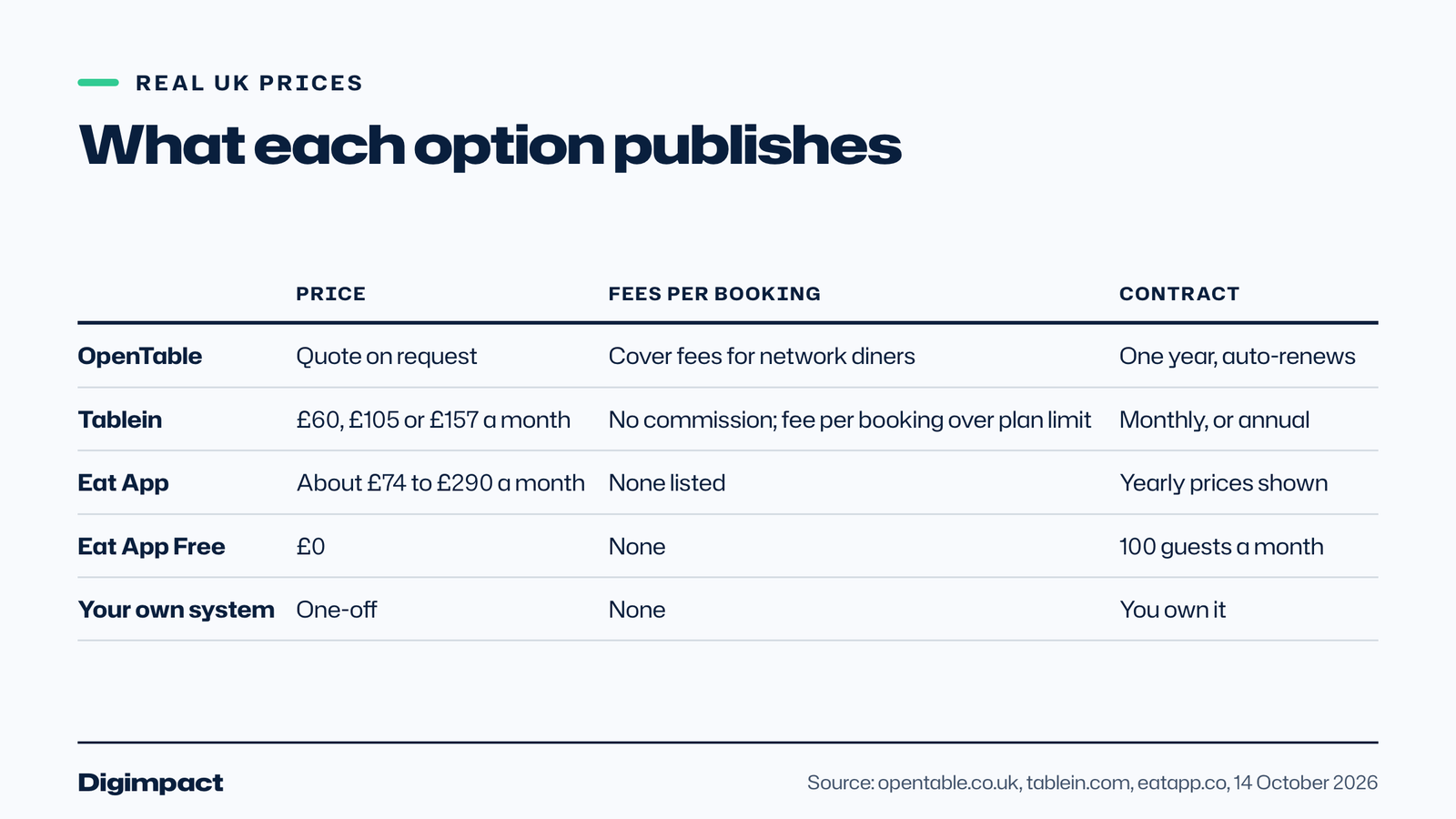
Restaurant booking software in the UK costs from nothing, on free plans with low limits, to about £60 to £300 a month on subscription plans, while network apps such as OpenTable quote prices individually and add cover fees for the diners they send. The right comparison is the yearly total, including add-ons such as SMS reminders.
Here is what each option publishes:
| Option | Published price | Commission or cover fees | Contract |
|---|---|---|---|
| OpenTable | Quoted on request (Core and Pro) | Cover fees for diners from the OpenTable network only | One year, renews automatically |
| Tablein | £60, £105 or £157 a month | No commission; a small fee per booking above the plan’s limit | Monthly billing, annual plans available |
| Eat App | About £74, £150 or £290 a month on yearly billing | None listed | 14-day free trial |
| Eat App Free | £0 | None | Limited to 100 guests a month |
| Your own booking system | One-off build or install | None | You own it |
The cheapest option on paper is not always the cheapest in practice. A busy restaurant on a plan with a booking cap may pay extra per reservation, and features such as SMS reminders can be add-ons. Read the limits as carefully as the headline price.
OpenTable: what do UK restaurants actually pay?
OpenTable does not publish UK prices for its Core and Pro plans; restaurants are asked to contact sales. Its pricing page explains that cover fees apply only to diners who discover the restaurant through OpenTable’s website, app or partner network, not to bookings made on your own website or by phone, and that no-shows are not charged.
On its UK pricing page, OpenTable says the standard contract is one year and renews automatically unless you tell it 30 days before the renewal date. It also lists Premium SMS messaging as a £19 a month add-on, and includes deposits and credit card holds, a waitlist, floor plans and Google’s Reserve a table button in its plans.
OpenTable’s strength is its audience: diners use its app to find somewhere to eat, so it can fill tables you would not otherwise fill. The trade-off is that a restaurant that gets most of its bookings through OpenTable’s own app pays a fee on each of those diners, so the cost rises with your success. Ask for a quote with your expected covers and work out the yearly total before you sign.
Tablein: who is it best for?
Tablein suits small and mid-sized restaurants that want a straightforward reservation system with no commission and a published price. Its UK prices are £60 a month for 50 reservations, £105 for 150 and £157 for unlimited reservations, per restaurant, and it says it charges no commission, including on bookings made through Google.
According to Tablein’s pricing page, the Starter plan charges €0.67 for each reservation over 50, the Growth plan €0.37 over 150, and the Success plan has no limit and offers annual billing. All plans include all features, and Tablein offers a free trial.
The booking caps are the detail to plan around. A restaurant taking 300 online bookings a month would pay for 150 extra reservations on Growth, which is when the Success plan’s unlimited bookings can work out cheaper. Count how many bookings you took online last month before choosing.
Eat App: who is it best for?
Eat App suits restaurants that want booking, messaging and marketing in one place, especially those that talk to guests on WhatsApp and Instagram. It lists plans at about £74, £150 and £290 a month on yearly billing, a free plan limited to 100 guests a month, and a 14-day free trial on paid plans.
Its pricing page shows the prices with a tilde, which usually means they are converted from another currency, so check the final amount at checkout. Plans differ mainly in the number of WhatsApp messages included, from 200 on Lite to 1,000 on Pro, and in marketing and AI features. Deposits and pre-payments, table management and a waitlist all appear in its feature list.
Can customers book a table through Google?
Yes. Customers can book a table directly from your Google Business Profile or Google Maps if you connect a supported booking provider. Google’s help page says the provider shows up on your profile within a week of setup, and warns that when people book through Google, your provider might charge you, so check the provider’s terms.
Google’s page on setting up bookings through a provider explains that you go to Bookings in your Business Profile and select your provider. OpenTable lists Google’s Reserve a table button in its plans, and Tablein states that it charges no commission on bookings made through Google.
The Google button matters because so many diners choose where to eat on Google Maps. If they can book in two taps without leaving Maps, fewer of them drift to the restaurant next door. Our guide on setting up a Google Business Profile covers the profile side.
Commission or subscription: which is cheaper?
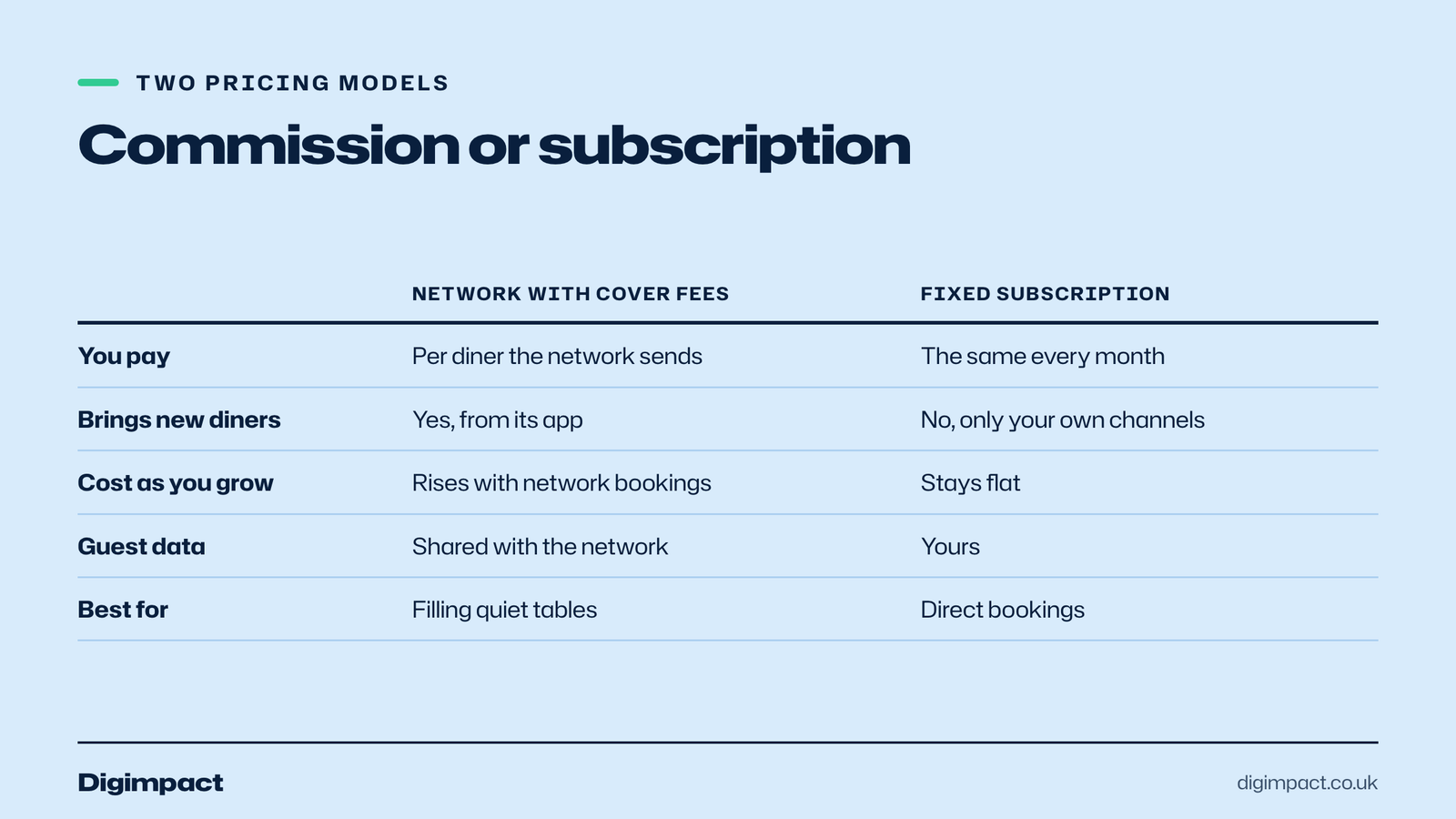
A fixed subscription is cheaper for a restaurant whose diners mostly book directly, because every extra booking costs nothing. Cover fees from a network can be worth paying when the network genuinely brings new diners you would not otherwise get. Most restaurants end up using both: a subscription booking system for direct bookings and a network for discovery.
Work it out with your own numbers. Take last month’s bookings and split them by source: your website, phone, Google, social media and booking apps. Price the subscription option against that volume, then ask each network for its cover fee and multiply by the diners it actually sent. If most diners came to you directly, a booking system without commission is almost always the better deal.
Which features matter most in restaurant booking software?
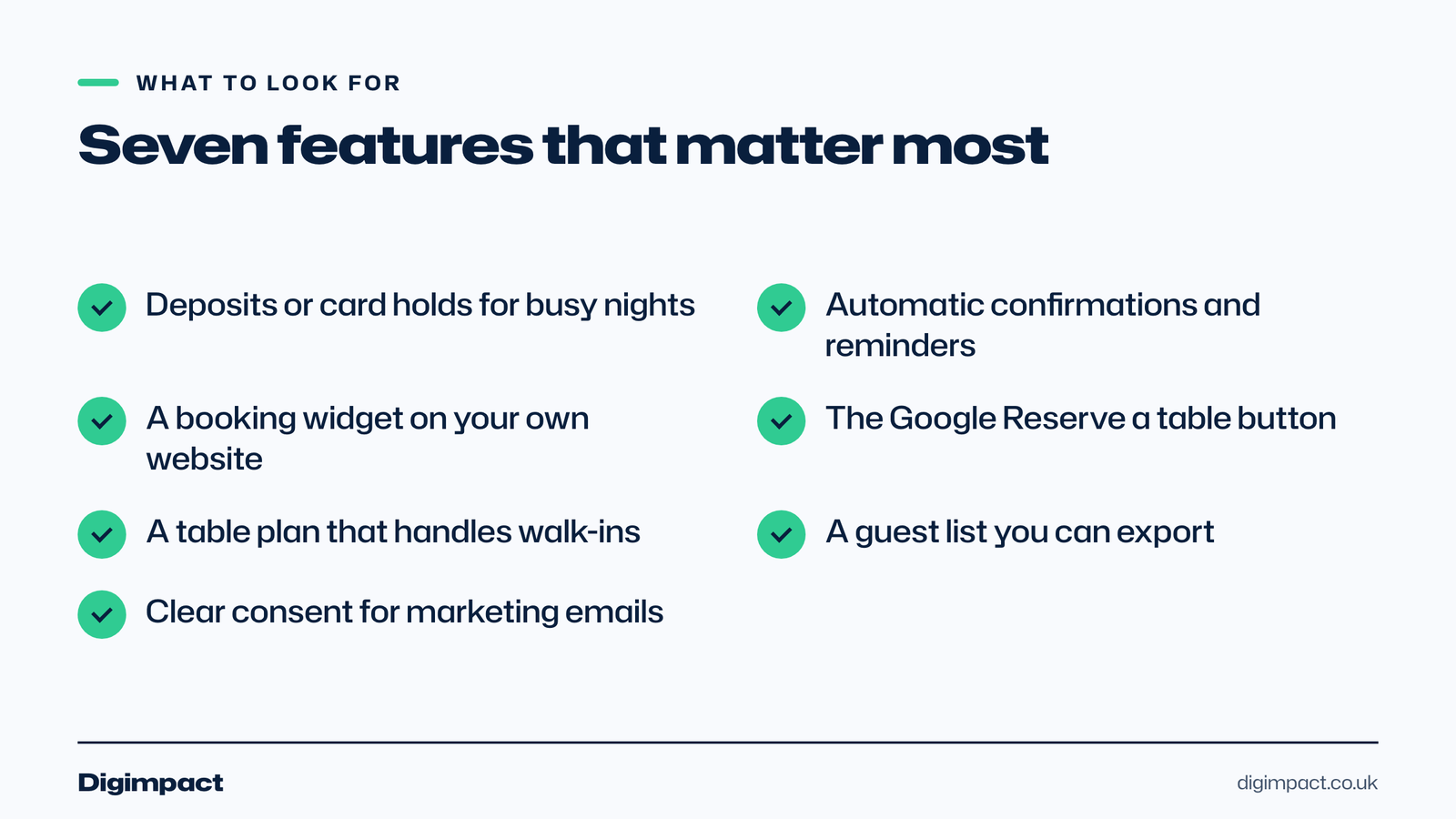
The features that matter most are deposits or card holds to cut no-shows, automatic confirmations and reminders, a booking widget on your own website, the Google booking button, a table plan, and a guest list you own and can export. Everything else is useful but secondary for a small restaurant.
The checklist we use when helping a restaurant choose:
- Deposits or card holds for large tables and busy nights, the single biggest lever against no-shows.
- Confirmations and reminders by email or text, sent automatically.
- Your own booking widget that matches your website and does not send guests to another brand’s page.
- Google bookings, so diners can book from Maps.
- A table plan that shows the night at a glance and handles walk-ins.
- Your guest data, exportable, so you keep your list if you change booking system.
- UK GDPR basics, with clear consent for any marketing emails.
Our page on cutting no-shows goes deeper on deposits and reminders.
What should you ask a booking provider before you sign?
Before you sign with any booking provider, ask for the full yearly cost at your number of bookings, the contract length and notice period, whether you can export your guest list, how deposits and refunds work, and what happens to bookings made through partner apps. The answers decide most of the real cost.
The questions worth asking every provider, in writing:
- What will I pay in a year at my current number of online bookings, including every add-on?
- How long is the contract, and how much notice do I need to give to leave?
- Can I export my guest list, with consent records, if I leave?
- How do deposits work, who holds the money and how are refunds handled?
- Which bookings carry a fee, and does that include bookings from Google or from my own website?
- How are reminders sent, by email, text or WhatsApp, and is texting extra?
- Does it connect to my till, if I want spend linked to guest profiles?
- What support do I get on a Friday night when something goes wrong?
Write the answers down next to each other, one column per provider, with your own booking numbers at the top. Ask each provider to confirm the yearly figure by email, so there are no surprises in the first invoice. If a provider will not put a yearly total in writing, treat that as an answer in itself. Providers describe their pricing in different ways, and a simple table with your own numbers is the quickest way to see which booking system really costs least for your restaurant.
How long does it take to set up a new booking system?
Most restaurant booking software can be set up in a day: adding your tables, opening hours and booking rules, connecting the widget to your website and linking it to Google. The longer part is getting the team used to it, so allow a quiet week to practise before a busy weekend.
Plan the setup around your quietest days. Load your table plan and the rules for each service, such as the longest party size you take online and how long tables are held. Test a few bookings yourself from a phone, including a cancellation and a deposit. Then switch on Google bookings, which Google says can take up to a week to appear on your profile.
Should a restaurant run its own booking system?
Running your own restaurant booking software makes sense when most bookings come directly from your website, Google and phone, and you want no monthly fee, no commission and full ownership of your guest list. It costs more upfront and needs someone to look after it, so it suits established restaurants better than brand-new ones.
We build and install a restaurant booking plugin for WordPress sites that does exactly this: online bookings on your own website, confirmations, an admin dashboard and your data on your own hosting. It is already running at Peperoncino, a restaurant we work with closely. Our page on stopping booking commission explains when it pays for itself.
How do you switch booking systems without losing bookings?
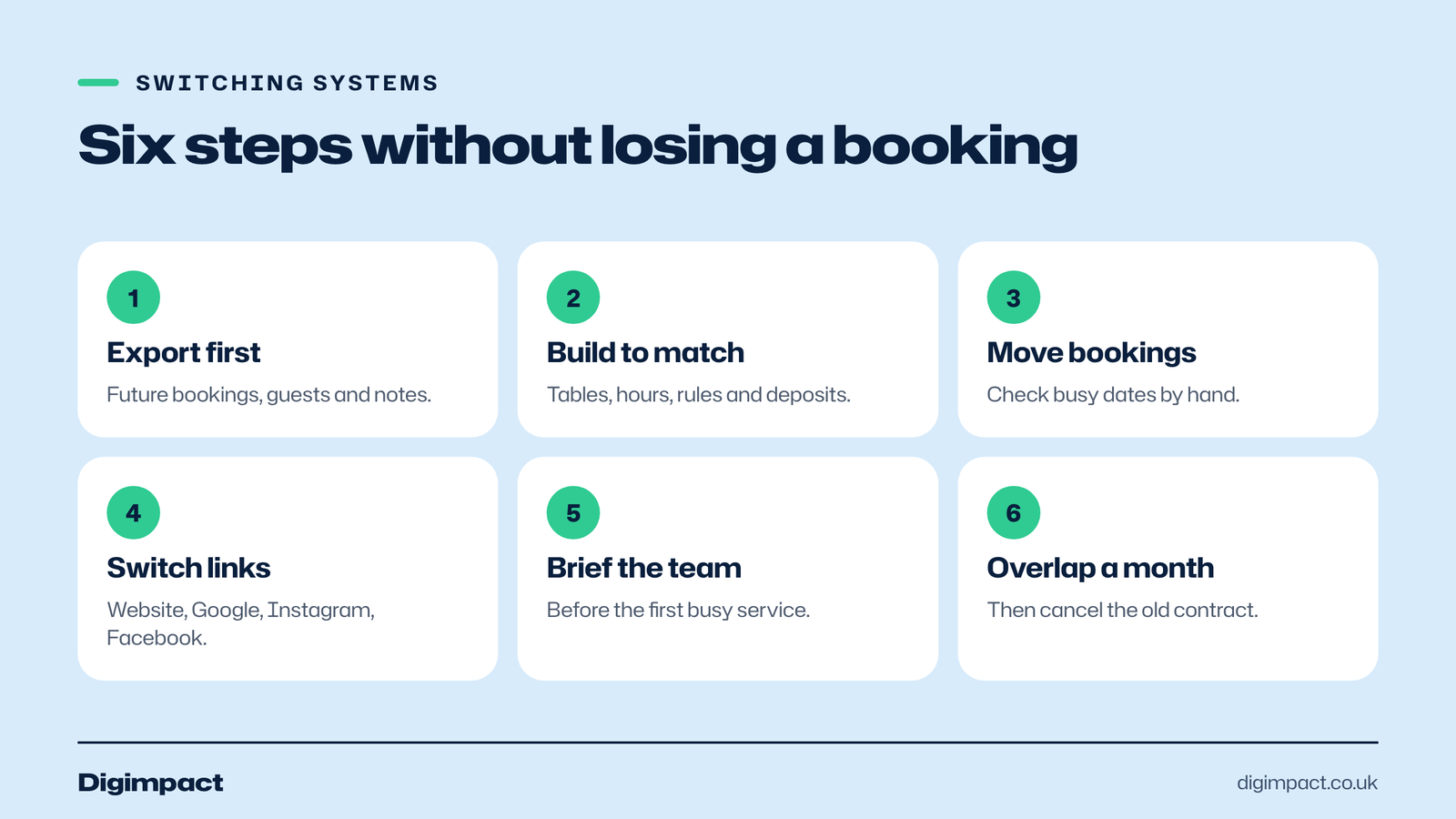
To switch booking systems safely, export your future bookings and guest list from the old booking system, set up the new one with the same table plan and rules, import or re-enter future bookings, then change the booking links on your website, Google profile and social media on the same day. Keep the old booking system open read-only for a month.
- Export everything first: future bookings, the guest list and any notes about regulars.
- Build the new system to match: tables, opening hours, booking rules and deposit settings.
- Move future bookings and check each one by hand for busy dates.
- Switch every link on one day: your website, Google Business Profile, Instagram and Facebook.
- Tell the team how the new diary works before the first busy service.
- Keep the old booking system open for a month to check nothing was missed, then cancel it in line with its contract.
If an off-the-shelf tool does not fit how your business runs, we build booking systems and staff apps from Portsmouth. See web development and the Peperoncino booking system.
Frequently asked questions
What is the best restaurant booking software in the UK?
There is no single best option. OpenTable is strongest for attracting new diners through its app, with cover fees on those diners. Tablein and Eat App suit restaurants that mainly take direct bookings and want a fixed monthly price. A restaurant with steady direct bookings can also run its own booking system with no monthly fee.
How much does OpenTable cost in the UK?
OpenTable does not publish UK prices for its Core and Pro plans and asks restaurants to contact sales for a quote. It charges cover fees only for diners who find you through OpenTable’s own website, app or partners, its standard contract is one year, and Premium SMS is a £19 a month add-on.
Is there free restaurant booking software?
Yes, with limits. Eat App has a free plan limited to 100 guests a month. Free plans suit very small venues getting off paper; most restaurants outgrow them quickly and move to a paid plan or their own system.
Can customers book my restaurant on Google?
Yes. Connect a supported booking provider in the Bookings section of your Google Business Profile, and a Reserve a table option appears, usually within a week. Google warns that your provider might charge you for bookings made through Google, so check its terms.
How do I stop no-shows at my restaurant?
Take deposits or card details for larger tables and busy nights, send automatic reminders the day before, and make cancelling easy so people tell you instead of not turning up. OpenTable and Eat App both list deposits among their features, so ask any provider how it handles them before you sign.
Get bookings without the commission
The right restaurant booking software pays for itself in fuller tables and fewer no-shows. If most of your diners already book with you directly, you may not need to pay per cover at all. Ask us about our booking systems service or our restaurant website work, and we will tell you honestly which option fits your restaurant.
Related reading: free staff rota template for Excel and Google Sheets, allergen information on a restaurant website and the right to cancel an online booking.
See it in practice: the Your Pub rota, stock and allergen system.
Keep reading
- Email marketing rules UK businesses must follow: consent and the soft opt-in What PECR says about marketing emails and texts in the UK, when you need consent, how the soft opt-in for existing customers works, the different rules for companies and sole traders, and a checklist to stay compliant.
- How long does SEO take? A realistic timeline for UK small businesses, with Google’s own answer How long SEO takes for a UK small business: what Google says today and used to say, what a study of millions of pages found, a realistic four stage timeline, how local SEO differs, and the red flags in any promise of fast rankings.
- How to make Reels for business on a phone, step by step A practical guide to filming Instagram Reels for a local business on a phone: what to film, how long Reels should be, how to edit and caption them, when to post and how to reuse them on other platforms.
Free website check
How does your own website do?
Enter your website and see a quick check on screen in about 20 seconds: speed, Google, phones and the details that win the click. A full written report follows within two working days, free and with no sales call unless you ask.
Want help with this?
Tell us about your business. We reply within one working day with a time for a 30-minute call, and a fixed quote afterwards.
Rather talk now? Call 07551 079787.
Thanks, that is with us.
We will reply within one working day with a time for a call.