The best time to post on Instagram for UK businesses in 2026
When UK businesses should post on Instagram, what Buffer's 2026 study of 9.6 million posts found by day and hour, how to read your own follower activity, and a simple weekly plan.
By GP 13 minute read
TL;DR: According to Buffer’s analysis of 9.6 million Instagram posts published in September 2026, the best times to post on Instagram are Thursday at 9am, Wednesday at 12pm and Wednesday at 6pm, local time. Wednesday is the best day, Friday and Saturday the weakest, and evenings from 6pm to 11pm do best on most weekdays. Use these as a starting point, then check your own follower activity in Instagram’s professional dashboard.
Key takeaways
- Buffer’s 2026 study of 9.6 million posts found the best time to post on Instagram is Thursday at 9am, then Wednesday at 12pm and Wednesday at 6pm, in your local time.
- Wednesday was the best day overall, followed by Thursday and Tuesday; Friday and Saturday were the weakest.
- Evenings from 6pm to 11pm gave the strongest engagement on every weekday except Thursday, when 7am to 9am did best.
- The worst times were 1am to 5am on any day.
- Your own followers may differ, so check their active times in Instagram’s professional dashboard and test for a few weeks.
What is the best time to post on Instagram?
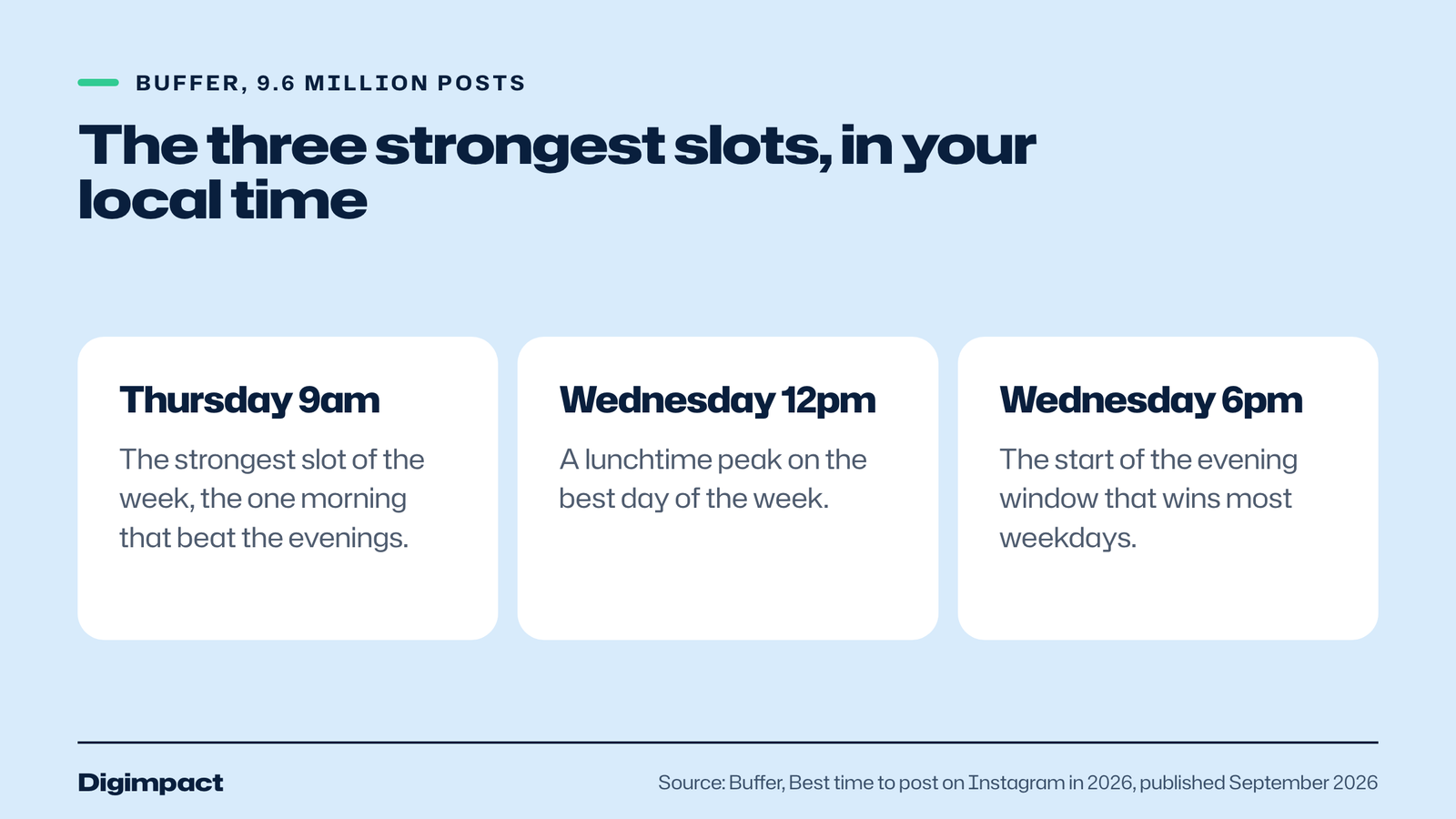
According to Buffer’s analysis of 9.6 million Instagram posts, the best time to post on Instagram in 2026 is Thursday at 9am, followed by Wednesday at 12pm and Wednesday at 6pm, in your local time. Wednesday is the best day overall, evenings from 6pm to 11pm do best on most weekdays, and Friday and Saturday are the weakest days.
Buffer, the social media scheduling company, published the figures in its best time to post on Instagram guide in September 2026. The data comes from its State of Social Engagement 2026 report, which looked at 52 million posts across 10 platforms from more than 200,000 accounts between January 2024 and December 2025. Buffer measured median engagement rate: likes, comments, shares and saves divided by followers.
Buffer says its data scientist normalised the times so they apply to any time zone. For a UK business, that means 9am on Thursday is 9am UK time, not a converted figure from another country. We checked the guide on 14 October 2026.
| Rank | Day | Time (local) |
|---|---|---|
| 1 | Thursday | 9am |
| 2 | Wednesday | 12pm |
| 3 | Wednesday | 6pm |
Why does posting time affect your reach?
Posting time affects reach because a post’s first hour of engagement helps decide how widely Instagram shows it. Buffer’s guide explains that relevance drives the feed, but recency still shapes a post’s initial reach: when followers are scrolling as you post, early likes, comments, shares and saves signal that it is worth showing to more people.
Timing works alongside how often you post. In a separate study of over 2 million Instagram posts, Buffer found that posting three to five times a week gave around 12% more reach per post than posting once or twice, and that weeks with no posts were linked to slower growth. Good timing makes each of those posts count.
Buffer also notes that engagement is one of the strongest signals Instagram uses to decide what to show, and that showing up on a predictable schedule, timed to when your followers are active, gives you the best chance of building momentum. Regular slots train your audience to expect you.
What is the best day to post on Instagram?
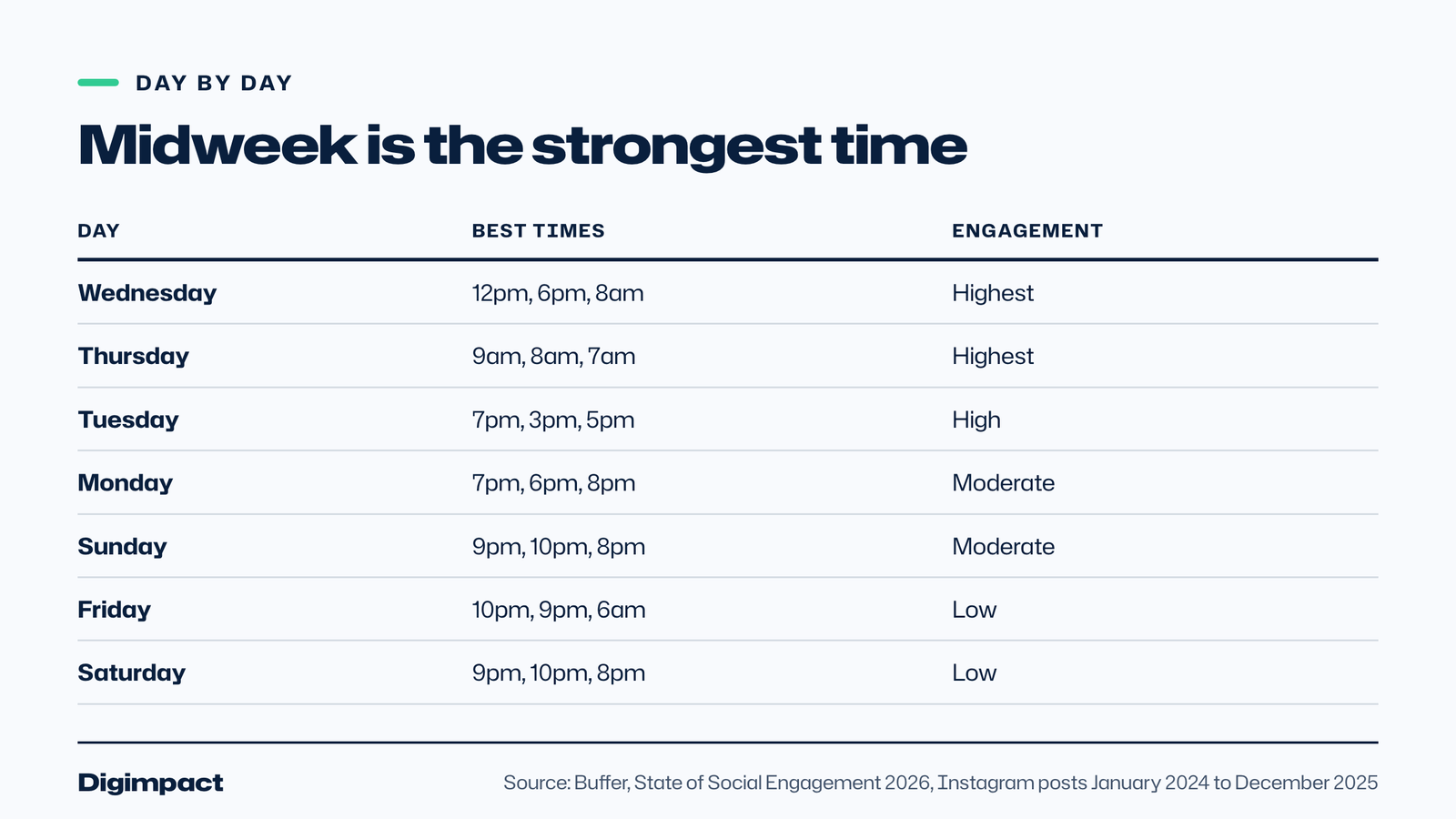
Wednesday is the best day to post on Instagram in Buffer’s 2026 data, followed by Thursday and Tuesday. Midweek consistently outperformed the rest of the week. Friday and Saturday were the weakest days, with lower engagement across every time slot, and Sunday evening was the best option at the weekend.
Buffer’s day-by-day table gives the strongest times for each day:
| Day | Best times | Engagement tier |
|---|---|---|
| Wednesday | 12pm, 6pm, 8am | Highest |
| Thursday | 9am, 8am, 7am | Highest |
| Tuesday | 7pm, 3pm, 5pm | High |
| Monday | 7pm, 6pm, 8pm | Moderate |
| Sunday | 9pm, 10pm, 8pm | Moderate |
| Friday | 10pm, 9pm, 6am | Low |
| Saturday | 9pm, 10pm, 8pm | Low |
If you only post on Instagram three times a week, Buffer’s data points to Tuesday evening, Wednesday at lunchtime or early evening, and Thursday morning. If weekends matter to your business, Sunday evening between 8pm and 10pm is the best of the weekend slots.
When is the worst time to post on Instagram?
The worst times to post on Instagram in Buffer’s data were between 1am and 5am on any day, and Friday and Saturday in general. Weekday mornings from 6am to 11am were also generally weak, with one exception: Thursday from 7am to 9am, which was one of the strongest slots of the week.
Posting overnight means your post is hours old by the time most followers open the app. Buffer’s guide explains that while Instagram’s feed rewards relevance, recency still affects a post’s first reach: posting when your audience is scrolling builds early engagement, which signals to Instagram that the post is worth showing to more people.
Does the best time depend on the type of post?
A little. Buffer analysed all post types together, so its times apply to Reels, carousels and photos alike, but it suggests evenings from 6pm to 11pm on Wednesday and Thursday for Reels, the same midweek slots for carousels, and Stories once or twice every day, because Stories disappear after 24 hours.
Buffer’s guide quotes Instagram’s head, Adam Mosseri, as saying people look for close friends in Stories, discover new content in Explore and look to be entertained in Reels. That fits the evening pattern for Reels: people have more time to watch once the working day is over. Carousels, which people swipe through, suit lunch breaks and early evenings.
| Format | Suggested timing from Buffer |
|---|---|
| Reels | Evenings, 6pm to 11pm, Wednesday and Thursday strongest |
| Carousels | Wednesday 12pm, Wednesday 6pm, Thursday 9am |
| Stories | Once or twice a day, every day |
| Photos | The same midweek peaks as other feed posts |
Does the best time differ by type of business?
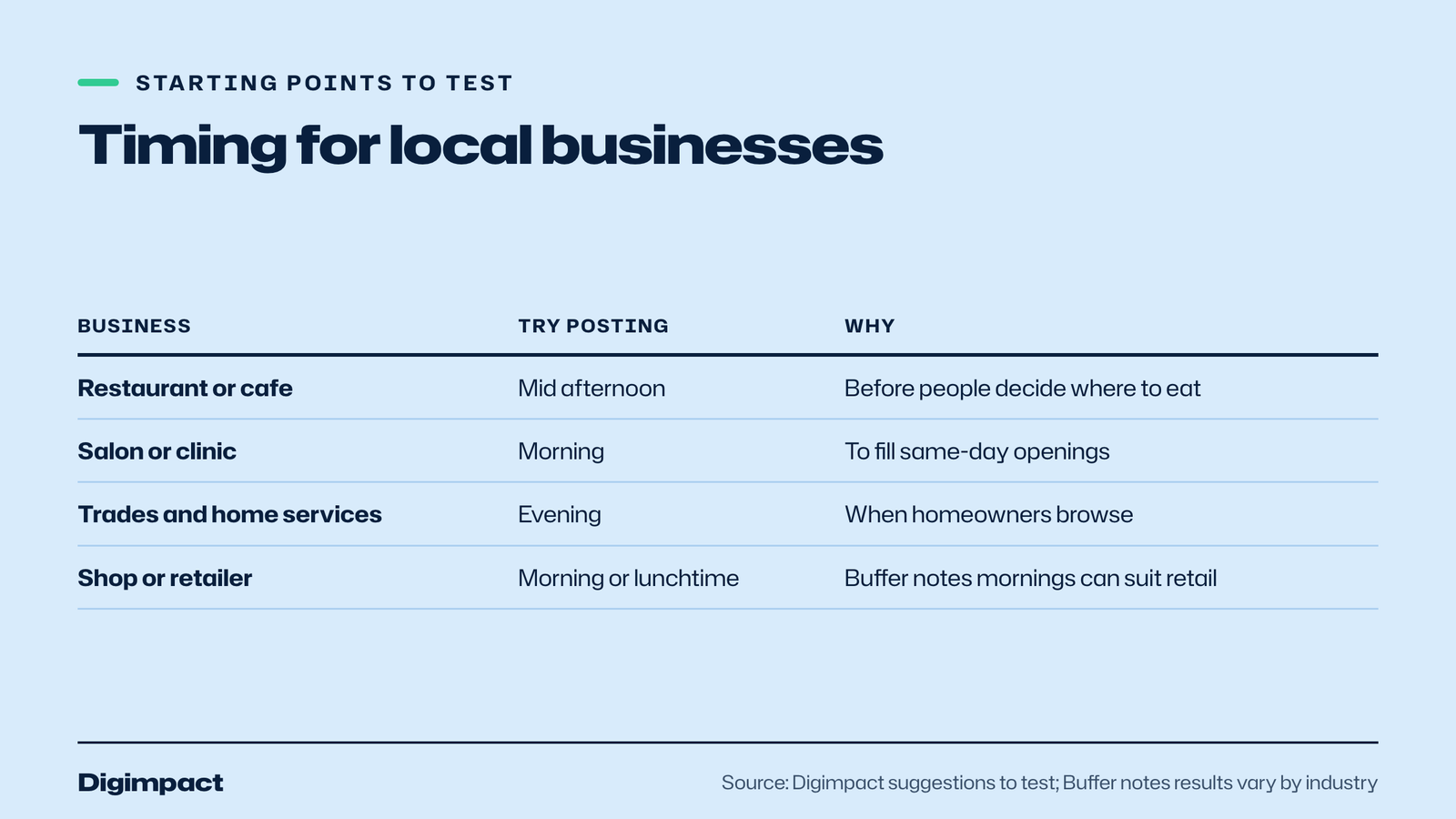
It can. Buffer notes that results vary by industry: morning posts may work better for some sectors, such as retail or media, while afternoon slots tend to do better for others, such as finance or hospitality. Use the overall figures as a starting point and let your own results decide.
For a local business, think about when customers make decisions. A restaurant posting tonight’s special is more useful in the afternoon, before people decide where to eat, than at 10pm. A salon with last-minute openings might post them in the morning. A tradesperson showing a finished job can post in the evening, when homeowners are browsing. Timing should serve the action you want people to take.
How do you find your own best time to post?
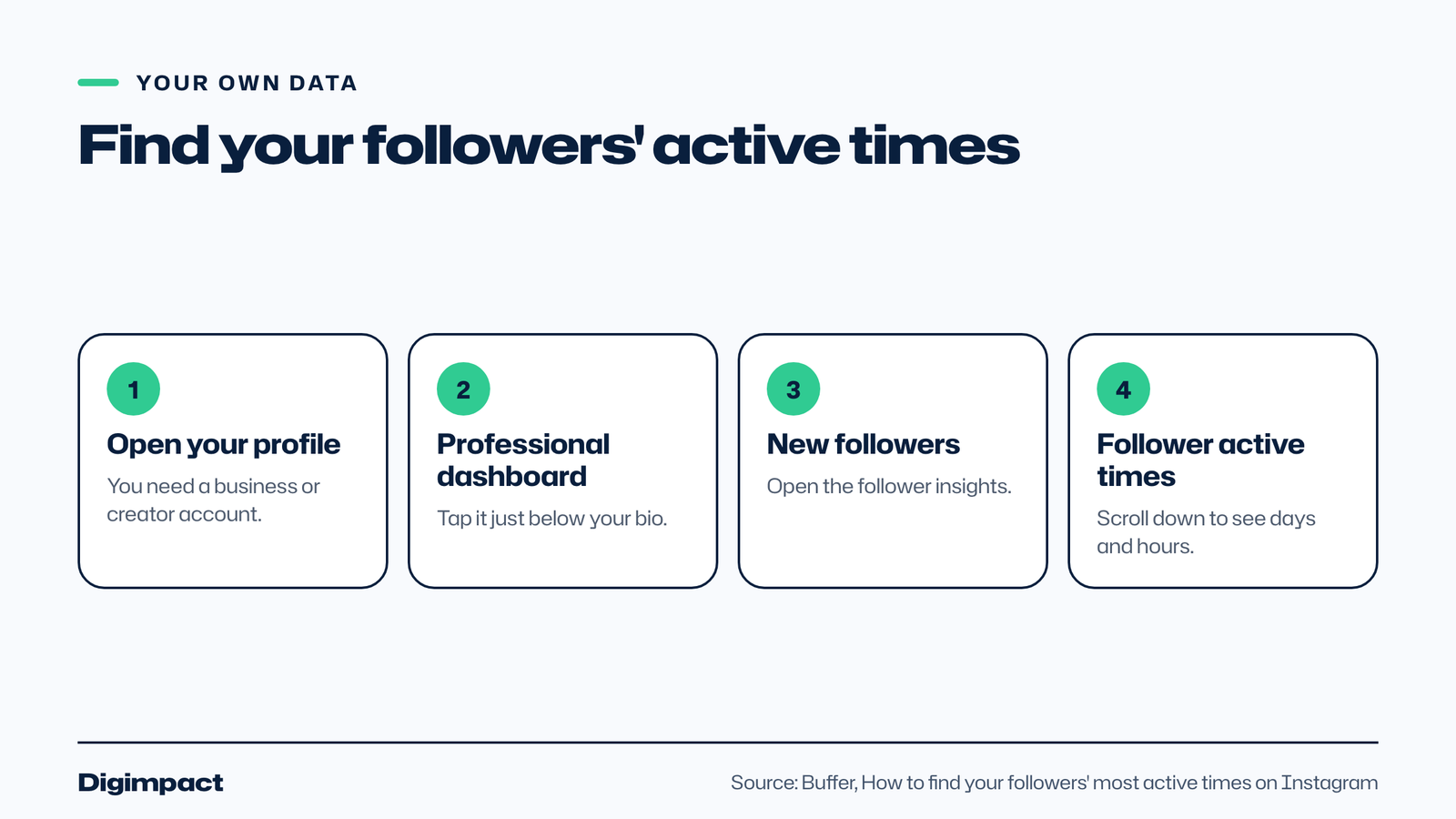
Check your followers’ most active times in Instagram’s professional dashboard. Buffer’s guide explains the steps: open your profile, tap Professional dashboard below your bio, tap New followers, and scroll to Follower active times. On the web, go to Dashboard, then Insights, then Account, and scroll to Followers.
You need a professional account, either a business or creator account, to see these figures. Our guide to setting up an Instagram business account explains how to switch. Buffer points out that active times show when followers are using Instagram, not necessarily when they engage with your posts, so treat them as a guide.
Then test. For four weeks, post at two or three different times on the same days, keep the content type similar, and compare reach and engagement in your Instagram insights. Change one thing at a time. Within a month, you will have your own best times, which beat any general study.
How do you run a four-week timing test?
Pick two time slots to compare on the same days, such as Wednesday at 12pm and Wednesday at 6pm. Post similar content in each slot for four weeks, record reach and engagement for every post, then keep the slot that wins and test it against a new one. Change only the time, not the type of post.
A simple spreadsheet is enough. For each post, note the date, the day, the time, the format (Reel, carousel or photo), the reach after 48 hours, and the likes, comments, shares and saves. Instagram insights shows all of these for each post on a professional account.
| Week | Slot A | Slot B | Keep |
|---|---|---|---|
| 1 | Wednesday 12pm | Wednesday 6pm | Record both |
| 2 | Wednesday 12pm | Wednesday 6pm | Record both |
| 3 | Thursday 9am | Tuesday 7pm | Record both |
| 4 | Thursday 9am | Tuesday 7pm | Record both |
After four weeks, compare the average reach and engagement for each slot. One unusual post can distort a small test, so look at averages, and repeat the test every few months, because audiences and Instagram both change.
What are the most common timing mistakes?
The most common mistakes are posting late at night after closing, posting several times in an hour and then nothing for days, ignoring your own insights in favour of general advice, changing the content and the time together so you cannot tell what worked, and posting then disappearing instead of replying to early comments.
- Posting after closing time. A post at 11pm after a busy service often lands as followers go to bed. Schedule it for the next day instead.
- Bunching posts. Three posts in one hour compete with each other. Spread them across the week.
- Ignoring your own data. General studies are averages; your followers may be most active at different times.
- Testing two things at once. Change the time or the format, not both, or the results mean nothing.
- Posting and leaving. Replying to comments in the first hour keeps the conversation going and helps the post travel further.
Fixing these usually does more for a small business account than finding the perfect minute to post.
What should you post in each slot?
Match the post to the moment. Lunchtime slots suit quick, useful posts people can read on a break, such as offers, menus or tips. Evening slots suit Reels and longer carousels, when people have time to watch and swipe. Thursday morning suits plans for the weekend, such as bookings, events and availability.
For a café, that could mean a lunch special at 12pm on Wednesday, a short Reel of the kitchen at 6pm, and a weekend brunch post at 9am on Thursday. For a salon, a before and after Reel on Tuesday evening, a carousel of aftercare tips at Wednesday lunchtime, and a post about weekend availability on Thursday morning. For a builder, a finished project Reel in the evening and a review or quick tip at lunchtime.
Thinking about what people are doing at each time makes the post more useful, which in turn earns the engagement that helps it reach more people.
Should you change your timing for holidays and events?
Yes. UK bank holidays, school holidays, local events and the run-up to Christmas all change when people are online and what they want to see. Post about bookings and offers well before the event, not on the day, and check your Instagram insights afterwards to see how the pattern shifted.
A restaurant taking Christmas bookings needs posts in October and November, timed for when people plan, rather than on the busy days themselves. A seasonal business should check its follower activity at the start of each season, because a summer audience of visitors may be online at different times from a winter audience of locals.
On the day of an event, Stories work better than feed posts: they are seen by your existing followers and feel live. Save your planned feed posts for the slots that have worked best for you, and use Stories for whatever is happening right now.
Should you schedule Instagram posts?
Yes, scheduling helps you post at the best times even when you are busy serving customers. Meta Business Suite can schedule Instagram and Facebook posts for free, and tools such as Buffer, Metricool and others can do the same. Schedule your planned posts, then add live Stories during the day.
Scheduling also makes a steady posting schedule realistic. Plan and create the week’s posts in one sitting, set them to go out at your best times, and spend the rest of the week replying to comments and messages. Our guide to how often to post on social media suggests three to five Instagram posts a week for most small businesses.
How much does posting time matter?
Timing helps, but content matters more. Buffer’s guide says content quality still matters most, but timing meaningfully shifts reach. A great post at an average time will usually beat a weak post at the perfect time. Use good timing to give strong content the best start, not to rescue weak content.
The biggest gains for most small businesses come from posting consistently, showing real products and people, and replying quickly to comments and messages. Get those right first, then use the best time to post on Instagram to squeeze a little more from each post.
A simple weekly Instagram plan for a UK business
A simple plan that follows Buffer’s data: post on Tuesday evening, Wednesday at lunchtime and Thursday morning, with Stories every day and an optional Sunday evening post. Adjust the slots once your own Instagram insights show when your followers are active.
| Day | What to post | When |
|---|---|---|
| Tuesday | A Reel showing your work or product | 7pm |
| Wednesday | A carousel with useful tips or offers | 12pm |
| Thursday | A photo post or review | 9am |
| Sunday | Optional post for the week ahead | 8pm to 9pm |
| Every day | Stories about what is happening today | Through the day |
This gives three feed posts a week at the slots Buffer found strongest, plus daily Stories to keep existing followers engaged. After a month, look at which posts did best and move the slots to suit your own audience.
If you are in Portsmouth and would rather not do this yourself, our social media management in Portsmouth includes filming at your place, from £300 a month.
Frequently asked questions
What is the best time to post on Instagram in the UK?
Buffer’s 2026 data, which it says applies in any local time zone, puts the top slots at Thursday 9am, Wednesday 12pm and Wednesday 6pm. For a UK business, that means those times in UK time. Check your own follower activity to fine-tune.
What is the worst day to post on Instagram?
Friday and Saturday were the weakest days in Buffer’s analysis of 9.6 million posts, with lower engagement across all time slots. Sunday evening was the strongest weekend option.
Is it better to post on Instagram in the morning or evening?
Evenings from 6pm to 11pm gave the strongest engagement on most weekdays in Buffer’s data. Thursday was the exception, with 7am to 9am performing best that day.
What time should I post Reels on Instagram?
Buffer suggests evenings between 6pm and 11pm, with Wednesday and Thursday the strongest days. It notes its data covers all post types together, so test Reels at a few different times.
How do I see when my followers are online?
With a professional account, open your Professional dashboard, tap New followers and scroll to Follower active times. These show when followers use Instagram, which is a good starting point for your own tests.
Want your Instagram posted at the right times?
Knowing the best time to post on Instagram helps, but only if the posts are ready and good. Our social media management plans include filming, editing and scheduling for local businesses around Portsmouth, posted at the times your own followers are most active, with a plain monthly report.
Keep reading
- How to make Reels for business on a phone, step by step A practical guide to filming Instagram Reels for a local business on a phone: what to film, how long Reels should be, how to edit and caption them, when to post and how to reuse them on other platforms.
- Apple Business Connect is now Apple Business: how to get your business on Apple Maps (2026 UK guide) Apple Business Connect became part of Apple Business in April 2026. This UK guide shows how to add your business to Apple Maps in seven steps, what is free and available in the UK, and how to use showcases, action buttons and insights.
- How to choose your Google Business Profile categories How to choose the right Google Business Profile categories, why the primary category matters most, when additional categories help, the mistakes Google warns against, and how to change them safely.
Free website check
How does your own website do?
Enter your website and see a quick check on screen in about 20 seconds: speed, Google, phones and the details that win the click. A full written report follows within two working days, free and with no sales call unless you ask.
Want help with this?
Tell us about your business. We reply within one working day with a time for a 30-minute call, and a fixed quote afterwards.
Rather talk now? Call 07551 079787.
Thanks, that is with us.
We will reply within one working day with a time for a call.