How to set up an Instagram business account the right way
How to switch to an Instagram business account in the app or on a computer, what you gain and give up, and how to set up the profile so local customers get in touch.
By GP 14 minute read
TL;DR: To set up an Instagram business account, open your profile, tap the menu, go to Account type and tools, choose Switch to professional account, pick a category and choose Business. Add your contact details, connect your Facebook Page if you have one, and finish your bio. It is free, but professional accounts cannot be private.
Key takeaways
- An Instagram business account is a free professional account for shops, local businesses, brands and service providers.
- You switch in the app under Account type and tools, then choose Switch to professional account and Business.
- Professional accounts cannot be private, so switching makes a private account public and accepts pending follow requests.
- Business accounts get a professional dashboard, insights, ads and a Contact button with phone, email and directions.
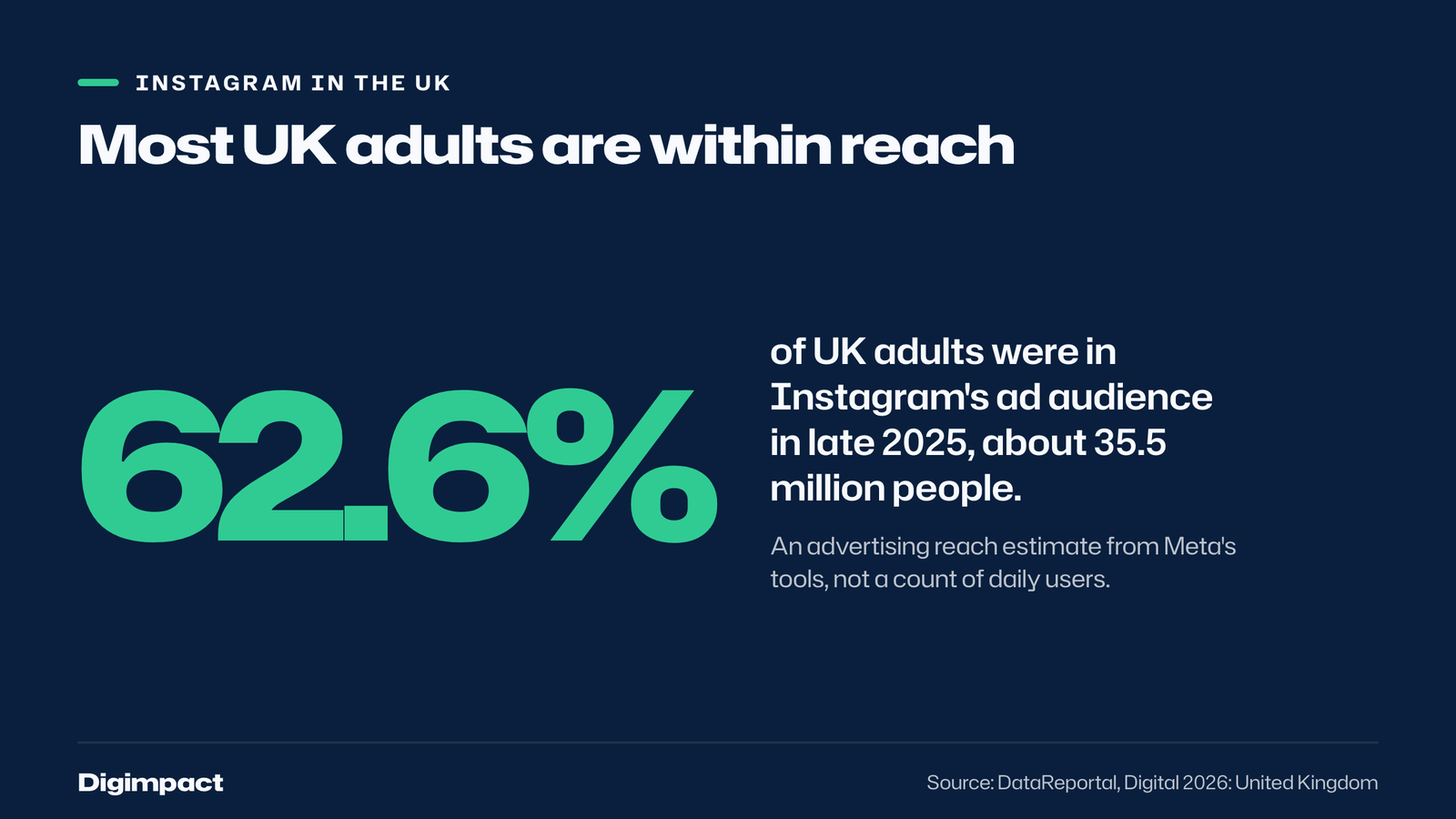
- Meta’s ad tools estimated an Instagram audience of 35.5 million people in the UK in late 2025, 62.6% of adults.
What is an Instagram business account?
An Instagram business account is a free type of professional account that gives a business tools a personal account does not have: a contact button, a category label under the name, insights on followers and posts, and the ability to run ads. You switch an existing account to business in the settings, and you can switch back at any time.
Instagram has two kinds of professional account. Its help page on professional accounts says business accounts are best for retailers, local businesses, brands, organisations and service providers, while creator accounts are best for public figures, content producers, artists and influencers. For a cafe, salon, gym, trade or shop, the Instagram business account is the right choice.
Instagram matters for local businesses because so many customers use it. DataReportal’s Digital 2026 report for the UK, based on Meta’s advertising tools, put Instagram’s UK ad audience at 35.5 million people in late 2025, equal to 62.6% of adults. That figure measures who ads can reach, not daily users, but it shows how widely the app is used.
Should a small business choose a business or creator account?
A small business should choose a business account. It is built for organisations that sell products or services, shows a category label and contact options, and connects to a Facebook Page and Meta’s business tools. A creator account suits an individual building a personal following, such as a photographer, coach or artist who is the brand.
The choice is not permanent. Instagram says you can change your professional account type at any time, so a hairdresser who starts as a creator because they are the face of the business can move to a business account later as the salon grows.
| Personal | Business | Creator | |
|---|---|---|---|
| Best for | Private use | Shops, local businesses, brands | Public figures, artists, influencers |
| Can be private | Yes | No | No |
| Insights and dashboard | No | Yes | Yes |
| Contact button | No | Yes | Yes |
| Ads | No | Yes | Yes |

How do you set up an Instagram business account?
To set up an Instagram business account in the app, go to your profile, tap the menu, find Account type and tools under For professionals, select Switch to professional account, choose a category, select Business, then add your contact details and, if you have one, connect your Facebook Page. The whole switch takes about five minutes.
The steps, as set out on Instagram’s help page on setting up a professional account:
- Go to your profile. Tap your profile picture in the bottom right.
- Open the menu. Tap the menu at the top right to reach Settings and activity.
- Find Account type and tools. It sits under For professionals.
- Switch to professional. Select Switch to professional account.
- Choose a category. Pick the one that best describes what you do, such as Cafe, Hair Salon or Plumber.
- Choose Business. Tap Business, then Next.
- Add contact details and a Facebook Page. Add your phone, email and address, and connect your Facebook Page if you have one, or skip either step.
Instagram notes that the category you choose does not decide whether you become a business or creator account; that is a separate choice. You then have the professional dashboard, where you can see insights and start creating ads.

Can you set up an Instagram business account on a computer?
Yes. On instagram.com, click More, then Settings, find Account type and tools under For professionals, click Switch to professional account, choose Business, pick a category and confirm. Instagram’s help page gives the same steps for the website as for the app, and you add your contact details at the end.
Setting up an Instagram business account on a computer is easier if you want to type a longer bio or copy in your exact business details. Everything else, such as posting Reels and Stories, works best in the app on a phone.
What do you get with an Instagram business account?
An Instagram business account gives you a professional dashboard, insights on your followers and posts, the ability to run ads on Instagram and Facebook, a Contact button with your phone number, email and directions, and a category label under your profile picture. All of these are free; you only pay if you run ads.
Instagram’s help page describes each feature:
- Professional dashboard to track performance and find professional tools.
- Insights showing who your followers are, when they are online, and how each post performed.
- Ads that you can run from your account and on both Instagram and Facebook through Meta’s tools.
- Contact button near the top of your profile, with directions, a phone number and an email address.
- Category label directly under your profile picture, which you can show or hide.
For a local business using Instagram for business, the contact button and insights matter most. The button turns profile visits into calls and directions, and insights show which posts actually bring people in, so you can make more of those.
What are the downsides of an Instagram business account?
The main downside of an Instagram business account is that it cannot be private: switching makes a private account public and automatically accepts all pending follow requests. If you link a Facebook Page, you can only share Instagram posts to Facebook through that Page, not to another Page or a personal profile.
Instagram’s help page lists these limits clearly. For most businesses neither is a problem, because a business wants to be seen. The privacy point matters if you are converting a personal account that you also use privately into an Instagram business account. In that case, it is usually better to create a separate Instagram account for the business and keep your personal one private.
Instagram’s setup page says you can have up to 10 Instagram accounts logged in at once, so running a personal and a business account side by side on one phone is straightforward.
Should you connect a Facebook Page?
Yes, if you have a Facebook Page for the business. Instagram recommends connecting your business Facebook Page to get the most out of its business tools. Instagram says connecting makes it easier to share Instagram posts on Facebook and to use connected experiences such as ads and shopping tools.
You can connect the Page during setup or later from your profile settings. If you do not have a Facebook Page, you can skip this step and still use your Instagram business account fully; you can always add a Page later. Facebook still reaches more UK adults than Instagram in Meta’s figures: DataReportal reported a Facebook ad audience of 38.8 million in late 2025.
How do you set up the profile so local customers get in touch?
Set up your profile so a stranger understands what you do, where and how to contact you within three seconds: a clear profile picture, a name that includes what you do, a bio with your town and one call to action, a link to your booking or contact page, the contact button switched on, and Highlights for menus, prices and reviews.
The profile checklist we use for clients:
- Profile picture: your logo or shopfront, readable at a small size.
- Name field: your business name plus what you do, such as Bloom Hair Salon.
- Bio: what you do, where, and one action, such as Book online below.
- Link: your booking page or contact page, not just your homepage.
- Contact button: on, with the phone number customers should actually ring.
- Category: the most specific one that fits, visible under your name.
- Highlights: menu or prices, reviews, the team and how to find you.

How do you use the insights on an Instagram business account?
Insights on an Instagram business account show who your followers are, when they are online and how each post performed, from the professional dashboard. Use them monthly: find the three posts that brought the most profile visits and calls, make more like them, and post at the times your followers are active.
Instagram’s help page says insights provide information on who your followers are, when they’re online, and how individual posts performed and how people engaged with them. For a local business, the numbers that matter most are the ones closest to a sale: profile visits, taps on the contact button, taps on your link and messages. Likes are pleasant but rarely pay the rent.
A simple monthly routine takes ten minutes. Note the month’s follower count, the three best posts by profile visits, and any spikes in calls or messages. After three months you will know which kinds of post bring customers through the door, which is worth more than any general advice about what to post.
How do you get your first local followers?
Get your first local followers from the people who already know you: tell customers at the till, put a QR code for your Instagram business account on menus, receipts and the counter, tag your location on every post, and follow and comment on other businesses on your street. Local followers who have visited are worth far more than followers from anywhere, and they are the ones who make Instagram for business pay off.
A few habits make the biggest difference in the first months:
- Ask in person. Staff mentioning the account when a customer is happy is the most reliable way to grow locally.
- Tag the location on every post and Story, so people browsing your area can find you.
- Work with neighbours. Share posts with the business next door, run a joint offer or feature each other.
- Reply to everything. Answer comments and messages the same day, because people notice.
- Post people, not just products. Faces of the team and regulars get more interest than stock photos.
How does Instagram compare with Facebook and TikTok for local businesses?
For most local businesses, Instagram and Facebook together reach the most customers, and TikTok is worth adding if you can film short videos regularly. In Meta’s figures reported by DataReportal, Facebook’s UK ad audience was 38.8 million in late 2025, Instagram’s 35.5 million, and TikTok’s ads reached 48.4% of UK adults.
The same report gives the share of adults each one reaches: 69.9% for Facebook, 62.6% for Instagram and 48.4% for TikTok. These are advertising reach estimates rather than counts of daily users, so treat them as a guide to where your customers are, not a promise of who will see your posts. A cafe or salon usually does best with Instagram and Facebook connected, and a business with a strong visual story to tell, such as a bakery or a barber, often gets good results from TikTok as well.
How do you write a bio for an Instagram business account?
Write the bio of your Instagram business account in three short lines: what you do, where you are, and one thing you want people to do next. Leave out slogans and long lists of services. A stranger should understand from the bio alone whether you are the cafe, plumber or salon they were looking for.
Three examples that work:
- A cafe: Independent cafe in Southsea. Brunch every day from 8am. Book a table using the link below.
- A plumber: Plumbing and heating across Portsmouth and Fareham. Gas Safe registered. Call or message for a quote.
- A salon: Colour and cuts in Cosham, by appointment. New clients welcome. Book online below.
Only claim what is true and current: a qualification you hold, hours you actually open, areas you really cover. Update the bio when anything changes, and change the link to your current offer or booking page rather than leaving it on the homepage. The bio is the one place on your Instagram business account that every visitor reads, so it deserves ten careful minutes.
What should you post first?
Before you invite anyone to follow you, post six to nine things that show what you do: your best work or dishes, the team, the place, a customer review, how to book and a short video. A new visitor judges the account from the first row of posts, so fill it with your strongest material.
A simple plan for the first two weeks of a new Instagram business account: one post a day about what you sell, one Reel filmed on a phone showing the place or a job being done, a Story most days, and a Highlight for prices or the menu. Our guide to what social media management costs explains what is involved if you would rather have it done for you.
If you are in Portsmouth and would rather not do this yourself, our social media management in Portsmouth includes filming at your place, from £300 a month.
Frequently asked questions
Is an Instagram business account free?
Yes. Switching to an Instagram business account is free, and so are the dashboard, insights, contact button and category label. You only pay if you choose to run ads, which you can do from the account or through Meta’s ad tools.
Can I make my Instagram business account private?
No. Instagram says professional accounts, both business and creator, cannot be set to private. To make an account private, you would have to switch it back to a personal account, which removes some business tools such as Meta Business Suite and Ads Manager.
Should I use a business or creator account?
Use a business account if you run a shop, local business, brand or service. Instagram recommends creator accounts for public figures, content producers, artists and influencers. You can change between the two types at any time.
Do I need a Facebook Page for an Instagram business account?
No, it is optional. Instagram recommends connecting a business Facebook Page to get the most from its business tools, such as sharing posts and running ads across both apps, but you can skip it during setup and add it later.
Can I switch back to a personal account?
Yes. Instagram says you can switch back to a personal account at any time from the Account type and tools menu. You lose access to some Meta business tools, such as Meta Business Suite and Meta Ads Manager, though a public account keeps its dashboard and insights.
Want Instagram to bring in customers?
Setting up an Instagram business account takes five minutes; posting something good every week is the hard part. Our social media management plans film and post content for local businesses, so you can get on with running yours. If you want the whole job handled, see how it works on our page about social media done for you.
Related reading: setting up WhatsApp Business for a small business, image copyright for a business website and the UK rules for labelling influencer ads.
Buy online: the Bronze social media plan at £300 a month, the Silver plan at £500 a month and the Gold plan at £800 a month.
See it in practice: El Greco social media and website, Southsea.
Keep reading
- How to make Reels for business on a phone, step by step A practical guide to filming Instagram Reels for a local business on a phone: what to film, how long Reels should be, how to edit and caption them, when to post and how to reuse them on other platforms.
- Apple Business Connect is now Apple Business: how to get your business on Apple Maps (2026 UK guide) Apple Business Connect became part of Apple Business in April 2026. This UK guide shows how to add your business to Apple Maps in seven steps, what is free and available in the UK, and how to use showcases, action buttons and insights.
- How to choose your Google Business Profile categories How to choose the right Google Business Profile categories, why the primary category matters most, when additional categories help, the mistakes Google warns against, and how to change them safely.
Free website check
How does your own website do?
Enter your website and see a quick check on screen in about 20 seconds: speed, Google, phones and the details that win the click. A full written report follows within two working days, free and with no sales call unless you ask.
Want help with this?
Tell us about your business. We reply within one working day with a time for a 30-minute call, and a fixed quote afterwards.
Rather talk now? Call 07551 079787.
Thanks, that is with us.
We will reply within one working day with a time for a call.