Google Business Profile photos: what to add, sizes and how many
Which photos to add to your Google Business Profile and how many, Google's sizes and formats, how the cover photo and logo work, video limits, review times and how to remove customer photos that break the rules.
By GP 13 minute read
TL;DR: Google says Business Profile photos should be JPG or PNG, between 10 KB and 5 MB, ideally 720 by 720 pixels, in focus, well lit and true to life, without heavy filters or AI. Add at least three exterior, three interior and three photos of your products, food or work, plus team photos, a logo and a cover photo. Videos can be up to 30 seconds and 75 MB. New media can take 24 to 48 hours to appear.
Key takeaways
- Google says Google Business Profile photos should be JPG or PNG, between 10 KB and 5 MB, ideally 720 by 720 pixels and at least 250 by 250.
- Photos should be in focus, well lit and represent reality, without significant alterations, excessive filters or AI.
- Google recommends at least three exterior, three interior and three product, food or work photos, plus three team photos.
- Videos can be up to 30 seconds long and up to 75 MB, at 720p or higher.
- Photos only show after your profile is verified, and new uploads can take 24 to 48 hours to appear.
Why do Google Business Profile photos matter?
Google Business Profile photos show customers what your business looks like before they visit: the outside so they can find you, the inside so they know what to expect, and your products, food or work so they can decide. Google says adding photos helps complete your profile and makes it more attractive to customers.
Google’s help page on managing Business Profile photos and videos says an exterior photo helps customers recognise your business when they visit. Its page on business-specific photos says these photos spotlight the features customers use when deciding to buy, and help your business stand out on Google. Everything in this guide comes from those pages, checked on 15 October 2026.
Photos also work alongside your description, categories and reviews. A profile with clear, recent photos looks active and trustworthy; one with a single blurry shot from years ago does not. If you are still setting up, start with our guide to setting up a Google Business Profile.
What size should Google Business Profile photos be?
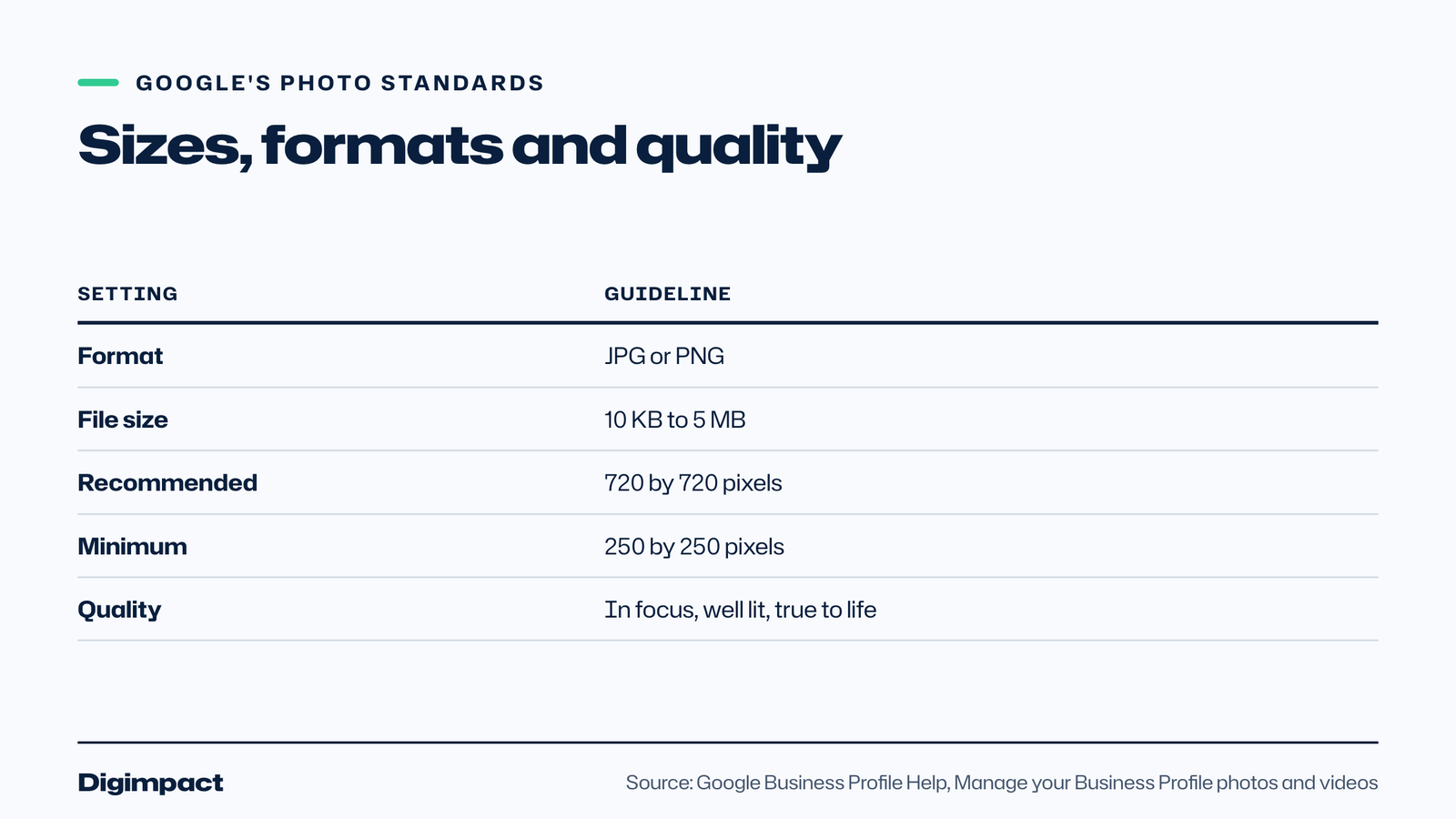
Google says photos look best when they are JPG or PNG, between 10 KB and 5 MB, with a recommended resolution of 720 pixels tall by 720 pixels wide and a minimum of 250 by 250. They should be in focus and well lit, with no significant alterations, excessive filters or AI, so the image represents reality.
| Setting | Google’s guideline |
|---|---|
| Format | JPG or PNG |
| File size | Between 10 KB and 5 MB |
| Recommended resolution | 720 px by 720 px |
| Minimum resolution | 250 px by 250 px |
| Quality | In focus, well lit, true to life, no heavy filters or AI |
Most phone photos used as business photos are far larger than 720 pixels, which is fine as long as the file is under 5 MB. If a photo is too big, export or resize it first. Keep the main subject near the centre of the frame, so it still reads well as a small thumbnail.
Which photos should you add, and how many?
Google recommends at least three exterior photos, three interior photos, three photos of your products, food or work, and three team photos. Hotels should add at least three photos of popular rooms and one of each common area. Add a logo and a cover photo too.
Google’s business photo guidance describes each type:
- Exterior. At least three, taken from each direction customers approach, ideally at different times of day.
- Interior. At least three that truthfully show what it is like to stand inside as a customer.
- Products. At least three of your most popular items, evenly lit.
- At work. At least three showing your team providing your services.
- Food and drink. At least three of your most popular dishes or drinks, evenly lit.
- Team. At least three of your management team and staff, a little less formal to show personality.
- Common areas and rooms. For hotels and similar businesses, each common area and your most popular rooms.
Start with the minimums for your business photos, then keep adding. A steady flow of new photos, such as a new dish, a finished job or a seasonal display, keeps the profile current.

How do the cover photo and logo work?
The logo helps customers recognise your business, and Google says it is highlighted on profiles that have their basic information filled in. The cover photo sits at the top of your profile, but Google says choosing one does not guarantee it will always show first; a customer photo may be used instead if yours is low quality.
Google says that if your logo does not appear, you should check your profile has a name, a valid location with a street address, categories, a phone number and opening hours. For the cover photo, choose a bright, sharp image that sums up your business, such as your shopfront, your signature dish or your team at work.
To add or change either, Google’s steps are: open Google Search or Maps on a computer, search for your business name and town, select Photos, then Add a cover photo or Add a logo, or Change cover or Change logo, and select your photo.
Which photos matter most for each type of business?
The photos that matter most are the ones customers use to decide. For a restaurant that is food and the dining room; for a salon, finished hair and the chairs; for a trade, finished jobs and the team on site; for a shop, the shopfront and best-selling products. Lead with those and fill in the rest over time.
- Restaurants, cafés and pubs. Popular dishes and drinks, the dining room at service time, the outside at night if you trade in the evening, and the menu board.
- Salons and barbers. Finished looks with the client’s permission, the chairs and treatment rooms, and the team.
- Trades and home services. Before and after photos of finished jobs, the team at work in uniform, and branded vans.
- Clinics. Reception, treatment rooms and the team, which reassure nervous customers.
- Shops. The shopfront from the street, the inside, and your best-selling products.
- Hotels and B&Bs. Each room type, common areas and the outside, as Google recommends.
For restaurants, Google’s posts help page says featured posts from Facebook and Instagram can also appear on the mobile profile of single-location food and drink businesses in the UK, so good food photos work twice. Our list of restaurant social media ideas has more on photographing dishes.
Do photos affect your ranking on Google?
Google does not say that photos directly change your local ranking. What it does say is that complete and accurate business information makes your profile more likely to show up in local results, and that photos make the profile more attractive to customers. Photos help most once customers have found you, by persuading them to call, book or visit.
Treat Google Business Profile photos as part of a complete profile, alongside your categories, description, hours and reviews. Our guides to Google Business Profile categories and the business description cover two of the other parts that matter.
How do you add photos and videos?
On a computer, open Google Search or Maps, search for your business name and town, select Photos, then Add photos, and choose your files. You can select several at once. Google reviews each upload, and says it can take 24 to 48 hours before new photos and videos show on your profile.
Google lists three upload statuses: Pending, while the media is being uploaded or processed or your profile is not verified; Not approved, when it has been flagged for breaking a policy; and Live, when customers can see it on Search and Maps. Photos and videos only show once your Business Profile is verified.
If an upload does not appear, Google suggests checking it is not a duplicate of a photo you already added, then trying again. Your newest media appears first on your profile.
What are the rules for videos?
Google says Business Profile videos can be up to 30 seconds long, up to 75 MB, and should be 720p or higher. Short clips work best: a walk through the room, food being plated, a job before and after. The same content policies apply as for photos.
If you already make short videos for social media or Google Maps, you can often reuse them, trimmed to 30 seconds. Our guide on how to make Reels for business covers filming on a phone. Avoid adding text over the whole frame; the video should show the place or the work.

What makes a good business photo?
A good business photo is sharp, well lit, honest and specific: it shows exactly what a customer will see or get. Google asks for photos that are in focus, well lit and represent reality. Real photos of your premises, team and work beat stock images and heavily edited shots every time.
Practical tips for phone photos:
- Use daylight. Shoot near a window or outside on a bright, overcast day.
- Clean the lens and tidy the shot before you take it.
- Shoot at eye level for interiors and exteriors, as a customer would see them.
- Fill the frame with the subject for products and food.
- Avoid heavy filters; Google says photos should not be significantly altered.
- Ask permission before photographing staff or customers.
Take several of each shot and pick the sharpest for your Google Business Profile photos. A handful of good photos is better than dozens of similar ones.
Can you remove photos customers add?
Customers can add their own photos to your profile. If one breaks Google’s policies, for example because it is not a photo of your place, shows personal information or is offensive, you can report it. Google reviews the report, which can take several working days, and may remove the photo.
Google’s steps are to go to your Business Profile, select Photos, then View all photos, select the photo, select Report a problem at the bottom right, choose a reason such as Privacy concern or Not a photo or video of the place, and submit. Google says sending several removal requests for the same photo can delay the review.
You cannot remove a customer photo just because you do not like it. The best answer to an unflattering customer photo is a steady supply of good photos of your own, which push it further down.
How often should you add new photos?
Add new business photos whenever something changes, such as a new menu, a refit, a new team member or a seasonal display, and aim for a few new photos each month. Fresh photos show customers the business is active and keep the profile accurate.
Combine photo updates with Business Profile posts, which Google says can include photos and videos and appear on Search and Maps. Our guide on how often to post on social media suggests a weekly or fortnightly profile update, and a new photo is the simplest one to make.

Should you hire a photographer?
A phone is enough for most everyday business photos, as long as you shoot in good light and keep them honest. A professional shoot is worth it for the photos that work hardest: your cover photo, your best dishes or products, your team and your interior. One good shoot can supply a year of Google Business Profile photos, website images and social posts.
If you book a photographer, ask for a mix of landscape and square shots, some with space around the subject, and a set taken from where customers stand outside your business. Make sure you own the rights to use the photos on Google Maps, your website and social media. Then upload a few business photos each month rather than all at once, so your profile always has something new.
Whichever route you choose, keep the cover photo and logo sharp and up to date. They are the first images many customers see on Google Maps and in search, and they set the tone for everything else on your profile.
Common photo mistakes
The most common mistakes are too few photos, only stock images, dark or blurry shots, heavy filters, photos that no longer match the business, and missing exterior shots so customers cannot find the door. Each is easy to fix with a phone and twenty minutes.
- Too few photos. Aim for Google’s minimums in every relevant category.
- Stock images. Customers want to see your real place and work.
- Dark or blurry shots. Retake them in daylight.
- Heavy filters or AI edits. Google asks for photos that represent reality.
- Out of date. Remove photos of old decor, old menus or old signage.
- No exterior shots. Show the entrance from each direction customers approach.
Frequently asked questions
What size should Google Business Profile photos be?
Google recommends 720 by 720 pixels, with a minimum of 250 by 250, in JPG or PNG format, between 10 KB and 5 MB.
How many photos should I add to my Business Profile?
Google recommends at least three exterior, three interior, three product, food or work photos and three team photos, plus a logo and cover photo. Keep adding new photos regularly.
Why are my photos not showing on Google?
Photos only show once your profile is verified, and Google says new uploads can take 24 to 48 hours. Check the upload status: Pending, Not approved or Live. Duplicates may not appear.
Can I choose which photo shows first?
You can set a cover photo, but Google says this does not guarantee it will show first. If your cover photo is low quality, Google may show a customer photo instead.
How long can a Business Profile video be?
Google says videos can be up to 30 seconds long and up to 75 MB, at 720p or higher.
Can I use stock photos on my Business Profile?
Google asks for photos that represent reality, and customers want to see your actual premises, team and work. Stock images do neither, so use your own photos wherever you can.
Do photos need to be square?
Google recommends 720 by 720 pixels, but landscape photos work too. Keep the main subject near the centre so it still reads well as a small thumbnail.
Who can add photos to my profile?
You can, and so can customers. Google says you can report customer photos that break its policies, such as photos that are not of your place or that show personal information.
Want professional photos for your profile?
Good Google Business Profile photos are one of the quickest ways to make your profile stand out. Our photo and video service shoots your premises, team and work around Portsmouth, and our local SEO service keeps your profile updated with fresh photos every month.
Keep reading
- Apple Business Connect is now Apple Business: how to get your business on Apple Maps (2026 UK guide) Apple Business Connect became part of Apple Business in April 2026. This UK guide shows how to add your business to Apple Maps in seven steps, what is free and available in the UK, and how to use showcases, action buttons and insights.
- How to choose your Google Business Profile categories How to choose the right Google Business Profile categories, why the primary category matters most, when additional categories help, the mistakes Google warns against, and how to change them safely.
- Business email address: how to set one up on your own domain, what it costs, and how to keep it out of spam How to get a business email address on your own domain in the UK: what you need, what it costs with Google Workspace or a free plan, the six setup steps, and the SPF, DKIM and DMARC records that keep your email out of spam.
Free website check
How does your own website do?
Enter your website and see a quick check on screen in about 20 seconds: speed, Google, phones and the details that win the click. A full written report follows within two working days, free and with no sales call unless you ask.
Want help with this?
Tell us about your business. We reply within one working day with a time for a 30-minute call, and a fixed quote afterwards.
Rather talk now? Call 07551 079787.
Thanks, that is with us.
We will reply within one working day with a time for a call.