The best rota app for UK small businesses: six apps and real prices compared
Six rota apps compared on real UK prices for a 15-person team, the features that matter for UK working time rules, free plans and what they leave out, and how to choose.
By GP 14 minute read Updated
TL;DR: The best rota app depends on team size and budget. For a 15-person UK team, on prices checked on 2 November 2026, Findmyshift costs £21 a month per team, RotaCloud £40, Planday Starter about £45 and Deputy Lite £54 billed monthly. Connecteam is free for up to 10 users and Sling’s scheduling is free for up to 30. Check each app warns you about breaks, rest between shifts and weekly hours before you choose.
Key takeaways
- The best rota app for a UK small business depends mostly on team size, because apps charge per team, per user or by employee band.
- For a 15-person team, Findmyshift was the cheapest paid option at £21 a month per team on 2 November 2026.
- RotaCloud charged £40 a month for 11 to 20 employees, Planday Starter £2.99 per user and Deputy Lite £3.60 per user billed monthly.
- Connecteam is free for up to 10 users and Sling’s scheduling is free for up to 30, but both price their paid plans in US dollars.
- Whatever you choose, check it warns you about UK rest breaks, 11 hours between shifts and weekly hours before you publish a rota.
What is the best rota app for UK small businesses?
The best rota app for most UK small businesses is the one that fits your team size and checks your rotas against UK working time rules. On price, Findmyshift’s flat team fee is hard to beat; RotaCloud suits UK teams wanting simple banded pricing; Deputy and Planday suit growing teams that want more automation.
There is no single winner, because the apps charge in different ways. Findmyshift charges per team, RotaCloud by employee band, and Deputy, Planday and Sling per user. A price that looks cheap for five staff can be expensive for forty, and the other way round. That is why this guide compares what a typical 15-person team would pay.
We first read every price on each company’s own UK or global pricing page on 14 October 2026, and checked them all again on 2 November 2026, in a browser located in the UK. None had changed. Prices change often, and some exclude VAT, so check the live page before you sign up. If you are still on a spreadsheet, our free staff rota template is a good place to start.
| App | How it charges | Price on 2 Nov 2026 | Free option |
|---|---|---|---|
| Findmyshift | Per team | £21 a month for up to 20 staff (Starter) | Free for 5 staff |
| RotaCloud | By employee band | £40 a month for 11 to 20 employees (Standard) | 30-day trial |
| Planday | Per user | £2.99 per user a month, minimum 5 (Starter) | 30-day trial |
| Deputy | Per user | £3.60 per user a month billed monthly (Lite), excluding taxes | Free trial |
| Connecteam | First 30 users, then per user | $35 a month billed monthly (Ops Basic) | Free for up to 10 users |
| Sling | Per user | From $1.70 per user a month (Premium) | Scheduling free for up to 30 users |

How much does a rota app cost for 15 staff?
For a team of 15, the paid plans we checked ranged from £21 a month with Findmyshift to about £90 with Planday Plus. RotaCloud Standard was £40, Planday Starter about £45 and Deputy Lite £54 billed monthly. Connecteam and Sling price in US dollars and have free tiers that may cover smaller teams.
The sums for 15 staff, using each app’s entry plan on monthly billing:
- Findmyshift Starter: £21 a month per team, covering up to 20 team members and one manager.
- RotaCloud Standard: £40 a month for 11 to 20 employees. Pro is £60. Time and attendance is an add-on.
- Planday Starter: £2.99 per user, so £44.85 a month for 15. Planday Plus is £3.99 per user plus a £30 monthly fee, so £89.85, with a minimum of 10 users.
- Deputy Lite: £3.60 per user billed monthly, so £54 a month, excluding taxes, with a £20 minimum monthly spend. Paying annually brings Lite to £3.25 per user.
- Connecteam Operations Basic: $35 a month on monthly billing for the first 30 users, or $29 billed yearly. Free for up to 10 users.
- Sling: core scheduling is free for up to 30 users. Paid plans add time tracking and labour costs from $1.70 per user a month.
Remember that the cheapest plan is not always the cheapest choice. If you need clocking in, labour cost reports or a second manager, you may need a higher plan or an add-on, so price the plan you would actually use.

What does a rota app cost over three years?
Over three years, the way an app charges matters more than its headline price. On monthly billing, a 50-person team would pay £1,116 on Findmyshift Business and £6,480 on Deputy Lite for the same 36 months, on prices checked on 2 November 2026.
| App and plan, monthly billing | 15 staff | 30 staff | 50 staff |
|---|---|---|---|
| Findmyshift (Starter up to 20, then Business) | £756 | £1,116 | £1,116 |
| RotaCloud Standard | £1,440 | £2,160 | £3,600 |
| Planday Starter | £1,615 | £3,229 | £5,382 |
| Deputy Lite, excluding taxes | £1,944 | £3,888 | £6,480 |
| Connecteam Operations Basic | $1,260 | $1,260 | $1,980 |
| Sling Premium | $1,080 | $2,160 | $3,600 |
Per-user and banded prices grow with every hire, while Findmyshift and Connecteam charge a flat fee up to a team size. Paying yearly is cheaper on most of these apps, and clocking in or a higher plan adds to the totals, so run the sums for the plan you would actually use.
What features should a rota app have?
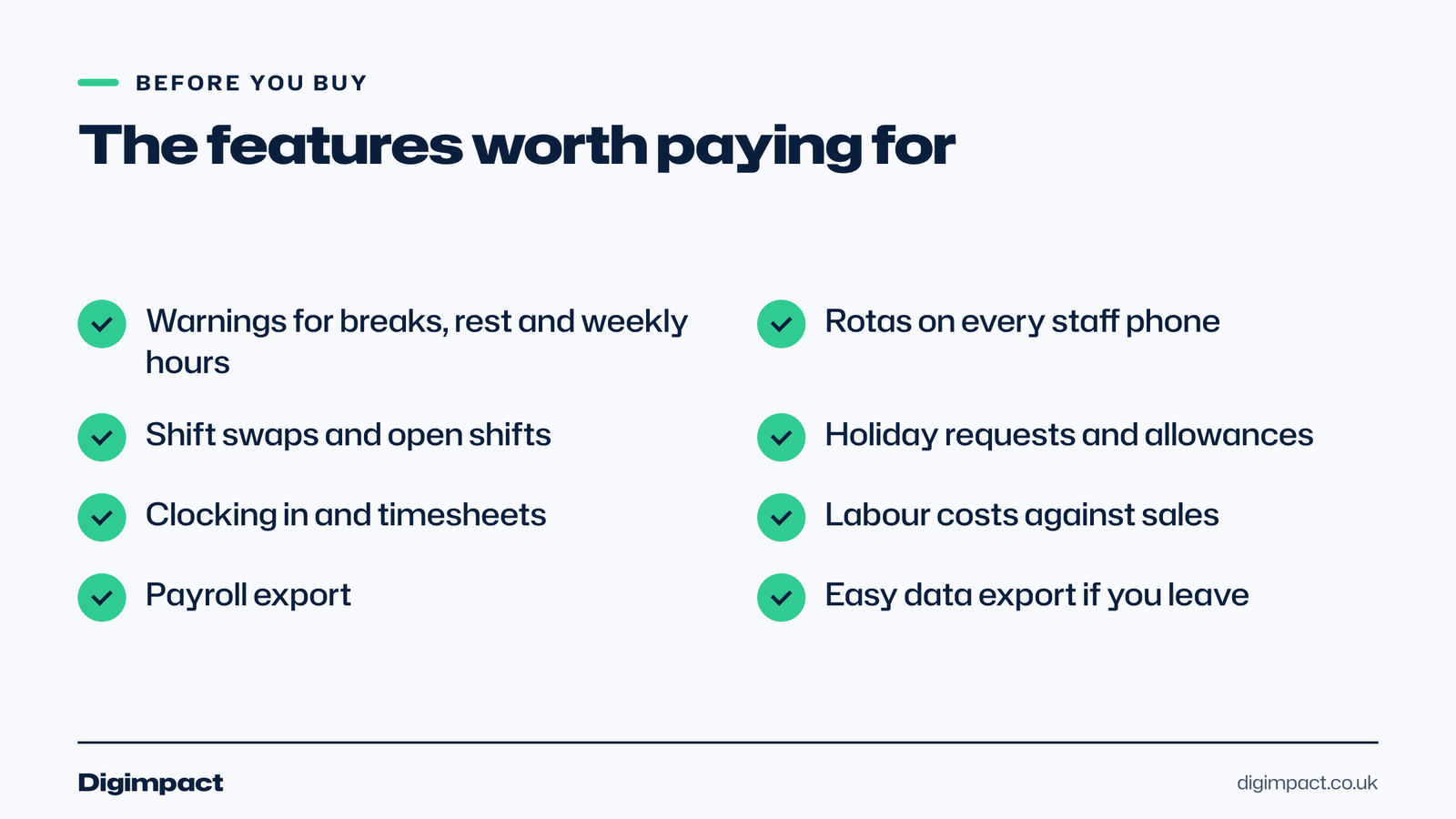
A good rota app should let you build and copy rotas quickly, send them to staff phones, handle swaps and holiday requests, and warn you when a rota breaks UK working time rules. Beyond that, time clocking, labour cost tracking and payroll exports are what save managers the most time.
The features worth checking before you buy:
- Working time warnings. Alerts for missing breaks, less than 11 hours between shifts and long weeks. Planday’s Starter plan lists working time rules and compliance warnings; Deputy lists labour law compliance in every plan.
- A staff app. Rotas, shift reminders and swap requests on each person’s phone. Every app here has one.
- Shift swaps and open shifts. Staff can offer and pick up shifts, with a manager approving.
- Holiday and absence. Requests, approvals and allowances in one place. UK workers are entitled to 5.6 weeks’ paid holiday, and GOV.UK says irregular-hours workers build up leave based on hours worked.
- Time clocking. Clock in and out on a phone or a tablet at the door, feeding timesheets.
- Labour costs. Wage cost per day or week, ideally against sales.
- Payroll export. Approved hours sent to your payroll software or accountant.
Our guide to the staff rota rules UK employers must follow explains the breaks, rest and hours limits a rota app should check for you.
Which rota apps have a free plan?
Findmyshift, Connecteam and Sling all have free plans. Findmyshift’s free plan covers 5 team members and one manager with a week of forward planning. Connecteam’s Small Business Plan is free for up to 10 users. Sling’s core scheduling is free for up to 30 users.
Free plans are fine for a small café or a single salon, but read the limits. Findmyshift’s free plan only lets you plan one week ahead and keeps one week of history. Connecteam’s free plan stops at 10 users, so the eleventh hire moves you to a paid plan priced in dollars. Sling’s free plan covers scheduling, but time tracking and labour costs need a paid plan.
If you only need to plan, cost and print one week at a time, our free rota maker does that in your browser with no sign-up, and it checks breaks, rest and the minimum wage as you go.
RotaCloud, Planday and Deputy have free trials instead. RotaCloud’s trial is 30 days with no payment details needed, Planday’s is 30 days with no credit card, and Sling and Connecteam offer 15-day and 14-day trials of their paid plans.
RotaCloud: simple banded pricing and UK support
RotaCloud charges a flat monthly price by number of employees, with no setup fees. On 14 October 2026 its Standard plan was £10 a month for 1 to 5 employees and £40 a month for 11 to 20 on monthly billing, with Pro at £15 and £60. It says its support team is based in York.
Standard includes drag and drop rota planning, templates, staff apps, holiday and sickness tracking, shift swaps and labour costs. Pro adds labour forecasting against sales, budget caps and leave request rules. Clocking in is a separate Time and Attendance add-on, priced by band.
RotaCloud suits independent restaurants, cafés, pubs and care providers who want straightforward pricing and UK-based help, and who are happy to add clocking in when they need it.
Deputy: per-user pricing with compliance tools
Deputy charges per user. On its UK pricing page on 14 October 2026, Lite was £3.60 per user a month billed monthly or £3.25 billed annually, Core £4.75 or £4.25, and Pro £7.25 or £6.50, all excluding taxes. Deputy says there is a minimum monthly spend of £20 on monthly plans.
Every plan includes rotas, timesheets, time clocking, shift swaps, leave accruals and labour law compliance, with Core adding auto-scheduling, demand forecasting and wage budgets. Deputy suits multi-site businesses and teams that want automation, though per-user pricing adds up quickly as you grow.
Planday: popular in hospitality, priced per user
Planday’s Starter plan was £2.99 per user a month on 14 October 2026, with a minimum of 5 users, and its Plus plan £3.99 per user plus a £30 monthly fee with a minimum of 10 users. Pro is custom priced. Every plan comes with a 30-day free trial and no credit card.
Starter covers scheduling, simple time tracking, working time rules and compliance warnings, basic payroll reporting and team messaging. Plus adds leave management, payroll integrations and revenue reporting. Planday’s pricing page features restaurant, retail and care customers, and it suits venues that want labour costs and sales side by side.
Findmyshift: one flat price per team
Findmyshift charges per team rather than per person, which makes it the cheapest paid option for teams of up to 20. On 14 October 2026, Starter was £21 a month for up to 20 team members and one manager, Business £31 for up to 100 with 100 managers, and Enterprise £62 for up to 300.
Findmyshift offers scheduling, time clocking, timesheets, mobile apps and shift reminders, with SMS messages charged extra. The main limits on Starter are one manager and three months of forward planning. It suits small teams with one person doing the rota who want the lowest fixed cost.
Connecteam and Sling: free tiers, priced in dollars
Connecteam and Sling both offer free plans that can cover a small UK team, but both show their paid prices in US dollars. Connecteam’s Small Business Plan is free for up to 10 users. Sling’s core scheduling is free for up to 30 users, with paid plans from $1.70 per user a month.
Connecteam is more than a rota app: its Operations Hub includes time clock, job scheduling, forms and tasks, with separate hubs for communication and HR. Sling focuses on scheduling and team messaging. Both suit very small teams on a tight budget, as long as you are comfortable with dollar billing and checking that their time and holiday tools match UK rules.
How do you move from a spreadsheet to a rota app?
Move over in a quiet week, not the week before Christmas. Set up your staff, roles and usual shift patterns first, copy one real week from your spreadsheet into the app, and run both side by side for a fortnight so nobody misses a shift while everyone gets used to the phone app.
- Add your staff with their roles, contracted hours, ages and holiday allowances.
- Build templates for your usual week, so you copy rather than retype each rota.
- Turn on the rules for breaks, rest between shifts and weekly hours, and flag under-18s.
- Invite staff to the app and show them how to see shifts, swap and book holiday.
- Run both for two weeks, publishing the app rota and keeping the spreadsheet as a backup.
- Switch off the spreadsheet once everyone has seen two rotas arrive on their phone.
Most of the effort is in the first setup. Once templates and staff details are in, building next week’s staff rota usually means copying last week and fixing the gaps the app highlights.
What should you ask before you sign up?
Ask how the price changes as you add staff, what happens to your data if you leave, whether there is a contract or notice period, and how support works when something goes wrong on a Saturday night. The answers matter more than a feature list, because they decide what the rota software costs you over several years.
- How does the price grow? Per-team, banded and per-user pricing behave very differently as you hire.
- What is extra? Clocking in, SMS reminders and extra managers are often add-ons.
- Is there a minimum? Deputy, for example, states a £20 minimum monthly spend on monthly plans.
- Can I export my data? Rotas, timesheets and holiday records should come out in a format you can keep.
- How do I cancel? Look for monthly billing with no long contract while you are still deciding.
When does a custom rota app make sense?
A custom rota app makes sense when off-the-shelf apps do not fit how you work: unusual shift patterns, several businesses under one roof, rotas tied to bookings or covers, or a need for the rota to live inside your own staff system. For most small teams, an off-the-shelf app is cheaper and quicker.
The trade-off is cost and ownership. An off-the-shelf app is a monthly fee for as long as you use it, and your data lives in someone else’s system. A custom app costs more up front but fits your exact process and stays yours.
Our staff rota app is set up for the business that uses it at one fixed price, agreed in writing before any work starts, with no fee per staff member. It is our own product, so we have left it out of the price comparison above. It is worth pricing when three years of a per-user plan runs into thousands of pounds, or when your rota has to follow rules an off-the-shelf app cannot. Our page on running a staff rota without spreadsheets explains how it works.
How do you choose the right rota app?
Count your staff and managers, list the features you need now, then price two or three apps at your real team size using the plan you would actually use. Run a free trial with a real week’s rota, ask staff to use the phone app, and check it flags rest and break problems before you commit.
- Count users and managers, including yourself, part-timers and casual staff.
- List must-have features, such as clocking in, labour costs or payroll export.
- Price the right plan at your team size, including add-ons and minimum spends.
- Check UK working time warnings for breaks, rest between shifts and weekly hours.
- Trial it with a real rota, and get two or three staff to use the app.
- Check how you leave, including exporting your data and any notice period.

Frequently asked questions
What is the cheapest rota app in the UK?
Of the apps we checked on 2 November 2026, Findmyshift’s free plan covers 5 staff and its Starter plan is £21 a month for up to 20. Connecteam is free for up to 10 users and Sling’s scheduling is free for up to 30, with paid plans in US dollars.
Is there a free rota app for small businesses?
Yes. Findmyshift, Connecteam and Sling have free plans, with limits on team size, managers or features. They suit small teams that only need to share rotas and handle swaps.
Which rota app is best for restaurants and pubs?
Look for labour costs against sales, shift swaps, time clocking and working time warnings. RotaCloud Pro, Planday Plus and Deputy Core all offer labour forecasting or revenue reporting; RotaCloud and Findmyshift keep costs fixed as you add staff.
Do rota apps check UK working time rules?
Some do. Planday lists working time rules and compliance warnings in its Starter plan, and Deputy lists labour law compliance in every plan. Check during the trial that the app warns about breaks, rest between shifts and weekly hours.
Do I need a rota app or is a spreadsheet enough?
A spreadsheet works for a small, stable team if someone checks it carefully. A rota app saves time once you have several part-timers, frequent swaps or more than one manager, and it sends rotas straight to staff phones.
Want a rota that fits your business?
The best rota app is the one your managers actually use every week. If an off-the-shelf app fits, start with a free trial. If none does, our HR and rota systems service builds a rota app around how your business works, with UK working time checks built in.
Keep reading
- How to make Reels for business on a phone, step by step A practical guide to filming Instagram Reels for a local business on a phone: what to film, how long Reels should be, how to edit and caption them, when to post and how to reuse them on other platforms.
- Apple Business Connect is now Apple Business: how to get your business on Apple Maps (2026 UK guide) Apple Business Connect became part of Apple Business in April 2026. This UK guide shows how to add your business to Apple Maps in seven steps, what is free and available in the UK, and how to use showcases, action buttons and insights.
- How to choose your Google Business Profile categories How to choose the right Google Business Profile categories, why the primary category matters most, when additional categories help, the mistakes Google warns against, and how to change them safely.
Free website check
How does your own website do?
Enter your website and see a quick check on screen in about 20 seconds: speed, Google, phones and the details that win the click. A full written report follows within two working days, free and with no sales call unless you ask.
Want help with this?
Tell us about your business. We reply within one working day with a time for a 30-minute call, and a fixed quote afterwards.
Rather talk now? Call 07551 079787.
Thanks, that is with us.
We will reply within one working day with a time for a call.