Free staff rota template for Excel and Google Sheets, and how to use it
A free weekly staff rota template for Excel and Google Sheets that adds up hours, takes off unpaid breaks and handles shifts past midnight, plus how to build a fair rota in seven steps.
By GP 13 minute read
TL;DR: Download our free staff rota template as an Excel file or a printable PDF. Type each shift’s start and finish time and any unpaid break, and it works out each person’s weekly hours, including shifts that end after midnight. Before you publish, check every shift against the UK rules: a 20-minute break after 6 hours and 11 hours’ rest between working days.
Key takeaways
- Our free staff rota template is a standard Excel file that imports into Google Sheets and prints on one landscape A4 page.
- It works out weekly hours for up to 15 people, takes off unpaid breaks and counts shifts that finish after midnight.
- UK workers who work more than 6 hours a day are entitled to one uninterrupted 20-minute break.
- Workers are entitled to 11 hours’ rest between working days and 24 hours off each week.
- Most workers cannot be made to work more than 48 hours a week on average, normally over 17 weeks.
Download the free staff rota template
The free staff rota template comes in two versions: an Excel file you fill in on screen, and a printable PDF for a noticeboard. Both cover one week, Monday to Sunday, for up to 15 staff, with a start time, finish time and unpaid break for each day.
- Download the Excel version (a standard .xlsx file for Excel, Google Sheets or LibreOffice)
- Download the printable PDF (landscape A4, rows tall enough to write in)
You do not need to sign up or give an email address. The file is yours to use, change and share. The second tab, called How to use, repeats the steps below and lists the UK working time basics with links to GOV.UK.
What is a staff rota?
A staff rota is a timetable that shows who works when: each person’s shifts for the week, with start and finish times, breaks and the role they cover. It lets a business plan enough cover for busy times, keeps staff informed, and gives a record of the hours each person worked.
In the UK the words rota, schedule and shift pattern are used for much the same thing. Restaurants, pubs, cafes, care homes, shops, salons and clinics all run on rotas, because their opening hours are longer than any one person’s working day. A good rota balances three things: enough people at the busiest times, a fair share of the unpopular shifts, and the legal limits on hours and rest.
What should a staff rota template include?
A useful staff rota template includes each person’s name and role, a start time, finish time and break for every day, the total hours each person works in the week, and a count of how many people are on shift each day. Those six things answer the questions managers and staff ask most.
Everything else is optional. Some businesses add a column for holidays, a row for opening hours, or colour coding by role. Keep it simple at first: the more a template tries to do, the more likely someone is to type in the wrong box.
Our template includes:
- Name and role for up to 15 people, frozen on the left so they stay visible as you scroll.
- Start, finish and break for each day from Monday to Sunday.
- Hours this week for each person, worked out automatically.
- Overnight shifts, so a shift from 17:00 to 01:00 counts as 8 hours, not minus 16.
- Staff on shift, a daily head count so you can spot a short-staffed day at a glance.
- A total of all hours for the week, useful for checking against your wage budget.
How do you make a staff rota, step by step?
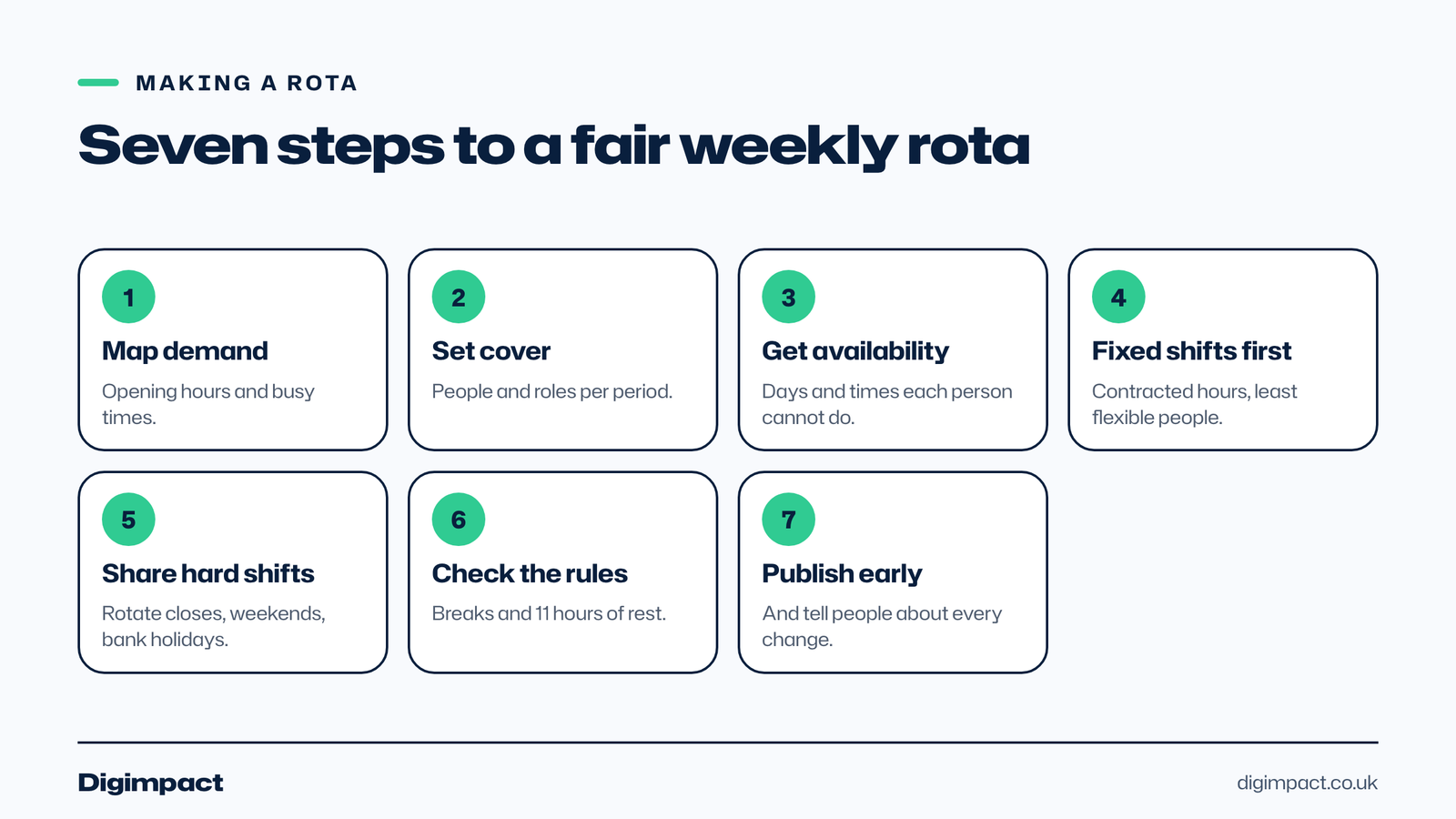
To make a staff rota, list your opening hours and busy periods, work out how many people each period needs, collect everyone’s availability, fill in the shifts fairly, check every shift against the rules on breaks and rest, then publish it early and keep it updated. Seven steps cover it.
- Map your demand. Write down your opening hours and when you are busiest, such as weekday lunches, Friday evenings or Saturday mornings.
- Set your cover levels. Decide how many people, and which roles, each part of the day needs. A cafe might need two baristas at 8am and one at 3pm.
- Collect availability. Ask staff for the days and times they cannot work, and note fixed commitments such as childcare or college.
- Fill in the fixed shifts first. Start with contracted hours, then the people with the least flexibility.
- Share out the hard shifts. Rotate closing shifts, weekends and bank holidays so the same people do not always get them.
- Check the rules. Make sure every shift over 6 hours has a 20-minute break and that there are 11 hours between one shift ending and the next starting.
- Publish and update. Share the rota as early as you can, and tell people straight away when it changes.
What does a good weekly staff rota look like?
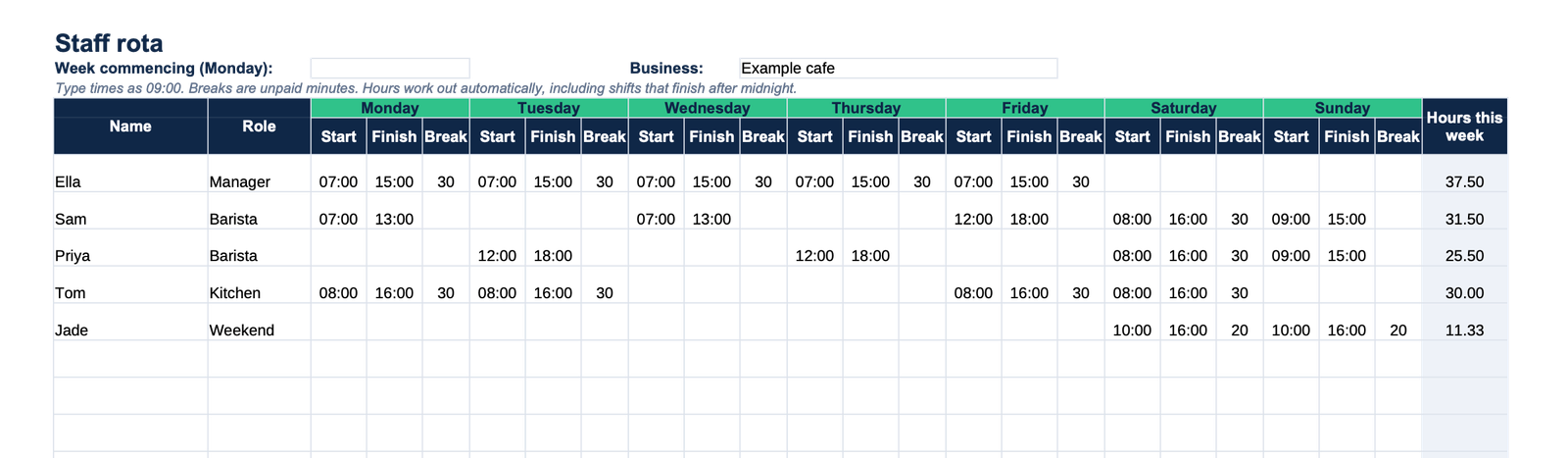
A good weekly staff rota covers the busy periods with the right number of people, spreads early, late and weekend shifts fairly, and gives everyone the breaks and rest the law requires. The example cafe week in the preview above shows how that works in practice for a team of five.
The cafe opens at 7am, so the manager, Ella, opens five days a week from 07:00 to 15:00 with a 30-minute break, which comes to 37.5 hours. Sam and Priya are baristas who split the weekday afternoons between them and both work the busy Saturday, so the counter has two people when it matters. Tom covers the kitchen on the four busiest days, and Jade works the weekend only.
Two details make the staff rota fair as well as legal. Every shift over six hours has a break written in, and nobody closes one night and opens the next morning. The Staff on shift row shows three or four people every day, with four on Saturday, which is when the cafe takes most of its money.
Which rota patterns work for small teams?
Most small businesses use one of three staff rota patterns: fixed shifts, where people work the same days every week; rotating shifts, where the pattern repeats over two to four weeks; or flexible shifts, built each week around availability. Fixed patterns are the easiest to run, and flexible ones suit businesses whose demand changes from week to week.
- Fixed shifts suit offices, clinics and shops with steady opening hours. Staff can plan their lives around them, and the rota barely changes.
- Rotating shifts suit pubs, restaurants and care settings that open long hours seven days a week. A four-week cycle shares out the weekends and late finishes evenly.
- Flexible shifts suit seasonal businesses and teams with many part-time staff or students. They take the most work each week, which is where a rota app starts to save real time.
Many venues mix the three: a fixed core team on contracted hours, with flexible part-time cover built around them for the busy evenings and weekends.
How should you handle shift swaps and sickness?
Agree one simple rule for swaps: staff can swap with a colleague who does the same role, but the swap only counts once the manager has approved it and the staff rota has been updated. For sickness, name a person to call and keep a short list of people happy to pick up extra shifts at short notice.
Write both rules down where everyone can see them, on the second tab of the template or on the staffroom wall. Most rota arguments come from swaps nobody recorded, so the rota stops matching who actually worked. That matters for pay as well as fairness, because the hours on the staff rota are usually the hours that go to payroll.
How do you use the template in Google Sheets?
To use the staff rota template in Google Sheets, download the Excel file, open Google Sheets, choose File then Import, and select the file. Google’s help page on importing spreadsheets lists .xlsx among the supported file types, and the formulas carry across.
Once it is in Google Sheets, you can share the rota with staff as view only, so everyone sees the latest version on their phone and nobody can change it by accident. Make a copy of the tab for each new week rather than overwriting the last one, because old rotas are a useful record of who worked when.
To share a printed staff rota, export the week as a PDF and print it in landscape on A4; the template is already set to fit one page. Put a copy where staff clock in, and send the same PDF to the team chat, so nobody is working from an old version. When the rota changes after it has gone out, reprint it with the date of the change written at the top, and take the old copy down straight away.
We tested the formulas in LibreOffice Calc with a week of sample shifts, including one that finished after midnight, before publishing the file.
What UK rules must a staff rota follow?
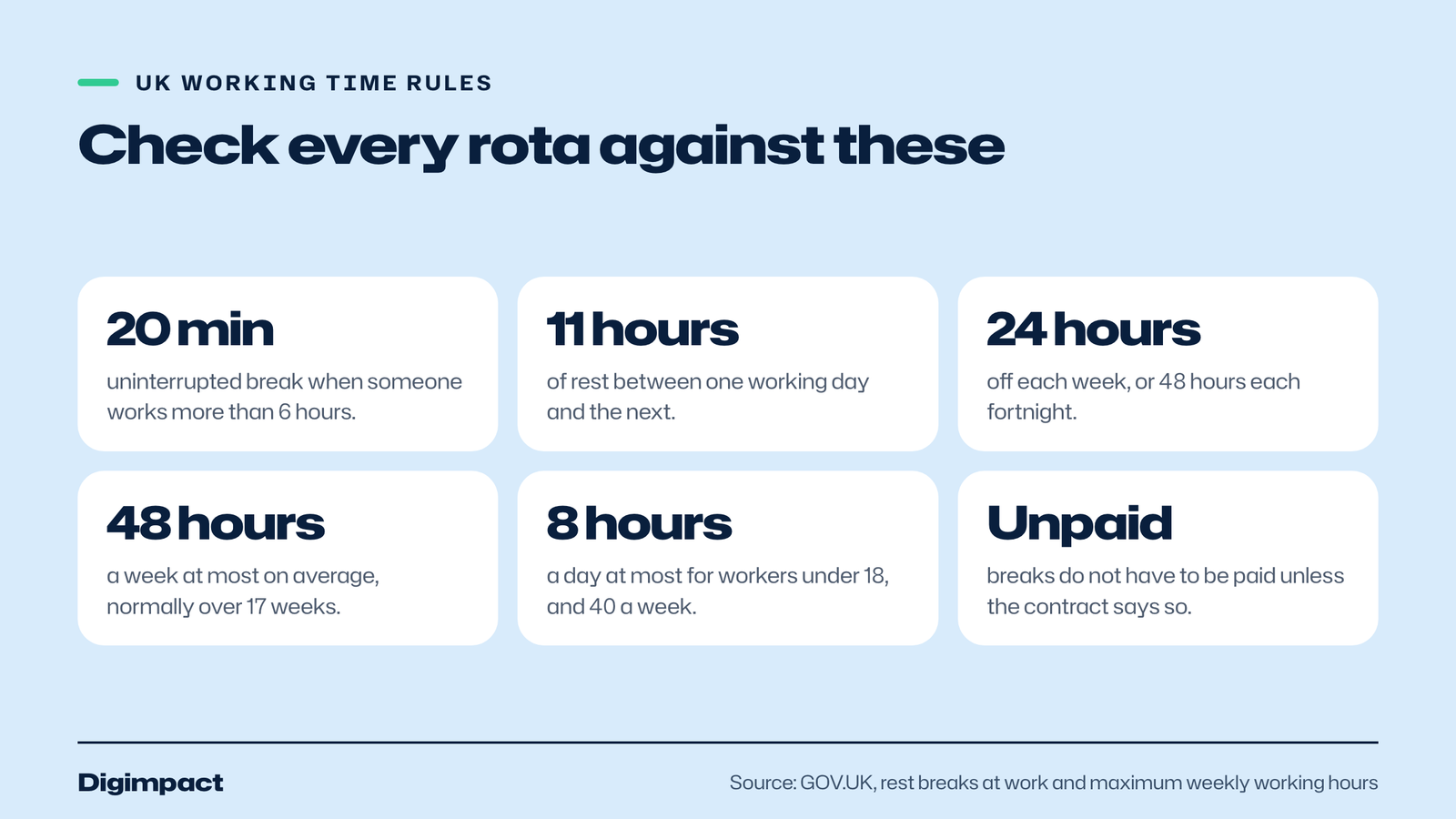
A UK staff rota must give adult workers a 20-minute rest break when they work more than 6 hours, 11 hours’ rest between working days, and 24 hours off each week or 48 hours each fortnight. Most workers cannot be made to work more than 48 hours a week on average, normally measured over 17 weeks.
These rules come from the Working Time Regulations, and GOV.UK explains them in plain English. Its page on rest breaks at work says workers have the right to one uninterrupted 20-minute rest break during their working day if they work more than 6 hours, and that the break does not have to be paid. The same page gives the example that someone who finishes at 8pm should not start again until 7am the next day.
The weekly limit is covered on GOV.UK’s page on maximum weekly working hours. It says you cannot work more than 48 hours a week on average, normally averaged over 17 weeks, and that a worker can choose to opt out. Workers under 18 have tighter limits: the same page says they cannot work more than 8 hours a day or 40 hours a week.
How far in advance should you publish a rota?
Publish a rota as far ahead as you reliably can, and at least a week before it starts. Two weeks ahead is common in hospitality and retail, and it makes a real difference to staff with childcare, second jobs or college. Check your employment contracts too, because some set out how much notice of shifts staff must get.
A late rota makes life hard for shift workers, and it is usually a planning problem rather than a staffing one. If you find yourself writing next week’s rota on a Sunday night, try fixing the regular pattern first and only adjusting for holidays and known changes each week.
Should you use a spreadsheet or a rota app?
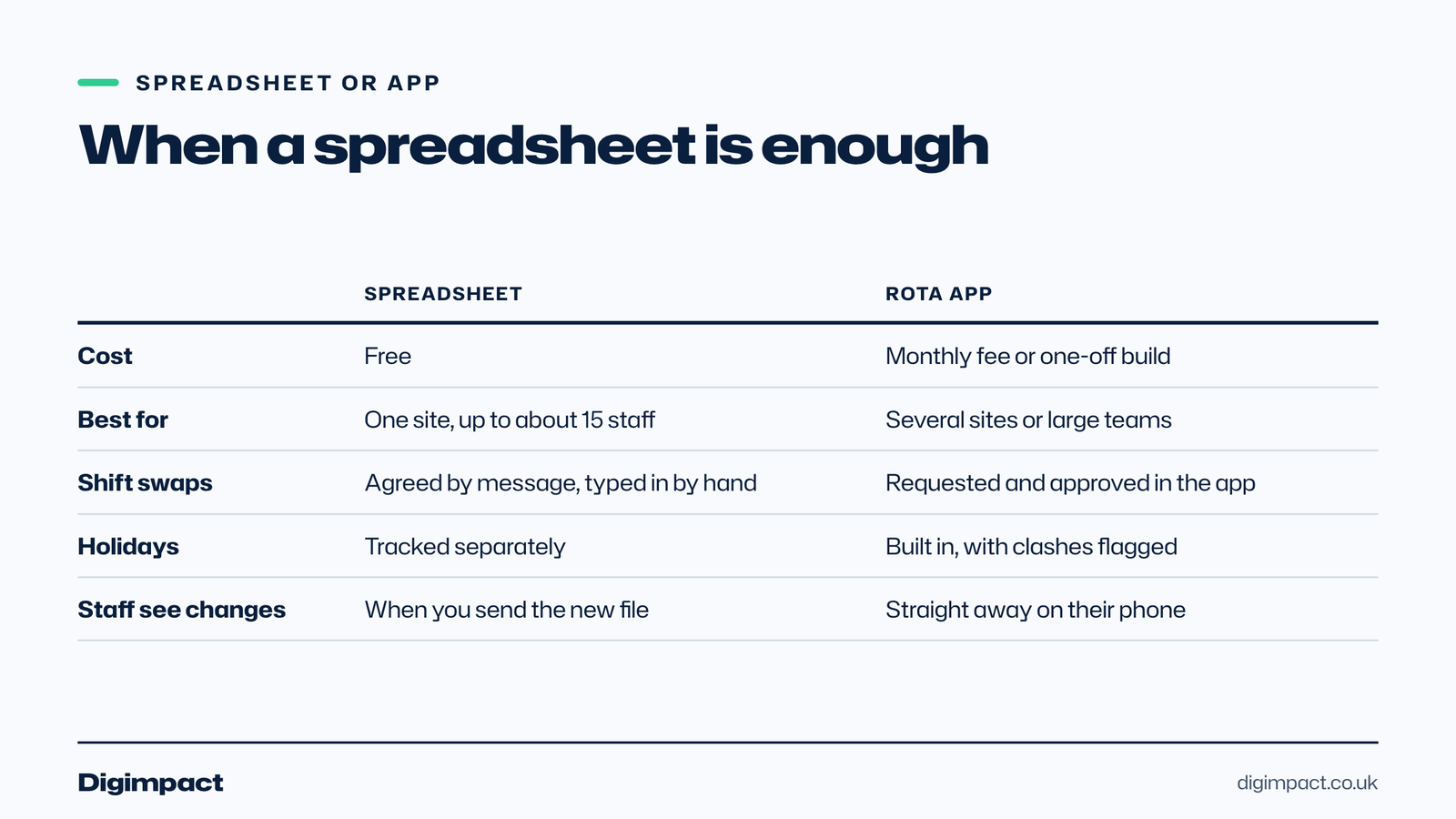
A spreadsheet staff rota template works well for one site with up to about 15 staff whose hours do not change much. A rota app is worth paying for when you have several sites, lots of shift swaps, holiday requests to approve, or staff who need to see changes on their phone the moment they happen.
The signs you have outgrown a spreadsheet are easy to spot: versions of the rota sent round on WhatsApp, swaps agreed in conversation that never make it onto the sheet, and payroll hours worked out by hand at the end of the month. Our page on running staff rotas without spreadsheets covers what changes when you move.
We also build a staff rota app for venues that want their own system rather than a monthly subscription per user. It came out of building rotas for pubs and restaurants, and our HR and rota systems service covers setting it up around how you already work.
What are the most common rota mistakes?
The most common rota mistakes are publishing too late, giving the same people every closing and weekend shift, forgetting breaks on long shifts, leaving fewer than 11 hours between a late finish and an early start, and not recording changes made after the rota went out. Each one causes either unhappy staff or a legal risk.
The ones to check every week:
- The clopen. A closing shift followed by an opening shift the next morning, often with less than 11 hours in between.
- Missing breaks. Any shift over 6 hours with no break written in.
- Uneven weekends. The same two people working every Saturday because they never say no.
- Silent changes. Swaps agreed verbally, so the rota no longer matches who actually worked.
- No cover plan. Nobody named to call when someone is ill on a busy day.
If an off-the-shelf tool does not fit how your business runs, we build booking systems and staff apps from Portsmouth. See web development and the Peperoncino booking system.
Frequently asked questions
Is there a free staff rota template for Excel?
Yes. Our free staff rota template is an Excel file for one week, Monday to Sunday, for up to 15 staff. It works out each person’s weekly hours from their start time, finish time and unpaid break, handles overnight shifts, and imports into Google Sheets as a standard .xlsx file.
How do I make a staff rota in Excel?
Make one column for names, then three columns for each day: start, finish and break. Use a formula that takes the start from the finish, multiplies by 24 for hours and takes off the break in minutes divided by 60. Our template already has these formulas, including the fix for shifts past midnight.
How many hours can staff work in a week in the UK?
Most workers cannot be made to work more than 48 hours a week on average, normally averaged over 17 weeks, though adults can choose to opt out. Workers under 18 cannot work more than 8 hours a day or 40 hours a week, according to GOV.UK.
Do staff have to have a break on a 6 hour shift?
The right to a 20-minute uninterrupted break applies when a worker works more than 6 hours in a day. A shift of exactly 6 hours does not trigger it under the rules, though many employers give a break anyway. The break does not have to be paid unless the contract says so.
Can I use the staff rota template in Google Sheets?
Yes. Download the Excel file, open Google Sheets, choose File then Import and select the file. Google Sheets supports .xlsx files, and the formulas for hours and overnight shifts keep working. You can then share it with staff as view only.
When the spreadsheet stops working
A spreadsheet rota is the right start for most small teams, and this template should save you an hour a week. When you are juggling several sites, constant swaps or holiday requests, a proper rota system pays for itself in hours saved. Have a look at our staff rota app, or ask us about booking systems if your rota depends on how many customers have booked.
See it in practice: the Your Pub rota, stock and allergen system.
Keep reading
- LinkedIn company page: how to create one for a UK small business, set it up properly and know what to post A UK guide to the LinkedIn company page: what you need before you start, how to create one in six steps, the image sizes and admin roles LinkedIn recommends, what Premium Company Page adds, and what a small business should post.
- Email marketing rules UK businesses must follow: consent and the soft opt-in What PECR says about marketing emails and texts in the UK, when you need consent, how the soft opt-in for existing customers works, the different rules for companies and sole traders, and a checklist to stay compliant.
- How long does SEO take? A realistic timeline for UK small businesses, with Google’s own answer How long SEO takes for a UK small business: what Google says today and used to say, what a study of millions of pages found, a realistic four stage timeline, how local SEO differs, and the red flags in any promise of fast rankings.
Free website check
How does your own website do?
Enter your website and see a quick check on screen in about 20 seconds: speed, Google, phones and the details that win the click. A full written report follows within two working days, free and with no sales call unless you ask.
Want help with this?
Tell us about your business. We reply within one working day with a time for a 30-minute call, and a fixed quote afterwards.
Rather talk now? Call 07551 079787.
Thanks, that is with us.
We will reply within one working day with a time for a call.